
Many tasks require the mouse. Make sure the mouse you use has a right-click button. The next time you use Google (or whatever search engine you prefer) instead of clicking a link, do a right-click “Open in New Window”.
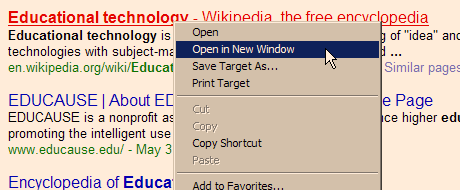
In Firefox it is “Open Link in New Window”. Opening a link this way preserves your entire search back in the original Google search page. How many times have you found pay dirt on the first link of a search? Depending on my search topic, I may look at 10 or 20 different pages. If the page I open is a dead end, I close that window (Alt-F4). There is the rest of my search waiting for me in the original window.
I use this method so much I once refused to switch from Netscape to IE because the Netscape right-click listed the new window option first and IE listed it as the second item in the drop-down menu. Over time I improved my mouse skills to almost make up the difference. IE still lists it second and in Firefox it is first.
TSPY=3.16 (IE)
TSPY=3.19 (Firefox)
1 Response to Efficiency Tip #11 – Open New Window