
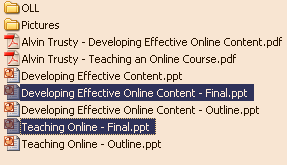
 When you need to select several files from different parts of a list, use the Ctrl key when you click. Hold down on Ctrl and single-click the files you want to select. The Ctrl button will permit you to select non-consecutive files from a list.
If you select a file by mistake and need to remove it from your selected list, Ctrl-click it a second time. This will de-select it.
TSPY=1.57
1 Response to Efficiency Tip #46 – Ctrl-Select