
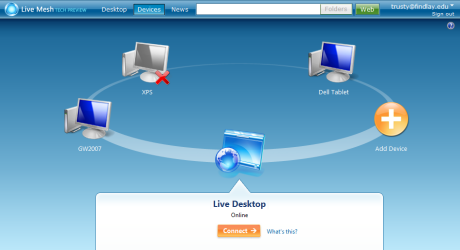
Recently I talked about keeping several computers, in different locations up-to-date with the latest versions of my files. Microsoft’s Mesh has solved this problem. Yesterday, I received my invitation to participate in the closed beta. I didn’t have to pull any strings or call in favors to get the invite. I went to the web site, filled out the request and waited for a few days. It was worth the wait.
Once I had the account, I logged into the Mesh site. I was presented with the picture above (without my computers that have been added). I went to each of my computers and clicked the Add Device button. A system tray program was installed and that computer was a part of my mesh.
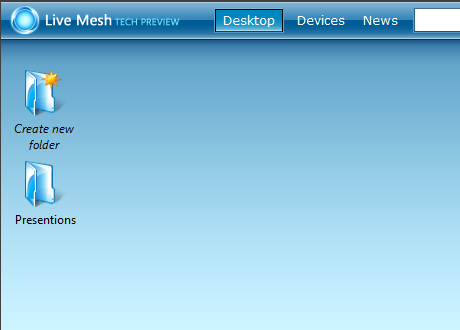
 Next I went to my Live Desktop. This is where I can share resources between computers. By clicking the Create New Folder icon a “mesh-share” is automatically created and shared among all the computers in my mesh. A short-cut to this share is added to my desktop and any files dropped into that folder are automatically synchronized on each computer in my mesh.
I started with my presentations, since I have a lot of them. I copied them into a mesh-share called Presentations. Here is where it gets really cool. From another computer I opened a PowerPoint that was in the mesh-share. I didn’t copy it to the computer; I merely opened it. I made an adjustment and saved it. The final version was instantly available to all the machines in my mesh.
In Windows Explorer, a new right-click item is added to the menu. It’s called “add folder to live mesh” and it permits any mesh member to synchronize a local folder with other computers on the mesh.
On top of the file synchronization, mesh adds a remote control feature to any computer on the mesh. I can already do this with a combination of VNC and Hamachi. I did test out the feature in mesh just to see how it works. It was slower than VNC. I also had a problem connecting to my home desktop with dual monitors. The remote display was resized to the equivalent of one screen (half the normal size). There may be a way to fix this, but I didn’t see the need to invest the time to research it as this remote control solution will be a backup for what I already use.
I am still playing around with all the features of Microsoft Mesh. I will certainly add a post as I become more proficient in its use.
Pingback: Alvin’s Educational Technology Blog » Blog Archive » More on Mesh
Pingback: Alvin’s Educational Technology Blog » Blog Archive » Backup Plan