Roll The Dice

Here’s something to make your assignment collection more interesting.  I routinely assign five homework problems.  Then I collect one of them.  I decide which one to collect by rolling the dice.

http://homepages.findlay.edu/trusty/dice/

Of course, there are six possible numbers.  I treat the six like a freebie.  If it comes up, I don’t collect anything.  You would think the students would want the six to come up every time.  That’s not the case.  If one homework problem was easy, they would prefer that number to come up.  That way it’s easy points.  Ten out of ten is better than zero out of zero.

Have fun with it.

Posted in edtech | Tagged | 3 Comments

The Magic Bullet – A Plan

Scott McLeod has a post about Blogging vs Life.  His main question – how do we learn all these new and incredible technologies without sacrificing our lives and families?

Let me rephrase the question.  How does a first grader learn to read when there are all those phonetic pronunciations, vocabulary words, punctuation and grammar rules?  The answer isn’t difficult.  All our students learn to read.  They learn a few new things each week and they practice these new things every day.  First graders spend a lot of time reading books.  As the years go by, they become proficient readers.

Technology is no different.  If you want to learn about new things, you should periodically learn something new and practice using that technology to make yourself a more effective or efficient teacher.  As the years go by, you will become a proficient user of technology.

Almost ten years ago, I worked for the state.  Each year we went through an evaluation process that included the development of an action plan for our own growth.  I was suffering from the same dilemma as most teachers today.  I wasn’t keeping up with new technologies, and I felt it was impacting my effectiveness as an educational technology professional.  During my annual review, I decided I should learn one new thing each week for a year.

I had one advantage over other professionals.  This learning process was part of my professional action plan, so I could learn new things at work.  Normally, I would use thirty minutes at some point during each day and read about a new technology.  If a ready about something that was interesting, I would spend more time on it.  During the first year, I more than doubled my goal and I learned over 100 technologies.  More importantly, I was using many of these new technologies in my day-to-day life.  By exposing myself to so many different technologies, I was able to see advantages to using certain software/hardware over other options in my work.

Anyone can do this.  We all have some time every day.  Teachers have planning periods. I have office hours that aren’t always utilized by my students.  Everyone can listen to podcasts during the daily commute.  I live fifteen minutes from my office.  That amounts to half an hour of listening each day, or 2 and half hours each week.  Most of the new things I have learned in the last two years have come from podcasts.

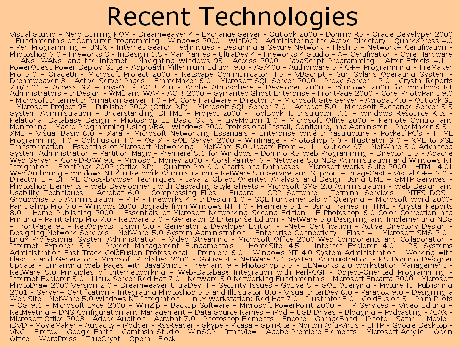
Over a ten year period, learning one new technology each week will expose you to 500 new technologies.  Here’s the text from a PowerPoint slide I show my freshmen (click for larger image).
Now look at the ISTE NETS for Teachers standards.  The first standard has two parts.  The first basically says teachers must understand the same technologies that the students are required to understand.  Standard IB says teachers must:

demonstrate continual growth in technology knowledge and skills to stay abreast of current and emerging technologies.

Staying abreast of current and emerging technologies requires a plan.  You should decide how you are going to approach learning new technologies.  It may be one new technology per week or one new technology per month.  The most important thing is to write down your plan.  My list of Recent Technologies has doubled since I started it in 2001.  It will double again.  Without a plan, you will be farther and farther behind.

Posted in edtech | Tagged | 5 Comments

Backups

John Schinker has a post that talks about the reliability of hard drives. I read the study by the Google people, and I can vouch for their results. I may not have the thousands of drives that they have, but my percentages of failures is similar. I look at it this way. If it is a hard drive, it will eventually fail. If you are lucky, the failure will be in the distant future.

I don’t chance things. I have one computer that does nothing but backups. During the night, it runs Cobain Backup and gets all the important information from my machines, my wife’s machine and the servers. The backups are saved onto a USB drive which is swapped out once a week. I have three 250 GB USB drives. One is always connected to the backup computer, one is waiting on the shelf and one is at my office at UF. I am happy to report that in twenty years of using PCs, I have only lost a significant amount of data one time… in 1989. Almost twenty years ago, while I was in graduate school, my main hard drive died. I lost about a week’s worth of data. That’s when I started doing regular backups. Since then, I haven’t lost more an hour’s worth of work on the rare occasion that my computer locks up in the middle of a project.

I have had some catastrophic drive fails, one of them being a few months ago over Christmas break. My web server which houses this blog, and many other important things, lost the main drive. Since the computer I was using was really old (vintage 1999), I decided to replace the whole thing. I was off line for a week or so while I scraped together some “not nearly as old as the last server” used parts to build a new (circa 2003) server. Once I had a working machine, I was back up and running in a couple of hours. Everything was just as I had it before.

When I talk with my students about backups, I always get the same thing. “What is a backup?” Most of them have USB flash drives. Anything from the lab usually gets saved to those portable drives. Beyond that, I haven’t had one student with a plan in place to backup important files.

Considering that a blank DVD costs less than 50 cents, everything created by a student during a four-year degree could be backed up many times for a few dollars. The media costs almost nothing. The data saved on it could be priceless.

Posted in edtech | Tagged | 1 Comment

remarkableohio

Since my podcast last week, I have become much more interested in geotagging (thanks John).  I have added a few pictures of the UF campus to the Flickr map:

http://www.flickr.com/map

Search for “Findlay” and click on the biggest dot.  Refine the search to “University of Findlay” and you will see the pictures I took on campus yesterday.

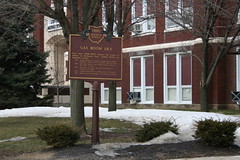
Tomorrow is the last day of class before spring break.  I wanted to do something with my students using geotagging during spring break.  After lunch yesterday, while Dr Dyer (of the now famous – If class were like a chat) chauffeured me and my camera around campus, we passed this.


It’s an Ohio historical marker.  There are thousands of them around Ohio.  The main web site for information about the markers is

http://www.remarkableohio.org

I had an idea.  My students will be traveling home this weekend.  They live all over Ohio.  They could take pictures of historical markers and geotag the locations.  We couldn’t find a project like this on the web.  The above URL lets you see a map for the individual marker of your choice, but there isn’t a statewide map that shows every marker on one screen.  Using Flickr and the tag “remarkableohio”, we plan to geotag as many of these markers as possible next week.  If you have a marker nearby, take a picture and tag it with our selected tag: remarkableohio and put it on the map in Flicker.

When we are finished, you will be able to go to

http://www.flickr.com/map

and search for “remarkableohio” and see every marker in the system on one map.

Posted in edtech | Tagged , | 4 Comments

File Size Matters

It just happened again. One of my students, working on a video project tried to email me the final version. Fortunately, the TWO GIGABYTE file was too big to be accepted by the UF email server. I did receive the follow-up email asking if I knew if there was something wrong with the email server because this email wasn’t going through.

Just for context, you should know a few things.

1. I teach most of my classes online.
2. The Learning Management System (Blackboard in my case) is where all assignments are turned in (no exceptions).
3. My syllabi specifically state the only time an attachment should be emailed to me is if I ask for it to be mailed to me ahead of time.

I have had instances where the LMS scrambles certain files. Our Bb server still can’t handle Flash files sent from certain Macintosh computers. If I have a student using a Macintosh in a multimedia class, I will have that student file attach a Flash file to me. I only do this AFTER we establish the fact that the LMS won’t handle the file without breaking it.

Having a student email me a file out of the blue is distressing. Everyone knows that email attachments are the primary source of modern viruses. On top of that, UF limits each user to 100 MB of total email. A couple of large email attached videos and I am out of commission.

When someone tries to email something that is twenty times larger than the limit I can receive, there is a bigger problem. The problem is that many users have no idea how to tell if one file is any different in size than any other file. The GUI has contributed to this problem. Even Windows Explorer doesn’t show file sizes or file extensions (don’t get me started on that) by default. If you mouse-over a file, you can get this information, but many users don’t know this or don’t use the information. Even knowing that a file is 2 GB doesn’t help. With high speed Internet, it should matter… right?

Email should be words. I don’t even format my email. It is plain ASCII. I would never choose to use HTML in my email. If I want to send someone an agenda, I don’t attach a Word document. An agenda is made of words just like email. I can copy and paste words from a word processor into my email and save someone the trouble of opening an attachment… that contains only words.

Do you realize the process involved in sending someone a file attachment. Since email is based on ASCII text, the email attachment must be converted to ASCII using Unix to Unix Encoding. This makes the file roughly twice as big as the binary version. This doesn’t include the extra overhead that is created by all the formatting code that goes into most binary files. An ASCII page of text is 2k. Copy the same text into Word and it becomes 4k. UUE the 4k and becomes 7k. So attaching a one page text document is like sending three and half pages of email.

Last year I received over 300 MB of file attachments. Most were only a few megabytes. The largest was 12 megabytes. If I consider only the attachments (not the accompanying email), this was more than three times the capacity of my inbox. Most of these attachments could have been avoided if senders would send links to files instead of attachments. With all the content management systems that we use to hold our information, emailing a link to something instead of an attachment saves everyone time. If I need the information, I can follow the link and I don’t have to clean it out of my attachment folder.

Posted in edtech | Tagged | 3 Comments