The Vista Switch

I have eased into Vista over the last couple of months.  I had too many critical programs on my old system to risk an upgrade.  I had my data backed up, but I could not risk the chance of some of my applications would not be able to handle the upgrade.

I did a fresh install on a machine with 2 GB of RAM.  I moved my good video card over with both of my monitors.  So far I have had very few problems, but there is one thing I can’t solve.  I can’t get VNC to wake my machine up if the screen is locked.  I run VNC and Hamachi on all my computers.  The free version of RealVNC (my favorite flavor) isn’t compatible with Vista.  I tried Ultr@VNC and it worked until my password protected screen saver kicked in.  Once that happens, there is no response from Vista.  I don’t have hibernate turned on, but the screen password seems to kick the machine into a different video mode that cuts the VNC connection.

There are some huge positives in my short Vista experience.  I love the Start menu.  I click the Windows-Key and a letter or two of the program I want to start and Vista finds it.  It does the same with documents.  Actually, it works with anything.

I do a lot of file renaming.  F2 still does the trick, but Vista doesn’t automatically highlight the file extension.  If I rename a file, the OS assumes I still want those last three letters to remain the same.  It takes an extra click to highlight the extension to change it (which I rarely do).  This is more efficient for me about 99.44% of the time.

I use the Sidebar with a few widgets.  I like the quick loading calendar that pops up with Windows-Space Bar.

The snipping tool is great for quick screen captures. 

The user directories are much better.  Everything is in a folder called “users” instead of “documents and settings” (what a dumb name).  All the “my” prefixes are gone too.  Now it’s “Documents”, “Pictures” and “Videos” instead of “My Documents”, “My Pictures” and “My Videos”.  Vista also included a “Downloads” folder.  This is something I have manually created on all my computers for years.  Where else would anyone store downloaded programs?  Finally it is built in and pre-programmed to communicate with applications that download files.

The “User Access Control” isn’t nearly as bad as the Apple commercial would have you believe.  I get beeped once a day at most.  As I get my machine tweaked, I will hardly see it at all.
Posted in edtech | Tagged , | 2 Comments

Over 200 RemarkableOhio Pictures

Over the weekend I went to Ottenbein College to pick the kids up from band camp.  Before I left I scanned the OHS site to see if there were any markers on campus.  There were two plus one a few blocks away in downtown Westerville.  On the way home I scared everyone with my best impersonation of “Josh” and slammed on the brakes when I saw a marker beside the road.

blank-marker.JPG

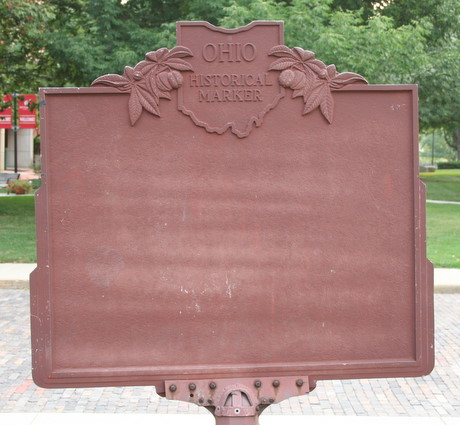
Here’s a strange marker.  It’s the flip side of the  Benjamin R. Hanby memorial marker.  So far this is the only marker I have come across with printing only on one side.  Usually the back side of the marker is the same as the front side unless extra room is needed to finish the story on the front side in which case it is continued on the back.

After posting my last set, I checked the map and we are up to 202 pictures.  Many thanks to Mr. O for posting almost 50 pictures to our Flickr map.  Last week I stumbled upon his blog because he had posted a reference to an Ohio Historical Marker.  It turns out he has a nice collection.  I left a comment about the project we have going on Flickr and he tagged his pictures and added them to the map.

This is one of the great benefits of social networks.  Several people with similar interests can easily find each other and collaborate on a project for the benefit of the children. 

Tagged | 1 Comment

Efficiency Tip #102 – The List

I had to rebuild one of my computers this weekend.  I do this from time to time.  Windows has an entropy problem and the OS seems to run best when freshly installed.
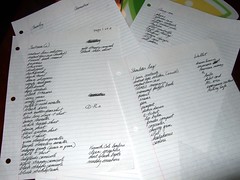
Since I like my computer setup in a particular way, certain applications must be installed on a new computer.  I keep a list of all my critical applications.  In addition to the typical programs like Word, Excel and PowerPoint, my list includes a lot of little things like my batch programs and all the command line utilities that I use.  Most of what I install is free: WS_FTP, RSS Reader, 7-Zip, Eudora, Firefox, etc.  The list assures I don’t leave anything off.

In case my computer crashes, I keep my list on the server.  I have found that I do re-installs enough that I also store most of the programs from the list on the server.  In fact, the program directory itself is as good as the list.  I start installing from the top of the directory and work my way down.

Posted in edtech, efficiency | Tagged , | 2 Comments

Tough Choices or Tough Times

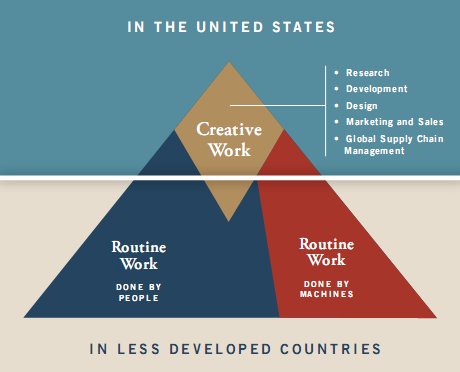
Last week I read several articles about this paper from  the New Commission on the Skills of the American Workforce.  A PowerPoint is here.  This reports says that the American standard of living is going to take a nasty dive if we cannot increase the number of people working in “creative” fields.  The chart below shows the three types of work defined by the report.

creativework.png

The areas are routine work done by people.  Routine work done by machines.  And finally, creative work.  Notice the triangle is split near the bottom of the creative diamond.  Only the top portion of the graph will be work done in the United States.  Almost all routine work will be completed in less developed countries.

Education (part of the creative diamond) will need to change drastically.  The commission recommends we begin to recruit teachers from the top third of all graduates.  Create an incentive for these students to go into education by offering a six-digit pay scale for the best teachers.  

We need to train students to solve problems.  One of the key points in the PowerPoint explains that our students must be creative, innovative and able to learn new things quickly.  That last point is a tough one.  It is one I stress in my classes all the time.  Being involved in technology requires me to continually learn new things because I have to teach them.  All educators need to do the same.

There was a time when the first computer course every educator took was programming in BASIC.  The computers we had in our classrooms didn’t do much more than BASIC.  I remember when Hypercard was the topic everyone needed to learn in education.  Now very few of my students have heard of the program.  In the mid-90’s we learned HTML.  At the start of the 21st century video editing was hot.  Now we have to manage web 2.0 applications.  Somewhere in there all our presentations switched to PowerPoint and we started taking all our pictures with digital cameras.

Students graduating from high school last spring had Microsoft Office available to them from kindergarten through twelfth grade.  Most of them will take a course in college that introduces them to this same set of tools.  Change takes time in education.  We need to speed things up if we want to stay ahead.

Posted in edtech | Tagged , | 4 Comments

Efficiency Tip #101 – Security

I’ve decided that a hundred efficiency tips is enough to make most computer users efficient.  There are undoubtedly a few that I have left out.  I’ll add new ones as time goes on, but I need to start a new thing right now.

 I would like to finish for now with something that really doesn’t save you time.  Security costs you extra time, but that extra time is worth the effort.

Computer security starts with a good password and a system that doesn’t automatically log you on at startup.  I talked about auto-login a few weeks ago.  This can save you a few seconds every time you turn your computer on, but in an office where other people have access to your computer it can cost you your data.  I once had a teacher ask me if it were possible for the network administrator to “get into” her personal laptop and “see” her data.  I booted her computer and it did an auto-login.  At that point, I said anyone that could physically touch her computer could get all her data.

If your computer never leaves your house and you have locks on your doors, an auto-login is probably safe.  I have lots of kids walking around my house so I don’t have auto-login enabled.

I talked about passwords last spring.  Using “strong” passwords will keep your data safe.  Strong passwords take longer to type, but the time is worth it. 

I also encrypt all my portable data using TrueCrypt.  If you keep sensitive data on a portable device (person information, grades, trade secrets), you should encrypt that data.  If you ever lose your USB drive, you won’t have to worry about anything except the cost of replacing the media.  Encryption would have prevented the whole fiasco with the backup tape stolen from an Ohio intern’s car.  Now it is going to cost the state of Ohio millions of dollars to protect those affected from identity theft.

Encryption takes more time, but it is worth it.

My friend, Mike, sent me this link.

http://blogs.techrepublic.com.com/tech-news/?p=907

It’s a story about a guy that was kidnapped and tortured by people that wanted his password.  The victim didn’t work for the government.  He didn’t know trade secrets.  He was the world leader in an online game and his captors wanted to sell his account to the highest bidder.  After five hours of holding a gun to his head, they could not get him to surrender his password.

I don’t recommend putting your life in jeopardy to protect your passwords.  An arm or a leg is the limit for me.

TSPY= -2.07

Posted in edtech, efficiency | Tagged , | Comments Off on Efficiency Tip #101 – Security