
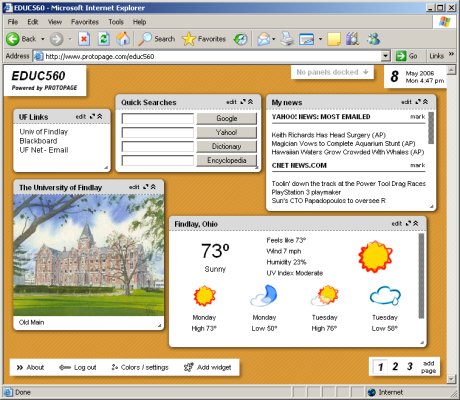
Every once in a while a technology comes along that completely changes the way you do your daily work. Protopage is one of those technologies. ProtoPage is a web site that gives you all the tools to easily create dynamic content on the web without any knowledge of HTML, scripting, or FTP. All you need to know how to do is type into a box. You can create links, upload pictures, add notes and incorporate RSS feeds into your page. Once you have content, you can literally drag the content to any location on the page… and it stays there. You can also drag the corner of a content box and resize its window.
I have created a page for EDUC560. Go to
http://www.protopage.com/educ560
This page includes links to all the important online servers at UFindlay.
I now use ProtoPage as my personal start page. My personal page is at
http://www.protopage.com/alvintrusty
and it’s password protected. Now my home computer, office computer, laptop and tablet all have the same dynamic starting page. I can change the page (add a link, create a new note, etc) and the changes are automatically reflected on all my computers.
Pingback: Alvin’s Educational Technology Blog » Start Page
Pingback: Alvin’s Educational Technology Blog » Blog Archive » Protopage Upgrade
Pingback: User links about "protopage" on iLinkShare