
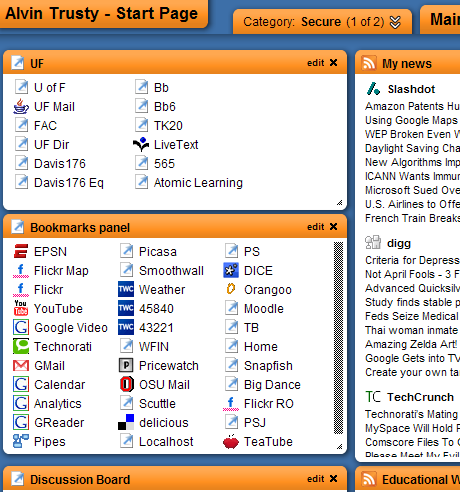
Where does your browser start? Currently mine goes to Protopage. A lot has changed with this free service since I blogged about it almost a year ago. The main thing that I now notice every time I open my browser is the sluggishness of the site. Sometimes my browser will take fifteen to twenty seconds to load my page. I don’t know if Protopage is bogged down or if I have too many items on my start page. It’s probably a little of both. I am very demanding of my start page. I have a dozen RSS feeds bringing all the news I want to one page. Three different sets of links get me to UF, Popular and Course related pages. Of course I have the local weather and quick notes to myself (the killer app of the Web 2.0 start page). I have five different computers pointed to my start page. From any of those computers I can make a change and it is instantly available to all the machines. On top of that, it is password protected so I am the only one that can get to it.
Over the Easter break I plan to look at some different start pages and decide if I want to make the jump to something new. It won’t be the first time that I have changed. Ten years ago, my start page was always my server at my office. You can find it on the WayBackMachine. If you want to see something really funny, check out the link to “searchs“. Alta Vista was the top search engine of the time and Google wasn’t even on the list.
At some point I realized that my “favorites” (bookmarks) were being saved on my computer as an HTML file. I found that file and made it my start page. I made a copy of my bookmarks page and loaded the HTML on my laptop, my office desktop and my home computer. The only problem with this was changing it. Every time I added a link, I had three places that needed the update.
By the time 2000 hit, I was connected enough of the time that I went back to a web server based starting page. My own server had a page I called the Intranet.
I switched to the UF server in 2002 – http://homepages.findlay.edu/trusty
I used the UF page until early 2006 when I switched to Protopage. Before starting with Protopage, I looked at several similar services.
http://www.netvibes.com
http://www.pageflakes.com
http://www.goowy.com
All the biggies have their own start pages tied to your personal account.
http://www.google.com
http://www.live.com (Microsoft)
http://my.yahoo.com
I even thought about making del.icio.us my start page since most of the resources on my start page have always been links. Google’s browser sync is similar. Ten years ago either would have worked great. Now I have notes, lists and dynamic content. A list of links isn’t enough.
I have start pages on all the popular sites and I plan to explore how each one can make my browsing more productive… and fun. I’ll check back in when I’m finished.
Alvin, I enjoyed reading this post because I love my protopage and find it extremely effective for me as an educator who travels from school to home and to other computers. http://staff.bbhcsd.org/wasilt/wp-content/uploads/2007/04/protopage.jpg
I always have my favorites… newsfeeds… weather… and so many more widgets. John S.(http://staff.bbhcsd.org/schinkerj/) and I plan on teaching a class over the summer to our staff on this concept. One of the many topics for the week is going to be Protopage and the benefits for teachers. I get many phone calls througout the year asking me what address is our webmail or what address is the grade book? Can you email me right now with the links? If only teachers took the time to set up a Protopage and then set it as their default start page for the internet. I set my wife up and my 3 year old son on separate tabs within my page and they love it too. A 3 year old knows what his tab is and he can select his games and play with his Proto Puppy at the same time. I have all kinds of news feeds on my page (including yours) and I set up my Protopage like a personal newspaper just for me. I have been using Protopage for about 6 months and I must say- it would be hard to manage without it. Protopage has come a long way with what they offer. I have a page just for my 3rd grade students that they can access from home or anywhere as long as they know the address. Whether they are in the classroom, the media center, the computer lab or at home, they can always see the bookmarks I have set for them through the protopage. I look forward to hearing more about what you find out there. In my opinion, it is going to be hard to beat Protopage. Thanks again for sharing.
Todd
Thanks for mentioning goowy.com in your post. However, to be fair, goowy is much more than a startpage – it is much more like an all encompassing webtop. That said, we (the folks at goowy) also have a product which is much more directly tied into the startpage space – http://www.yourminis.com – the startpage is actually at http://www.yourminis.com/startpage – make sure you check that out when adding the goowy team into the mix!
Pingback: Alvin’s Educational Technology Blog » Student Flakes
Pingback: Alvin’s Educational Technology Blog » On the move