
 I mentioned this when I talked about pictures, but it goes for all content. Use folders to organize your files and do it in a logical way. This is the single most important technical skill anyone can master and it is easy to learn.
I keep everything I create in the My Documents folder. This makes backup simple; I only have to copy one folder to my backup drive. I have generic folders for most things – music – pictures – taxes. Inside these folders are more folders that separate content into more specific categories: Taxes/2007, Taxes/2006, Taxes/2005, and even Taxes/2007/Receipts.
My folder rule is simple. Every project gets a folder and all the files for the project go in the folder.
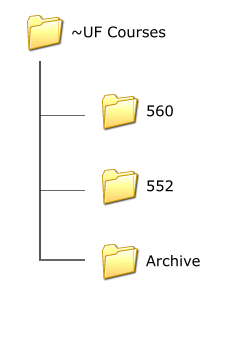
The graphic to the right shows my “courses” folder structure. Each semester I create folders with the course numbers I teach. The previous semester’s folders are copied into a “semester” folder and then moved to the “archive” folder. The “semester” folder has a name in the form “2007 Spring”. By organizing files in this manner I can easily grab work from any student by knowing the year and semester the student participated in a specific course.
One other important tip. Notice the top folder in the graphic is named “~UF Courses” instead of “UF Courses”. There are two folders I use multiple times each day. I want those two folders at the top of the My Documents list for quick access. I prefixed their names with the Tilda so those folders are always alphabetically first.
You may think this “folder organization” is overkill. I cannot disagree more. Right now I have more than 159,000 files in My Documents dating all the way back to 1993. If it were not for folders it would be complete chaos. I use Google Desktop as well, but it’s the folder organization that prevents my insanity.
TSPY=3.14
Pingback: Alvin’s Educational Technology Blog » Efficiency Tip #48 - Be Intentional