
As web users, we spend a lot of time typing things into a browser. I have talked about reducing your typing using Ctrl-Enter. 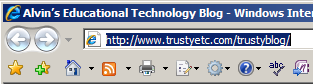 Here is another “URL” time saver.
I have seen many people spend too much time entering a URL. The box at the right shows a “selected” URL. A “selected” URL is one that has been high-lighted. Once it is high-lighted, you can immediately start typing the destination URL. You don’t have to press the Delete key. Typing anything will replace all that is high-lighted.