
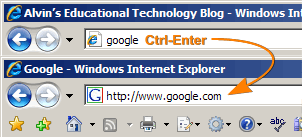
 I seem to remember a time when typing the main domain name would take you to the site. I could type “google” and hit enter. Magic happened and all the pieces of the URL appeared. That doesn’t seem to work any more, but there is a way to reduce all that typing. This tip that will save fifteen key strokes every time you must manually type a URL into your browser. Instead of typing
http://www.google.com [Enter]
type
google [Ctrl-Enter]
Both Internet Explorer and Firefox will automatically type the “http://www.” and “.com” for you when you use the Ctrl-Enter shortcut.
If you are going to a site that ends in “.net” use Shift-Enter. A “.org” address uses the Shift-Ctrl-Enter shortcut.
Quick Reference:
google [Ctrl-Enter] —> http://www.google.com
google [Shift-Enter] —> http://www.google.net
google [Shift-Ctrl-Enter] —> http://www.google.org
TSPY=2.88
Google’s perhaps not the best example, because if you just do “google [enter]” in IE, it’ll do a Google search for Google, which technically takes you to the right site, but in the wrong way.
In Firefox, though, if I type “cnn [enter]” it goes to the CNN site, and “bbhcsd [enter]” goes to bbhcsd.org. So it appears to work with other top level domains as well.
I’d also challenge the TSPY, because any browser can figure out the protocol. Even in IE, if you type “cnn.com”, it’ll figure out the “http://www.” part for you. So you’re only saving four characters (“.com”).
The browser can only figure out CNN.COM and BBHCSD.ORG because those URLs are in your history. Try the process using a URL you have not visited before. Try “www.leastpopularwebsites.com”. Both Firefox 2 and IE 7 bomb for me.
About that TSPY… The lab actually rated this one based on typing without the protocol, because (as your clearly point out) everyone knows you don’t have to type the protocol. Originally the first paragraph was to read “save eight key strokes”, but the committee thought more people would be impressed with a shortcut that saved fifteen key strokes.
Pingback: Alvin’s Educational Technology Blog » Efficiency Tip #53 - Select - Type