Tale of Two Browsers

I use Internet Explorer for just about all my browsing. Firefox is just as good, but I prefer IE. It is like my choice in an automobile. I prefer to drive a Honda even though a Toyota is probably just as good. I simply like the look and feel of a Honda better.

ievsfirefox.png

I do use Firefox often. The unpredictable nature of the Internet makes having two browsers a real life saver at times. Here’s an example. When I do something in a browser that is going to require extended input, I use Firefox. When I grade papers, Blackboard has a page that lists all my students and I can easily enter all the student grades for one assignment on one page. If the grading process requires me to do anything else like check a web page, open a document, click a link in an email, that second browser will protect my work.

I can’t count the number of times that I have lost “form” information because another process took my browser to a new page and lost my form data. Since IE is my default browser, I don’t have to worry about an outside process changing my Firefox page. That alone makes the two-browser environment worthwhile.

I also use Firefox as my non-authenticated browser. I have so many sites that require authentication; I have IE automatically log me in to many of them. If I want to see what my delicious links (or some other site where I have an account) look like when I am not logged in, I use Firefox. Don’t point back to my post about passwords and my “security freakishness” and say that remembered passwords aren’t OK. My machine is locked any time I am not typing on the keys.

I find the two-fisted approach to browsing is handy. I even have Opera

http://www.opera.com

if I need to have a third iron in the fire.

Posted in edtech | Tagged | 1 Comment

Passwords

I had another person “share” his password with me today. I didn’t ask for it. He was having a problem with a system that required a username and password. Instead of logging in, he blurted out his password so that I could login.

crypto.gif

I gave him the normal lecture about security. I asked if he knew how many other people already knew his password, and how many people those people has shared it with. On top of that, this was his “master” password. By that, I mean he uses it for everything. Who knows how many people can log into his online class, check his email, sell his stuff on eBay and modify his MySpace page? I hope he did some password changing after our talk.

I am somewhat of a password freak. How can you be surprised by that? For the last ten years my passwords have been varying strings of random characters. I don’t write them down. In my opinion, I good password should never even be spoken. The reason is simple. My accounts tend to have a lot of access (grades, student records, etc). I need to have secure passwords.

I tell my students this. A good password should be treated like underwear.

Don’t leave it lying around.
Don’t share it with friends.
Change it often.

With all the things that require passwords, it is difficult to use good passwords everywhere without using the same one in multiple places. I have an account on Yahoo and an account on Google. I don’t want to use the same password everywhere, but I want to use something that is semi-secure. I also need to recall it without pulling out too much hair.

A long time ago, I came up with a domain/secret “hash” that could easily be used to recreate a password. If I went to Yahoo, I would take the domain name, “yahoo” and mix that with a “secret” word, to make a unique password. It could be as simple as

ysaehcoroet

Google’s password would be

gsoeocgrleet

The only problem with this is that someone from Google could see that I have added “google” to the word “secret” and then they could use my algorithm on any page where I have an account. I needed something a little more complex (remember, I’m a security freak).

I scripted up something that took all the letters of my secret word and domain name, converted them to ASCII, did some massaging and then parsed out chunks into a series of letters and numbers. I have been using this for a couple of years. I have it on a web page (running HTTPS). I can get to it from anywhere so I don’t have to remember any of my passwords.

Recently I had to create a lot of accounts for domains that were very similar. I ended up having a lot of passwords that were very similar. I decided that I wasn’t the only person on the planet with this problem, so I went looking for a solution created by someone with some crypto knowledge. Here is what I found SuperGenPass:

http://labs.zarate.org/passwd_new/mobile.html

You can save the source of this page to your own page. It’s written in Java, so nothing needs to be processed by a server and transmitted over the Internet when creating or recreating a password. I copied it to my USB drive, my office computer and laptop. Now I can create a very good password any time and all I ever need to remember is my master password.

Now I have to change a lot of underwear.

Posted in edtech | Tagged | 3 Comments

Tumblr

tumblr.jpg
If a blog is too much, and a link isn’t enough, the answer might be Tumblr. This free service is like a mini-blog. It’s designed to be a quick place to toss some content.

I send most of my “cool” info to del.icio.us because a link is often enough. Tumblr will handle a link, text, pictures, and embedded objects. I setup an account in about a minute and added several different kinds of content.

Graphical buttons across the screen let you create:

Regular Post – just like a blog post
Photo – you are permitted to upload a photo up to 10MB in size. I’m not sure if there is a limit on the number of photos that can be uploaded.
Quote – enter a few words and Tumblr formats it like as a quote.
Link – a link
Conversation – this is dialog archived so every other line is prefixed with the person speaking it.
Video – embedded video or other embedded content. I also added a Slideshare presentation.

Things like this are useful for class. There are times I want to send my students to one page with different kinds of content. I have used Protopage to do this before. Tumblr loads quicker and has a simpler interface. Plus it has an RSS feed.

Posted in edtech | Tagged | 1 Comment

Web Based Presentations

I have started to use YouTube and Google Video for some of my presentations. Here is the latest one.

Slideshare.net is another site that is excellent if you only want to upload a PowerPoint presentation. Here is the same presentation.

Slideshare offers one thing that the video sites do not – vector based text. You can enlarge the presentation to full screen and all the letters are still perfect. If you have graphics, those will get grainy, but PowerPoint text will remain crisp. It was also very easy to take my PowerPoint and get it online with Slideshare. I literally uploaded the PPT file. All the transitions and animations are filtered out, but everything else is there.

But I don’t think the presentation without the audio is very educational. A viewer may be able to pick up a few things using only the text from the presentation, but the real message comes from the audio. Tell me what you think.

Posted in edtech | Tagged | 1 Comment

The Folder

Over lunch I was talking with Buzz. The topic was digital photos. I take a lot of them. Last weekend I took about 400 pictures. Annually I take about 15,000 photos and have done this for the last several years. Buzz asked how I was ever able to keep track of those pictures. My answer – “folders”.

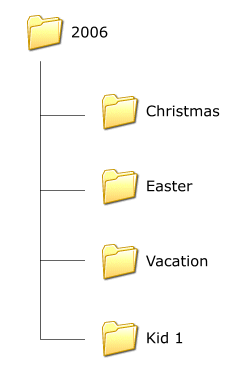
picturefolderlayout.gif
Everything gets a folder. Without a little planning, I could easily end up with hundreds or thousands of folders all over the place. Here is how I avoid that.

1 – All the photos from any given year go into a folder with that year’s number. Right now all my photos are going into a folder called “2007”. All of last year’s photos are in the “2006” folder.

2 – Every family member gets a folder. I have five kids. Each one gets a “personal” folder inside each year folder.

3 – Personal folders have folders for each major event. Each kid has a birthday and we take a lot of pictures on that day. For this reason, every personal folder has a “birthday” folder in it. If I am looking for the 2005 birthday pictures of Kid #3 (we have so many kids we have to number them), I look in

\2005\kid3\birthday

4 – Major family events get their own folder in the “year” folder. For instance, Easter is a big family event. Not only will there be pictures of our kids, there will be pictures of extended family members. All of last year’s Easter pictures are in

\2006\Easter

If it’s an event that covers multiple days, the “special” folder can end up with folders of its own.

\2006\Christmas\At Home
\2006\Christmas\At Alvin’s Parents
\2006\Christmas\Band Concert

By the time we add “personal” and special folders, there are about two dozen top-level folders that cover everything. Each year, as we add new pictures, we add the extra folders as needed. As it is right now, none of the kids has a birthday. None of the “personal” folders have a “birthday” folder yet. That will get added when we take some birthday pictures.

Every time new pictures are added to the collection, I synchronize my picture folder with a share on the server. This gives everyone in the house the ability to get to all the photos. Where they go from there, I have no idea.

Posted in edtech | Tagged | 11 Comments