
Inconvenient Science

You may not know this, but I am a scientist. I have two degrees in Chemistry. Part of my graduate work was in Analytical Chemistry. I have seen, used and built a lot of scientific instrumentation. So the whole Al Gore thing interests me as a scientist. I did a little research. I didn’t have to go far before I found this: “The Great Global Warming Swindle”

I did a little checking and found that Al Gore isn’t a scientist, but these guys are. That shouldn’t automatically discredit Al Gore. He did have scientists working for on this project.
co2temp.jpg

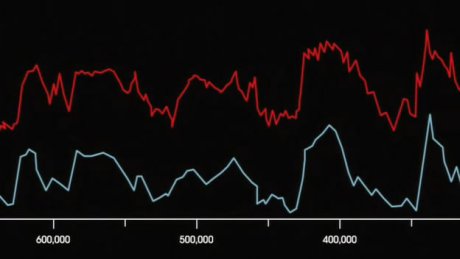
Here is something “The Great Global Warming Swindle” points out. The above graphic is from Al Gore’s documentary. The red line (top) is CO2 concentration in the atmosphere and the blue line (bottom) is the surface temperature of the earth. It is clear the two are related. Al Gore says that when CO2 goes up, the temperature goes up. The scientists in “The Great Global Warming Swindle” say that a rise in temperature causes CO2 concentrations to go up (scroll in to the twenty minute mark).
templag.jpg

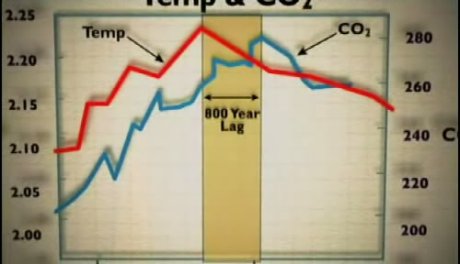
They say the CO2 concentrations increase hundreds of years after the temperature increases. They show a graph with a much more granular time axis so you can see the lag of the CO2 concentration. With Al Gore’s chart showing 50,000 years at each clip, it is difficult to tell. Al Gore makes a point of saying that zero scientists dispute this relationship between CO2 and temperature. He failed to say that some scientists think it is the other way around.

I’m looking for a reliable resource (other than these videos) for the breakdown of the percentage contributions of different greenhouse gases. I would really like to know how much the average volcano emits compared to all the cars in an average sized metropolitan area. I’ll keep you posted on what I find.

Posted in edtech | Tagged | Comments Off on Inconvenient Science

Copyright Chaos

Over the weekend, the New York Times had an op-ed piece by Lawerence Lessig on the ever more interesting topic of copyright law.

He pointed out something that I did not know. The Supreme Court has deferred to the Congress the decisions on how new technologies affect copyright law. You could say that the Supreme Court encouraged Congress to update the law by the creation of the Digital Millennium Copyright Act.

In the 1984 Sony Betamax case, the Supreme Court stated that the Congress would have to create new rules concerning copyright if technology were to make them necessary. The Betamax case decided it was legal to “time shift” or record a television show on a VCR so that it could be watched at a later time. Another important case in digital media was RIAA v. Diamond Multimedia. This case established that it is legal to “space-shift” music from a CD to an MP3 player.

The Lessig article focuses on how the Supreme Court has decided to take on the role of law maker and create new laws. Specifically, the Supreme Court decided in the Grokster case that it was illegal to provide technology that induces copyright infringement.

Viacom has sued YouTube for copyright damages to the tune of one BILLION dollars. Under the DMCA, a service like YouTube is protected under the “safe harbor” provision. This provision protects the creator of a service from being sued if someone uses the service to violate copyright law. For example, if someone used a Sony video camera to record a movie still playing in a theater, the MPAA cannot sue Sony.

Because users have posted copyright protected content to YouTube, Viacom says YouTube should pay. As a user of YouTube and many other streaming services, I don’t want these crazy suites destroying these free services. I have waited long enough to get a streaming service that lets me upload as much content as I can create (for free) and then streams that content to any number of people (for free) for as long as I choose to store my content (for free) on their servers.

Posted in edtech | Tagged , | 1 Comment

Friday Fun

I learned to do this when I was a kid. Now that the Rubik’s Cube is in vogue again, my own kids didn’t think the “behind the back” trick was even possible.

This is harder than doing the cube blindfolded. Behind the back requires you to think upside down.

Posted in leisure | Tagged | 1 Comment

Humans vs Computers

I’ve been searching through Google Video looking for good presentations that I can use as resources.  I am mainly looking for presentation styles, but much of the content has been interesting.  Here is one I stumbled across today.

Luis von Ahn, a professor at Carnegie Mellon University, is talking about Human Computation.  He looks at several things that computers just can’t figure out yet.  One of those things is a captcha.  This is a term coined by Prof Ahn.  You have probably seen a few of them during your browsing.  They look like this:


Humans can read the letters, but computers cannot.

Here’s the first really interesting statistic from the presentation. 

9 Billion Human-Hours of Solitaire were played in 2003. 

That is billion with a B.  In comparison, the Empire State Building took 7 million (with an M) human-hours to build.  That is equivalent to 6.8 hours of the world playing Solitaire.

Ahn’s goal is to put this wasted Solitaire time to good use.  He has devised a program that is fun and competitive that will help correctly label pictures on the web.  Before showing the game, he went to Google Images and searched for “dog”.  There were a lot of dogs, a rabbit and a guy wearing a blue suite.  This is because the image identification process cannot analyze the picture to identify a dog.  Instead, Google relies on the file name and words around the picture to try and identify a picture.

The ESP Game solves this problem.  The game pairs two anonymous people and shows them both the same picture.  As quickly as possible both players (without seeing what the other is typing) must try to type a word that identifies the picture.  As soon as the two players have a common word, points are scored.  Here’s the twist.  Certain words are “taboo” words.  Generally those are the obvious things in the picture.  It requires the players to look at all the items in the picture in choosing descriptive words.

The end result is a very accurate list of descriptive words for each picture in the database.  Plus the players can get millions of points (the top ten are listed on the site).

Ahn estimated that all the pictures in Google’s database could be accurately tagged in about two months if about 5000 people were to play this game around the clock.  He pointed out games in Yahoo and MSN that average 5000 players all the time.  The whole project is an interesting way of using human brain power.

Once you master the ESP Game, give Peekaboom a try.

Posted in edtech | Tagged | Comments Off on Humans vs Computers

Google Search Tip #4

Every six months someone posts a message on the eTech Ohio listserv that asks this question:  Can anyone share their school’s Acceptable Use Policy with us?

Four different times I have posted this message to the list that explains how to use Google to find all the AUPs anyone would ever want.

Here are ONE THOUSAND AND TEN in PDF format, all on Ohio K12 web servers.

+filetype:pdf +site:k12.oh.us +”acceptable use policy”

You can tweak the search strings to find very specific content… like “photos” or “publishing guidelines”, etc.

Here are 38 in DOC format

+filetype:doc +site:k12.oh.us +”acceptable use policy”

If you switch the search to “aup”, here are a couple hundred more

+filetype:pdf +site:k12.oh.us +aup

+filetype:doc +site:k12.oh.us +aup

The link below will take you to Google and do a search on web sites ending in K12.OH.US (all K12 schools in Ohio) for PDF documents containing the exact phrase “acceptable use policy”.

+filetype:pdf +site:k12.oh.us +”acceptable use policy”

Let me explain the key search features that are used in this search.

FILETYPE:

This filter will only return the file type that corresponds to the file extension used in the search string.

DOC – Word Document
PDF – Adobe PDF
XLS – Excel
PPT – PowerPoint

If you want to find a PowerPoint that talks about Global Warming, search for

+filetype:ppt +”global warming”

Note: there is no space between the colon and the file extension. 

Notice two other things in the above search.  A plus sign in front of each term forces that term to show up in the search result.  Also the quotes around the phrase “global warming” will force those two words to show up in that exact order (the word “global” immediately before the word “warming”).  If you search for

+filetype:ppt +”global warming”

you get about 44,000 PowerPoint files.  If you change it to

+filetype:ppt +global +warming

You get 55,000.  The increase is due to the fact that the second search does not require the two words to be one after the other.  Once slide could have the word “global” and a completely different slide could have the word “warming”.

SITE:

This keyword is really handy.  It will limit the results to URLs that meet the specified requirements.  You can use this one to have Google search a whole web site even if the site has no search engine of its own.  The use looks like this

+site:findlay.edu +”educational technology”

This search locates every web page on the UF web site with the exact phrase “educational technology”.  Because the “root” of the domain was used, the search finds pages on

http://www.findlay.edu
http://homepages.findlay.edu

If you wanted pages at a more specific sub-domain, include it in the search

+site:homepages.findlay.edu +”educational technology”

Using the SITE keyword, it is easy to find school web pages in Ohio using

+site:k12.oh.us

This will find every school from ada.k12.oh.us to zanesville.k12.oh.us and all the ones in between.  If you are looking for a document on one of those school sites, you can combine keywords like this

+site:k12.oh.us +filetype:ppt

This search generated a list of more than 1600 PowerPoint files all on Ohio school web sites.

Making this modification:

+site:k12.oh.us +filetype:ppt +”global warming”

Produces six PowerPoint presentations from Ohio schools that have the phrase “global warming” somewhere in the presentation.

Posted in edtech, efficiency | Tagged , | 5 Comments