What if class were like a chat

This is right out of my eTech presentation.

If you have ever taken an online class with a chat component, the video should ring true.  Here are the points I made about chats in online classes.

Chats 

  • Inefficient
  • Difficult for instructor to control
  • Difficult for students to follow
  • Painful if you type slow

I have never been in a chat that didn’t take three times as long as any other method of interaction. The quality of the conversation is usually poor because everyone is trying to reply as quickly as possible.

I am part of an Elluminate pilot at UF.  It is an expensive alternative, but the closest thing I’ve seen to a virtual face-to-face class.  It even works well from a dial-up connection.

Thanks to Buzz Dyer for taking the leading role in my chat video.

Posted in edtech | Tagged | 4 Comments

Free Culture

If you haven’t watched/listened to Lawerence Lessig, here is a presentation that is worth your time.

http://randomfoo.net/oscon/2002/lessig/free_culture.swf  (Flash)

http://www.oreillynet.com/pub/a/policy/2002/08/15/lessig.html  (HTML)

The presentation can be summed up in the refrain of a song that he wrote for the presentation.

Creativity and innovation always builds on the past.
The past always tries to control the creativity that builds upon it.
Free societies enable the future by limiting this power of the past.
Ours is less and less a free society.

This is a presentation about copyright and how its evolution in our country can stifle creativity.  He starts with the writings of Shakespeare and goes all the way to present day copyright law. 

Most people don’t realize that the founding fathers thought copyright should last 14 years.  Ideas from existing works could be taken and built upon (derivative works) without legal ramifications.  Now copyright protection lasts almost 100 years and it’s illegal to read many books outloud in public.

The most compelling part of the presentation deals with Walt Disney and how he took stories that were out of copyright (older works) or parodies and created animated movies.  Think of shows like Cinderella, Alice in Wonderland, Pinnochio and Sleeping Beauty.  All of these stories were derivative works.  They were stories that already existed.  Many were fairy tales written by the Brothers Grimm.  Even Mickey Mouse was parrotted after Steamboat Bill in the same year that Steamboat Bill was released in theaters.  Consider the lead character in Pirates of the Caribbean – Jack Sparrow.  If someone were to create a parody animated figure of Captain Jack and release a film in 2007 starring that parody character, they would be sued into oblivion.  This very practice (parodying, not suing) made Disney the empire that it is today.

The most powerful slide about the current state of copyright:

“No one can do to the Disney Corporation what Walt Disney did to the Brothers Grimm.”

Lessig goes on to talk about how copyright is blocking all kinds of innovative “fair use” with examples from Aibo to a couple of seconds of Homer Simpson in the background of an educational film.  This presentation is an eye-opener about the current “police” state of copyright law in America.  It is worth a listen.

Posted in edtech | Tagged , | Comments Off on Free Culture

Tagging and Tag Clouds

Tag Cloud

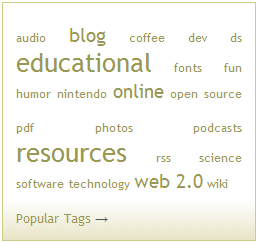
Here’s an interesting report from PEW on tagging.  In Decemeber of last year they found that 28% of Internet users are taggers and 7% of us tag on a daily basis.  If you are familiar with del.icio.us, you are probably familiar with the tagging phenomenon.  Wikipedia calls a tag a keyword that is associated with some piece of information.  If I were reading an article about the Hubble Telescope, I might tag it with astronomy.  Later I could come back to my list and ask to see all the references tagged with astronomy and more easily find that one link I was looking for.  Using a service like del.icio.us, you can organize all your Internet links using tags and all the links will be stored in one online location.  I do this with my presentations.  To find all of the links referenced in the talk I gave at the 2006 eTech Ohio Conference, you can search del.icio.us for eTechOhio06 and find all 41 of the links that were in my presentation.  Having the ability to find all those links with one keyword is handy given the fact that I talked about those 41 links in a 50 minute presentation with a lot of other content.  I wanted the audience to listen to the content and not worry about writing down every link.  In the first minute, they all had the tag.  After that, they were able to pay attention to the more important content of the presentation.

I’m a daily tagger.  I blogged about Scuttle before.  I setup my own server and use it for my personal bookmarks.  I find it quicker to use than delicious because all the links there are mine.  For class projects I have also found Scuttle to be more useful.  The first time I worked with a class of 30 freshmen to build a group of links for a course, we decided to tag all the links with EDUC260 (the course number).  Some people used EDUC 260 (note the space), so delicious didn’t associate those links with our “class tag”.  Other students left the class tag out altogether.  In the end, almost half of the links didn’t have the needed tag to associate them with the course.  With Scuttle, I can create a separate “link database” for each class.  It takes me an extra five minutes to setup.  Considering the benefit, that is trivial.  I have the students enter the links by going to a specific URL and all the links are grouped into one database without using any special tags.  This way, the students may use tags that describe the content of the link and not just the course.

By using tags to keep track of information, a new visual depiction of information has been created.  This is the tag cloud.  The tag cloud shows a list of the tags most used in a subset.  A larger font is used for the tags used most often and a smaller font for tags used the least often.  The graphic at the top of this post is the tag cloud generated from all my personal links.  The subset of tags can be anything: my delicious account, all delicious accounts, all tags created today, etc.

There are even tag clouds for information outside of tagged metadata.  Here is an article that shows the three keynote addresses given by Steve Jobs, Bill Gates and Michael Dell at MacWorld 2007 and CES 2007.  All the words from the speeches were analyzed to produce tag clouds showing which words were used the most during the talks. 

Jobs: phone, iphone, ipod
Gates: devices, great, windows
Dell: gaming, great, online, digital

It will be interesting to see how analysts use tag cloud information to track different trends.  Tagging certainly isn’t going to slow down.

Posted in edtech | Tagged | 3 Comments

MediaWiki

http://www.mediawiki.org

A lot of my students are using WikiPedia as a resource.  That’s not necessarily a bad thing, but many of them do not understand exactly why it could be problematic.  I feel the best way to understand how a Wiki works is to use one.

Instead of polluting a wonderful resource like WikiPedia, I decided to setup my own wiki to use with my students.  I already have a Moodle server with a wiki, but I wanted a stand alone version.  I consulted the OpenSourceCMS – CMS Ratings list and found that MediaWiki with high ratings.

MediaWiki uses PHP and MySQL.  There was no prep as the install script setup the database and populated all the tables.  I found a nice installation resource:

http://devpit.org/wiki/Installing_Mediawiki

that helped with a couple of problems I encountered.  The main problem with the default installation is that anyone (including anonymous users) can create or edit entries.  I wanted to require users to login before doing these things.  In defense of MediaWiki’s defaults, it does give IP address tracking for anonymous users.  But for my class, I wanted to be able to easily determine who has created or edited each entry.

I gave everyone a copy of WikiPedia’s Cheatsheet for editing.  We are creating a wiki that covers copyright and all its implications on education.  There isn’t a lot of formatting required, but everyone does have to insert links to external resoures.  At this point, we are about half way through the project.  It seems to be going well.  I’ll post a followup when we finish.  It could be interesting.

Posted in edtech | Tagged , | 2 Comments

Scuttle

http://scuttle.org/

Everyone has heard of del.icio.us.  I use it to keep track of my bookmarks that I want to share with other people.  But what if I could have my own del.icio.us server?  Then I could do projects with groups of people and all the tags we create would be limited to the people in our group.

To get an idea of what I’m talking about, go to del.icio.us and search for the tag: flash.  You’ll get more than 182,000 links.  Many of those links will connect to pages with information about Macromedia Flash, but there will be plenty of other things to sift through: flash drives, flash bulbs, flash arrests…

More importantly, most of them will not deal with Flash items that can be used in an educational environment.

I want to have a site where my students can go and enter URLs for sites that have educational multimedia activities.  I want my students to put in tags that relate to these sites: arithmetic, chemistry, elementary reading, etc.  I don’t want all this work to “disappear” in a sea of millions of delicious links.

Using Scuttle I have created my own delicious server.  It even workings with any program that uses the del.icio.us API.  It takes a few minutes to install.  You download the package

http://sourceforge.net/projects/scuttle

and uncompress it on your server.  Create a MySQL database.  Import the provided database table.  Edit the provided profile file to include the name of your database, username and password.  That’s it.

I have already setup three different instances of the scripts.  I use one for my own bookmarks.  The others I use for student projects.  For my own bookmark, I exported my current bookmarks from my browser and used the built-in Scuttle tool to import them into the database.  Now all my new bookmarks go right into Scuttle.

Posted in edtech | Tagged | 6 Comments