
Squeak

squeak.gif

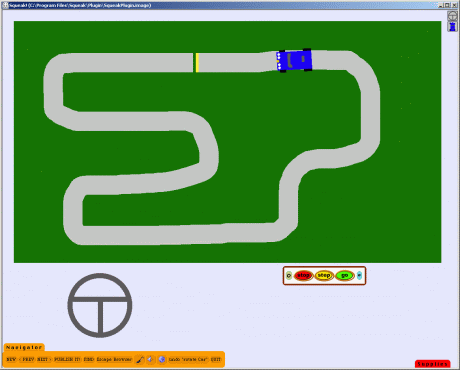
Next semester I will be teaching a multimedia course.  Most of the course focuses on Flash, but we start with some very basic programs.  Squeak is one of those programs.  Squeak is a graphical programming interface based on the SmallTalk programming language.

Here is how I like to introduce Squeak to my class:

Today we will be creating an interactive game.  We will use a paint program to draw a car.  Once we have the car, we will draw a steering wheel that will be used to maneuver the car.  Once all this is working, we will create a race track and program the car to detect if the driver is steering the car on or off the road.  Someone playing the game will use the mouse to turn the steering wheel in such a way as to keep the car on the road.  If the car leaves the road, it will disappear from the track and start back at the beginning.

With Squeak, all of this takes about fifteen minutes.

Squeak is a graphical programming interface.  There is a paint tool and everything that is drawn has programming properties.  An object can be linked to other drawn objects.  In this way, the direction of the car can be linked to the degree of rotation (the heading) of the steering wheel.  All the programming tools are simple drag-and-drop objects.

If you are looking for a tool to introduce programming to a youngster, Squeak is perfect.
Posted in edtech | Tagged | 1 Comment

Inline Search

http://www.ieforge.com/InlineSearch/HomePage

I use Internet Explorer as my main browser.  I have it locked down to prevent any problems and I don’t visit questionable sites.  Steve Gibson uses it.  That’s good enough for me.  Besides, there are several sites that I must use every day and these sites have Active X controls that don’t work in Firefox.

There is one feature of Firefox that I like… the search tool.  That little search box at the bottom of the page is great.  More importantly, the F3 key works from within the tool.  IE’s search tool is terrible.  CTRL-F produces a pop-up box that always gets in the way.  On top of that, the treasured F3 doesn’t work at all.  Why have a two-key combination when one key will work great?

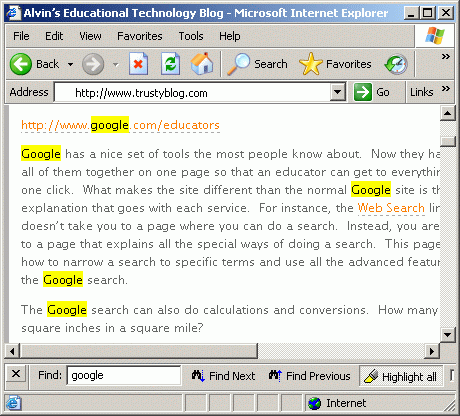
Then I found Inline Search from the guys at IEForge.  This free IE add-on gives the same user experience during a search as does Firefox.  There is no pop-up box and the F3 key (or shift-F3 to find previous) works just as it should in any Windows application.

In addition, there are Highlight All and Match Case options just like in Firefox.

The extension works in IE 6 or IE 7.  If you are using Internet Explorer, this is one of those things you must have.

Posted in edtech | Tagged | Comments Off on Inline Search

Google for Educators

http://www.google.com/educators

Google has a nice set of tools the most people know about.  Now they have put all of them together on one page so that an educator can get to everything with one click.  What makes the site different than the normal Google site is the explanation that goes with each service.  For instance, the Web Search link doesn’t take you to a page where you can do a search.  Instead, you are taken to a page that explains all the special ways of doing a search.  This page shows how to narrow a search to specific terms and use all the advanced features of the Google search.

The Google search can also do calculations and conversions.  How many square inches in a square mile?

http://www.google.com/search?hl=en&lr=&q=1+square+mile+in+square+inches

There is also the language translator too.  Here’s my first paragraph… in German.

Google läßt einen netten Satz Werkzeuge die meisten Leute ungefähr wissen.  Jetzt haben sie alle zusammen sind auf eine Seite gesetzt, damit ein Erzieher an alles mit einem Klicken gelangen kann.  Was den Aufstellungsort unterschiedlich als bildet, ist der Normal Google Aufstellungsort das explaination, das zu jedem Service gehört.  Zum Beispiel nimmt die Netz-Suchverbindung dich nicht zu einer Seite, in der du eine Suche tun kannst.  Stattdessen wirst du zu einer Seite genommen, die alle speziellen Weisen des Tuns einer Suche beschreibt.  Diese Seite zeigt, wie man eine Suche zu den spezifischen Bezeichnungen verengt und alle vorgerückten Funktionen des Google zu benutzen suchen.

That took all of ten seconds to do.

Besides the Google search techniques, there are links to Google Earth, Book Search, Maps, Video, Docs & Spreadsheets (Google’s web-based word processor and spreadsheet programs).  You’ll also find Blogger, SketchUp (a program that can be used to add 3D objects to Google Earth), Calendar and Picasa. 

Schools can also setup “group” email and calendars.

Most of these services are available to everyone, but Google for Educations puts all the tools together with a nice set of tutorials.  Your biggest concern is that all this is blocked by your district’s filter.

Posted in edtech | Tagged | Comments Off on Google for Educators

Is Educational Technology Useful?

Here’s an article from the Mitiri group, sponsored by Cisco.

It’s an interesting read showing some real research into the effective use of different technologies in improving student learning.  As you read through the article, you’ll notice that some of the areas (they point them out) still don’t have rigorous research showing if technology is helping or not.

Posted in edtech | Tagged | Comments Off on Is Educational Technology Useful?

Google Video

I was looking for a short video clip for one of my classes when I stumbled across this link.

http://video.google.com/ucberkeley.html

It looks like Berkeley is using Google Video to post lectures from courses offered on campus.  The production quality isn’t great, but it captures most of what is seen in a classroom.  This particular effort involves at least one person running a video camera for the instructor.  It looks like multiple channels are being captured for some of the lectures as the video of the presenter is switched with the presenter’s computer screen at different times.

Producing these would take a little work, but it’s nothing outside the capabilities of a technology student.  In fact, this would be great experience for a teacher candidate interested in technology integration in the classroom.  Digitizing video and editing that video into something that could be used online is a valuable skill.  The downside to online video has always been the limit of bandwidth in a school district.  Most districts have one T1 for several buildings.  Adding video streaming to the normal traffic sometimes just doesn’t work well.  But having a resource like Google Videos is great.  At no cost to the school (money or bandwidth), the district can have video streaming of content created by teachers.

Now we just need to make sure the school’s filter doesn’t block Google Video.

Posted in edtech | Tagged | Comments Off on Google Video