Podcasting – It’s not about the iPod

I don’t have an iPod.  If you gave me one, I would give it back.  The reason is simple.  All of my music is archived as WMA files and not MP3.  The quality is higher and the file size is smaller.  The iPod won’t play WMA files because it is a format created by Microsoft. So I have a Zen Micro from Creative Labs.  Mine is orange.  Its five gigabyte hard drive can hold a few thousand songs or several hundred podcasts.

A podcast is a digitally recorded conversation between two or more people.  Typically, the sound is saved as an MP3 file.  This recorded broadcast can be played on an iPod… thus the name podcast.  Since a podcast is just digitized sound, it can be played on any device that will play an MP3… even a computer.  The MP3 can also be burned to an audio CD.  In this way, you can play a podcast through your car stereo.

That’s the technical side of the podcast.  The more important side is the content.  Imagine this.  A few experts sit down to talk about an interesting topic.  Someone places a microphone in the middle of the table and the conversation is recorded.  After the conversation is finished, it is made available to people that may be interested in the topic.  That is what podcasting is all about.

There are a lot of podcasts out there.  Feedburner alone handles more than 50,000 podcast feeds.  There are many sites that list podcasts by topic.  Here are a few links:

http://www.podcast411.com/
http://www.allpodcasts.com/
http://www.ipodder.org/

I listen to these podcasts: This Week in Tech (TWiT), Security Now, Cranky Geeks, Bit by Bit and EdTechTalk.  All these Podcasts deal with technology; the last two are about educational technology.

Usually I burn them to CD and listen to them in my car.  I use re-writable CD’s because each week all the podcasts are new.  In this way I don’t end up with a pile of CD’s that I will only listen to one time.  My car actually has a stereo that plays MP3 (and WMA’s) from a CD.  So I can easily fit a week’s worth of podcasts on one CD.

Since I started listening to podcasts, most of the new technologies that I currently use, I heard about first on a podcast.  For my own professional development, podcasting is at the top of the list.
Posted in edtech | Tagged | 1 Comment

Google Earth

Google Earth

http://earth.google.com

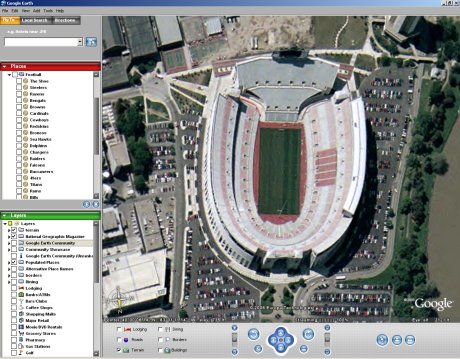
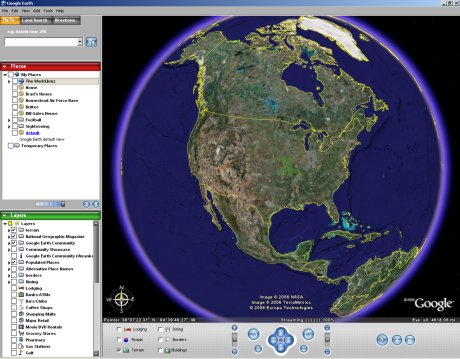
If you teach geography, this is an application you need to get.  Google Earth is a free program that can be downloaded from the URL above.  It is available for the PC or Mac.  Once you install the program, you are plugged into Google’s database of satellite images and geographic data.  You can look at places like Ohio Stadium in Columbus.

The Shoe

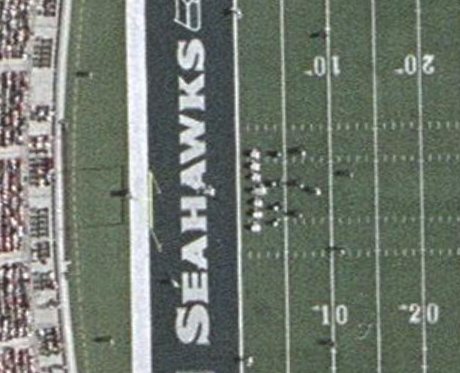
Some locations have high resolution images.  In the picture below, you can not only see that the field says “Seahawks”, but also that the home team is on defense and in a four-man front.  The resolution varies from place to place.  In Findlay, the resolution is so poor, my neighborhood (30 homes) is not clearly visible.

Seahawks

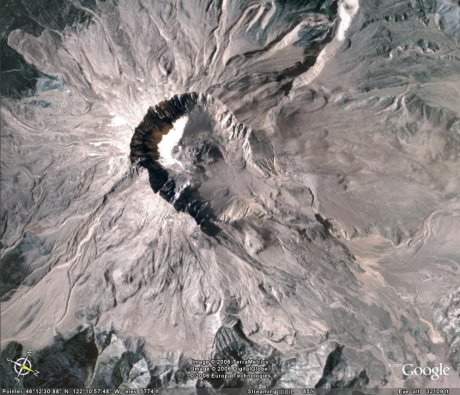
Here is a picture of Mount St Helens.  From the shadow, you can tell that half of the mountain was blown away during a volcanic eruption.  But Google Earth also has altitude information.

Mt St Helen 1

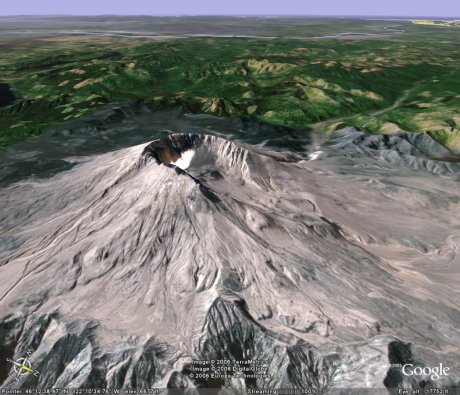
By changing the angle of view (a feature built into Google Earth), you can see how tall the mountain is and just how much of the side is gone.

Mt St Helen 2

Posted in edtech | Tagged | Comments Off on Google Earth

ProtoPage

Old Main

http://www.protopage.com/ 

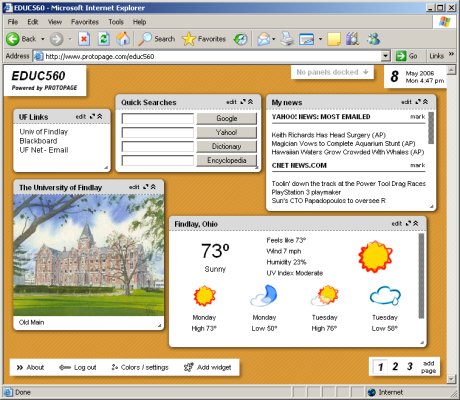
Every once in a while a technology comes along that completely changes the way you do your daily work.  Protopage is one of those technologies.  ProtoPage is a web site that gives you all the tools to easily create dynamic content on the web without any knowledge of HTML, scripting, or FTP.  All you need to know how to do is type into a box.  You can create links, upload pictures, add notes and incorporate RSS feeds into your page.  Once you have content, you can literally drag the content to any location on the page… and it stays there.  You can also drag the corner of a content box and resize its window.

I have created a page for EDUC560.  Go to

http://www.protopage.com/educ560

This page includes links to all the important online servers at UFindlay.

I now use ProtoPage as my personal start page.  My personal page is at

http://www.protopage.com/alvintrusty

and it’s password protected.  Now my home computer, office computer, laptop and tablet all have the same dynamic starting page.  I can change the page (add a link, create a new note, etc) and the changes are automatically reflected on all my computers.

Posted in edtech | Tagged | 3 Comments

ACSII Art

http://www.text-image.com

AlvinAlvinAlvinAlvinAlvinAlvinAlvinAlvinAlvinAlvinAlvinAlvinAlvinAlvinAlvinAlvin AlvinAlvinAlvinAlvinAlvinAlvinAlvinAlvinAlvinAlvinAlvinAlvinAlvinAlvinAlvinAlvin AlvinAlvinAlvinAlvinAlvinAlvinAlvinAlvinAlvinAlvinAlvinAlvinAlvinAlvinAlvinAlvin AlvinAlvinAlvinAlvinAlvinAlvinAlvinAlvinAlvinAlvinAlvinAlvinAlvinAlvinAlvinAlvin AlvinAlvinAlvinAlvinAlvinAlvinAlvinAlvinAlvinAlvinAlvinAlvinAlvinAlvinAlvinAlvin AlvinAlvinAlvinAlvinAlvinAlvinAlvinAlvinAlvinAlvinAlvinAlvinAlvinAlvinAlvinAlvin AlvinAlvinAlvinAlvinAlvinAlvinAlvinAlvinAlvinAlvinAlvinAlvinAlvinAlvinAlvinAlvin AlvinAlvinAlvinAlvinAlvinAlvinAlvinAlvinAlvinAlvinAlvinAlvinAlvinAlvinAlvinAlvin AlvinAlvinAlvinAlvinAlvinAlvinAlvinAlvinAlvinAlvinAlvinAlvinAlvinAlvinAlvinAlvin AlvinAlvinAlvinAlvinAlvinAlvinAlvinAlvinAlvinAlvinAlvinAlvinAlvinAlvinAlvinAlvin AlvinAlvinAlvinAlvinAlvinAlvinAlvinAlvinAlvinAlvinAlvinAlvinAlvinAlvinAlvinAlvin AlvinAlvinAlvinAlvinAlvinAlvinAlvinAlvinAlvinAlvinAlvinAlvinAlvinAlvinAlvinAlvin AlvinAlvinAlvinAlvinAlvinAlvinAlvinAlvinAlvinAlvinAlvinAlvinAlvinAlvinAlvinAlvin AlvinAlvinAlvinAlvinAlvinAlvinAlvinAlvinAlvinAlvinAlvinAlvinAlvinAlvinAlvinAlvin AlvinAlvinAlvinAlvinAlvinAlvinAlvinAlvinAlvinAlvinAlvinAlvinAlvinAlvinAlvinAlvin AlvinAlvinAlvinAlvinAlvinAlvinAlvinAlvinAlvinAlvinAlvinAlvinAlvinAlvinAlvinAlvin AlvinAlvinAlvinAlvinAlvinAlvinAlvinAlvinAlvinAlvinAlvinAlvinAlvinAlvinAlvinAlvin AlvinAlvinAlvinAlvinAlvinAlvinAlvinAlvinAlvinAlvinAlvinAlvinAlvinAlvinAlvinAlvin AlvinAlvinAlvinAlvinAlvinAlvinAlvinAlvinAlvinAlvinAlvinAlvinAlvinAlvinAlvinAlvin AlvinAlvinAlvinAlvinAlvinAlvinAlvinAlvinAlvinAlvinAlvinAlvinAlvinAlvinAlvinAlvin AlvinAlvinAlvinAlvinAlvinAlvinAlvinAlvinAlvinAlvinAlvinAlvinAlvinAlvinAlvinAlvin AlvinAlvinAlvinAlvinAlvinAlvinAlvinAlvinAlvinAlvinAlvinAlvinAlvinAlvinAlvinAlvin AlvinAlvinAlvinAlvinAlvinAlvinAlvinAlvinAlvinAlvinAlvinAlvinAlvinAlvinAlvinAlvin AlvinAlvinAlvinAlvinAlvinAlvinAlvinAlvinAlvinAlvinAlvinAlvinAlvinAlvinAlvinAlvin AlvinAlvinAlvinAlvinAlvinAlvinAlvinAlvinAlvinAlvinAlvinAlvinAlvinAlvinAlvinAlvin AlvinAlvinAlvinAlvinAlvinAlvinAlvinAlvinAlvinAlvinAlvinAlvinAlvinAlvinAlvinAlvin AlvinAlvinAlvinAlvinAlvinAlvinAlvinAlvinAlvinAlvinAlvinAlvinAlvinAlvinAlvinAlvin AlvinAlvinAlvinAlvinAlvinAlvinAlvinAlvinAlvinAlvinAlvinAlvinAlvinAlvinAlvinAlvin AlvinAlvinAlvinAlvinAlvinAlvinAlvinAlvinAlvinAlvinAlvinAlvinAlvinAlvinAlvinAlvin AlvinAlvinAlvinAlvinAlvinAlvinAlvinAlvinAlvinAlvinAlvinAlvinAlvinAlvinAlvinAlvin AlvinAlvinAlvinAlvinAlvinAlvinAlvinAlvinAlvinAlvinAlvinAlvinAlvinAlvinAlvinAlvin AlvinAlvinAlvinAlvinAlvinAlvinAlvinAlvinAlvinAlvinAlvinAlvinAlvinAlvinAlvinAlvin

It’s hard to tell, but this is a picture of my car. The CSS settings in WordPress won’t let me reduce the spacing in between the lines of text. So this picture looks taller than it should.

Posted in edtech | Tagged | Comments Off on ACSII Art

Cobain Backup

I just automated all my backups using a FREE backup program called Cobain Backup.  I used an XP machine with a few hundred free gigabytes of hard drive space.  It’s the same machine I use to stream TV to the rest of the house.  From this one machine I backup my desktop machine, my server and my laptop.  The backup task is scheduled for the wee hours of the night (Cobain runs as a service).  On the first night it does a full backup and for the next six days it does incremental backups.  The next week, it starts fresh with a full backup.

On top of copying all my files to this XP machine, Cobain also zip’s the files into password protected archives using strong encryption (Blowfish, Rijndael or DES).  Each archive is also chopped into 4.7 GB pieces so they will each fit on one DVD.  There are also filters to include/exclude certain file types in the archive.  For instance, I didn’t want all the podcast files on my computer to be backed up, so I filtered out all files with the MP3 extension.

It’s pretty slick for free software.

Posted in edtech | Tagged | 2 Comments