XBox – Alive Again

xboxmediacenter.jpg

I have an original XBox purchased at Christmas time in 2001.  It’s long out of warrantee.  Something happened to the operating system and it stopped working.  I looked around the Internet and found there were many modifications and replacement OS’s for the XBox.  I figured anything was worth a shot because the old thing was just collecting dust.

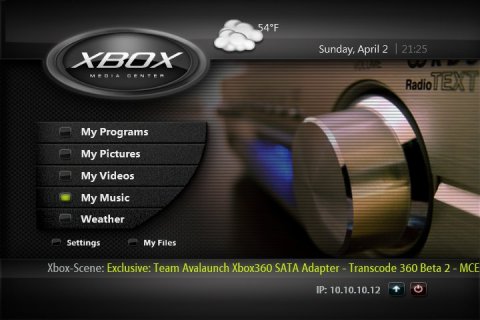
I found this thing called the XBox Media Center and it has made my old XBox the most useful thing I have ever connected to my TV.  I now have a media center.  Since the XBox has an ethernet connection, and the ability to connect to the Internet and other devices in my house, I can access everything from the TV and play it through the surround sound system.

All of my music is MP3′ed on my home server.  Now I can connect to the server via the XBox and play all that music on the good stereo.  I can also capture live television with my streaming server (that was a project from a few years ago) and watch the digitized video through the XBox.

All my pictures are on the home server.  The XBox can do a slide presentation of those right on the TV as well.

It even has an RSS feed that picks up news and the weather… right on the TV.  The picture was captured by pressing the left thumb stick on the XBox controller.  It has a build-in screen capture utility.  The backend permits FTP connection so anything can be retrieved from the XBox.

Posted in edtech | Tagged | Comments Off on XBox – Alive Again

Jogging Distance

This one is for Kara. It’s 650 yards to the creek.
 The Creek

Click the picture for the large version of the graphic. Note the scale and the red line corresponding to 100 yards.  It takes six and a half of these lines to make it to the creek.  So a jog to the creek and back would be roughly 3/4 of a mile.

Posted in edtech | Tagged | Comments Off on Jogging Distance

First Sign of Spring

IMG_4053.JPG

The flowers in the front yard are starting to bloom.

Posted in leisure | Tagged , | Comments Off on First Sign of Spring

Picasa 2

I’ve found a way to keep track of all my digital photos. Google purchased a company called Picasa and made the program available for free. You can download a copy at

http://www.picasa.com/

Picasa scans your entire hard drive and creates thumbnails off all the pictures it finds. Each picture is listed using the folder as a category. Within Picasa you can move your pictures to other folders, give each picture a caption, do simple editing (rotate, crop, remove red-eyes).

I have a lot of pictures (thousands), so the scanner took a few hours to create the index. Once I had that, it’s a dream. It not only does Picasa index all your JPG, GIF, TIF and BMP files, it also indexes all your movie clips. Using a scroll bar on the right side of the program, it is simple to browse through hundreds of photos in just a few minutes.

Posted in edtech | Tagged | Comments Off on Picasa 2

SCOCA CON 2005

Here is my presentation from SCOCA CON 2005. If you have any questions about Blogging, please drop me an email.

http://homepages.findlay.edu/trusty/Alvin_Trusty-Blogging_to_Learn-SCOCA_2005.pdf

trusty@findlay.edu

Posted in edtech | Tagged | Comments Off on SCOCA CON 2005