Windows Live Writer

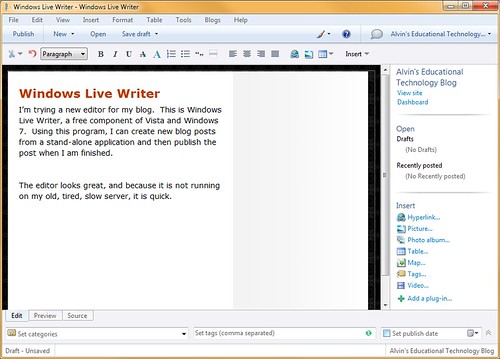
I’m trying a new editor for my blog.  This is Windows Live Writer, a free component of Vista and Windows 7.  Using this program, I can create new blog posts from a stand-alone application and then publish the post when I am finished.
 Windows Live Writer

The editor looks great, and because it is not running on my old, tired, slow server, it is quick. 

This is a full test, with an image and the whole nine yards.  I have had problems with the latest version of the WordPress editor.  When I right-align an image, it goofs everything up.  I have to go into HTML mode and fix that tags so that the image is actually right-aligned.  I’m not going to do that with the above image.  If it looks funny, it’s because this editor couldn’t do any better than the built in one.

This is cool.  I have added the Flickr Image plugin.  So now I can search all of Flickr or just my photos on Flickr and insert images directly into my blog posts.  Maybe there is a WordPress plugin for this?  I will have to look.  SO far, the Writer plugin works great.

— – — – — – — – — – — – — – — – — – — –

Update: The image alignment worked perfectly.  I am also editing my post from Live Writer.  This is cool.

Posted in edtech | 2 Comments

John C Dvorak supports Univ of Findlay

Posted in edtech | Tagged | 1 Comment

Photosketch

PhotoSketch: Internet Image Montage from Tao Chen on Vimeo.

It’s incredible if you can get into the site.

http://cg.cs.tsinghua.edu.cn:8080/cmm/?page_id=155

Posted in edtech | 1 Comment

My Windows 7 party has started

About a month ago I signed up to host a Windows 7 launch party.  Officially, Microsoft will release Windows 7 on Octobery 22.  Those selected to host a party are suppose to have a party within a week after the launch.  My party will be on October 25.

I received a nice box of goodies today from Microsoft including party favors, balloons, napkins, playing card, a jigsaw puzzle and Windows 7 tote bags.  Most importantly the box also included a Signature Edition of Windows 7 Ultimate.  There were actually two DVDs in the box: 32bit and 64bit.

The instructions said to install Windows 7 right away.  The host needs to be well versed in the new operating system features before the party gets here.  I wasted no time in getting started with the installation.  My Dell Studio 17 is less than six months old and runs Windows Vista Home Premium.  I did something I never do… an upgrade (sorry Paul Thurrot).

The Studio 17 is my main laptop.  It is packed with everything: pictures, video, music, software and all my documents.  A pre-installation scan said there were 930,000 files on the hard drive.  I then received a warning that this could take a few hours.  No big deal.  I had other computers to use while the upgrade progressed.

Before I started, I told Mesh to go offline.  Otherwise I left everything running including Symantec Antivirus.  The upgrade took five hours but worked perfectly!  As soon as everything finished, I logged in and Mesh immediately grabbed all the files I had created while the installation progressed.

I have been using the Beta of Windows 7 for many months.  It has worked well even on my oldest computers.  Now that I’m officially using the production version, it looks great.  This is my first blog post from my upgraded computer.  Plan to see many more.

Posted in edtech | Tagged , , , | 3 Comments

Picasa Has Name Tags

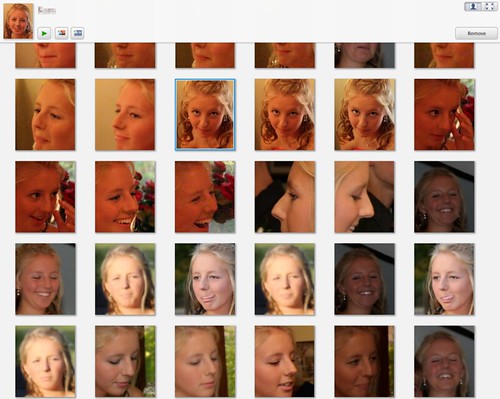
The stand alone Picasa application from Google now recognizes who is in your pictures and groups all the pictures based on this information.  The web version of Picasa has had this feature for at least a year.  I blogged about it last September.

I just installed the update and it’s only about 2% complete with the initial “face” scan.  I have 92,000 pictures, so it will probably take all night to go through them.

As the program identifies new faces, a new icon is added to the “scanned pictures” group.  Type a new name under one of these pictures and Picasa begins to group other pictures of this person under the same name.  If the program is unsure of a picture (some of my kids look like each other) the pictures have a “check” and “X” under them so they can be easily added or removed from a group.  If there is a large number of picture you wish to move to another group, the click-shift-click method will highlight a large number of photos.  A context sensitive right-click offers options on re-assigning the pictures to another group.

I see some useful applications for this already.  I have photos of every freshman who has taken my edtech class for the last four years.  I could build a database of these students and then as other people in the college take photographs, we could sort them by person.  Wouldn’t it be great if every senior could be given a personalized set of photos showing all the major events of a college education?  I think we are getting close.

Posted in edtech | Tagged , | Comments Off on Picasa Has Name Tags