Backyard Guests

A robin has decided to raise a family in one of the trees in our back yard.  The nest is high enough in a pine tree that I can’t see inside it.  I held the camera up in the air and snapped this shot.  If you click the picture, there is a higher resolution version on Flickr.  You can just make out a small beak and two pink behinds (I think).

I tried not to linger as the mother bird was making a lot of noise.  I’ll get some better shots as the chicks get bigger.

Posted in edtech, leisure | Tagged | 1 Comment

Jing

jingscreencast.png

Jing is a free screen capture tool from TechSmith, the makers of Snag and Camtasia.  Jing runs on Windows or OS X and can be linked to your own server or to a free streaming service called ScreenCast.com.

Jing will capture a single screen shot or a movie that includes your audio input.  After starting the program, simply drag to create a box to define the capture area.  If you are using OS X, there is nothing this good that is also free.

There are some limitations on the free version.  It can only capture a five minute movie.  WYDIWYG – What you do is what you get.  There are no tools for editing your movie.  It’s designed for quick and dirty projects.

Limitations aside, this is a great free product.  The resolution of the movies is incredible.  Try watching the above movie in full screen mode.

Posted in edtech | Tagged , , , , | Comments Off on Jing

TrustyETC Googlified

trustyetcgoogled.png

A couple of weeks ago, my mail server started making one of those “it won’t be long now” sort of sounds.  It was the kind of noise you hear an eight year-old computer make just before everything goes dark.

I have toyed with the idea of turning everything over to Google, and this seemed as good a time as any.  I went to Google Apps

http://www.google.com/apps

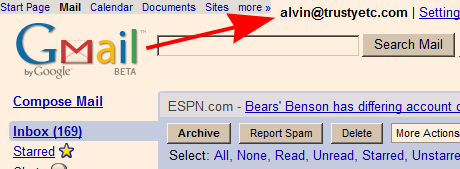
and signed up.  The first thing Google did was send an email to me ensuring I could receive email at TRUSTYETC.COM.  Once I confirmed that email, I moved on to creating an MX record so that all my email would be redirected to GMail instead of the dying machine at my house.  To do this, you will need access to your domain’s DNS settings.  Because I own my own domain, I have this access.

That was all it took.  Just that quickly and easily, Google became the home for all my email.

Google can do this for any organization, no matter the size.  I selected the free, non-educational version of Google Apps.  That permits me to create 100 email accounts each with 6 GB of storage.  That’s right, they give me a total of 600 GB (0.6 TB) of space for free.  Before I shutdown my old server, I exported all the username information.  Google Apps imported those so I had no downtime for any of the email accounts.

Email works just as before with POP, IMAP and the GMail web interface.

Here’s where it gets cool.  Members of my domain (which is mostly family) can now easily share email, calendars and docs using Google’s online tools.  We can also create custom start pages and regular web pages.

http://start.trustyetc.com

is now the start page for my domain.  I can create as many of these as I need, with any domain prefix in the URL.

I have been using this service for a few weeks and I really like it.  The only missing piece is Picasa.  The online picture storage system does not tie into the Google Apps suite yet.  That has to be one of the features on the drawing board.  When Google adds Picasa and some sort of G-Drive, my family will be completely in the cloud.  That will be cool.

Posted in edtech | Tagged , , | 2 Comments

Who Is Important Here?

If you could choose three people as the most prominent people in educational technology, who would you select? This is the question I posed to one of my classes. I gave no ground rules. We have no text book with a chapter that discussions this. It’s wide open.

Pick three and give the reasons for selecting each.

If you think about this question in a different context, it could be easy to answer. Name the three most important people in the history of American government. In technology, it would be easier to list the three most important people in the world of personal computers or in the development of the Internet.

Educational technology is more obscure. The entry in Wikipedia wasn’t created until 2005, four years after most topics were entered. There is no standard introductory text that is used in edtech. In fact, most of the people I know in this field are self-taught.

It will be interesting to see the names that make the list.

Posted in edtech | Tagged | 2 Comments

AndreaMosaic

John mentioned this mosaic program during EdTechWeekly last night.  AndreaMosaic is free.  You provide the program a directory of your pictures and one target image.  Above is something I created today.  I pointed AM to the folder with our pictures from Disney’s Magic Kingdom.  As the target, I found a GIF of Mickey Mouse.  The program went to work and in a few minutes created a collage (click picture for higher resolution) of our Disney pictures in the shape of that famous mouse.

The big question is whether or not my image is a violation of copyright law.  I know the image of Mickey Mouse is protected by the Sonny Bono Copyright Term Extension Act.  But what about my pictures arranged in the shape of Mickey?

Posted in edtech | Tagged , , , , | Comments Off on AndreaMosaic