Google Earth in a browser

googleearthbrowser.png

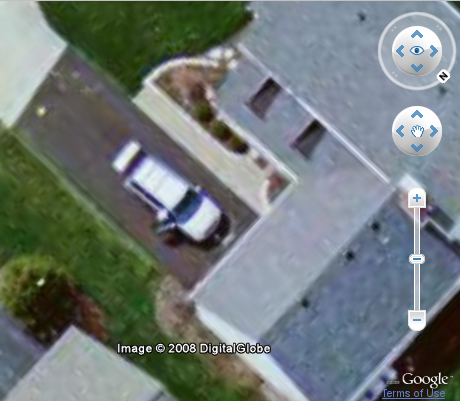
Today Google announced that the ever popular Google Earth program can now be incorporated into a browser.  You will need a plugin, but you will not have to install the heavy application.

I captured the inserted picture from my browser.  I think that’s one of my college buddies getting out of his car.  Either that, or someone is stealing the stereo.

Google has developed an API (complete with sample code) so that developers can use Google Earth in web projects.  All I need to do is find that map key from a couple of years ago.  I know I got one.

— – — – — – — – — – — – — – — – — – — – 

Update: Found the key.  Got it to work.

http://www.trustyetc.com/map/

— – — – — – — – — – — – — – — – — – — –

Posted in edtech | Tagged , , , , , | Comments Off on Google Earth in a browser

Sync’ing

I asked my students how they move files from home to school.  I expected the most common method to be a USB drive, but I was surprised to hear that most still email files.

I consider email as a last resort when it comes to file management.  It’s inefficient because of the background processes involved.  There are also file size limitations.  UF gives every user 100 MB of email space.  It doesn’t take much to fill 100 MB.

I am waiting for an account on Microsoft’s new Live Mesh.  Once I have an account there, I will be able to synchronize files across multiple computers in multiple locations.  That will be ideal.  I can create a PowerPoint file at home and it will automatically be copied to my laptop, tablet and office desktop.  Likewise, I can update the PowerPoint on my office desktop and the new version will be copied back to my machines at home.

For local file synchronization, I have been using Microsoft’s SyncToy 2.0 beta.  By hand-configuring the Windows Scheduler, I can automatically sync my files every night.

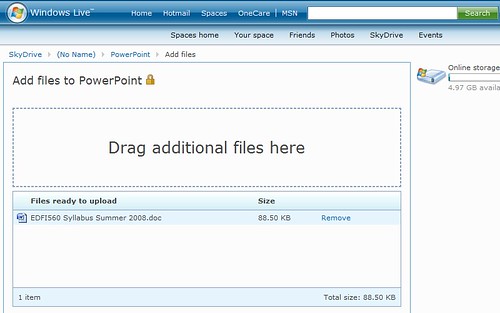
I have a few files that I use over and over.  Using Microsoft’s SkyDrive, I have placed those into a more permanent online storage area that is accessible from anywhere.  With the drag-and-drop control in IE, SkyDrive is about as easy to use as a local file manager.

Drag

Drop

The files here are not automatically synchronized, but manage them much more easily than with email attachments.  Plus, Microsoft gives everyone 5 GB for free.

Posted in edtech, efficiency | Tagged , , , , | 2 Comments

Copyright at the Art Museum

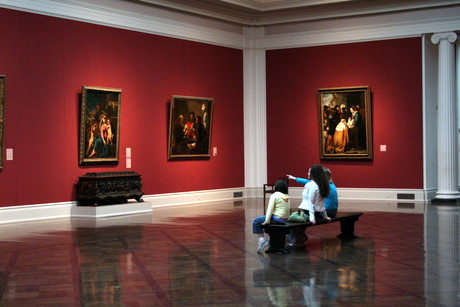
Over the weekend we visited the Toledo Museum of Art.  It’s an impressive facility with pieces from many famous artists.  The spaces available in the galleries offer exceptional viewing environments.

As with many museums, most of the art can be photographed as long as no flash is used.  Modern art is normally off limits because the copyright has not expired.  The cutoff for copyright protection is 1923.  Anything before that time is now in the public domain.

We like paintings from the impressionist era (late 1800’s).  TMA has a wonderful collection with pieces by Monet, Renoir, Degas, Cezanne and Pissarro.  Moving through the exhibit toward 1900, we ran across a Van Gogh and other post-impressionist paintings.  We were told not to photograph the last painting before the door. 

Why?

It’s still under copyright.

I looked at the description next to the painting.  The picture was painted in 1919.  I asked the docent if there was something special about this particular painting as everything else created in 1919 is now in the public domain.

Apparently this caused a bit of confusion.  The docent explained that everything less than one hundred years old was still protected by copyright.  This picture still had a few years left.

Fortunately I happen to have all human knowledge available to me on my iPod.  I showed (the growing crowd of docents) that 1923 was the magic year.  Anything created before that year is now unconditionally in the public domain.

They still wouldn’t let me take a picture.  The director was not there and he would have to change the policy.  Oh well, at least a few more people know about copyright and the public domain.

Posted in copyright | Tagged , | 1 Comment

Canon HG10

I have moved into high definition video recording.  Through a mini-grant I have received a Canon HG10 hard drive based video camera.

I can record about five hours of 1920 x 1080 video on the 40 GB hard drive.  Putting that video online is going to be a bit of a trick right now.  At more than 100 MB per minute, I won’t be streaming HD for a while.

While I wait for a free HD streaming site, I can upload the huge pictures snapped with the camcorder.  Normally pictures from movie cameras are awful.  The resolution is typically 320 x 240, or if you’re lucky they are pixel-doubled to 640 x 480.  The HG10 can snap pictures at full HD resolution.  Click the picture insert to see the higher resolution version on Flickr.

Posted in edtech | Tagged , , , , | 5 Comments

EveryZing

everyzing.PNG

Here is a handy tool for anyone interested in finding a podcast about a specific topic.  Everyzing is a service that scans through an assortment of podcasts and converts all that speech into text that is searchable.  You can search for generic topics like “educational technology” or broad topics like “politics.”   Search results can be sorted by date or relevance.  By clicking on a hit, you can listen to the audio in the built-in player.

A link to your specific search term is also available so you can jump right to the part of the podcast talking about your topic.  In this way, you can quickly hear a phrase in the context it was recorded.

The site also searches online video clips and other multimedia.  The goal is to make all digital content searchable.  Imagine being able to find a video clip of someone giving a speech by searching for a few key terms from the speech.  You wouldn’t even have to know the speaker’s name.

EveryZing also sells a product that will convert multimedia content to printed pages.  This has potential for hearing impaired students.

I can even find someone I know in a podcast.  Here’s John… fifty times.

Posted in edtech | Tagged , , , , , , , | Comments Off on EveryZing