What’s wrong with this picture

Here is something most teenagers don’t know.  Stealing a CD from Wal-Mart isn’t nearly as bad (based on the magnitude of the fine) as downloading the same CD using an illegal P2P networking.  See chart below.

stealvsp2p.gif

If the height of the “steal” bar is twelve inches, the “download” bar is as tall as the Empire State building.  The exact difference will depend on where you live.  The “steal” bar could be 1/4 as tall (three inches) in your state.

Posted in copyright | Tagged | 1 Comment

SP1 Fixed My Vista Problem

I have discussed the one major problem that I have had with Microsoft Vista.  For no apparent reason, my ability to right-click randomly stops working.  The problem continues until I close Internet Explorer.  Often closing it doesn’t work and I have to end the IE process from the Task Manager.

In the last week this problem has seemed to happen more each day.  On Monday I had to kill IE more than ten times.  I can live with once or twice a day, but not multiple times each hour.

I was anxious to download SP1 when it became available yesterday.  It took an hour to install, but I think it fixed my right-click problem.  So far (knock on wood) I haven’t had to restart IE one time.

I don’t know if IE was actually upgraded as part of the service pack.  I didn’t look before the upgrade, but now I have version 7.0.6001.1888CO.  I will check my other machine running Vista sans-SP1 to see if the version is different.

Suddenly I don’t like XP as much.

Tagged | 3 Comments

BYO Search Engine with Google

If your web site uses a content management system, you probably have a built-in search tool that can find anything on your site. If you created your site using straight HTML, making the sight searchable isn’t as easy.  Now you can create your own site search engine using the power of Google.

http://www.google.com/coop/cse/

Search using the box above and you will see only links from my blog. Now use the search engine below. It will give search results from (all HTML) site on the UF server.

This could be a useful tool for teachers. A custom search can be created that searches an assortment of pre-approved sites. If you would like your students to find information about a curricular topic, a custom search can be created that is strictly limited to the sites that you have specified in your custom Google search.

Posted in edtech | Tagged , , | 1 Comment

TinyURL

I don’t know why I haven’t used this free resource before.  Today I was helping my wife with a presentation she is giving to a group of high school students that are thinking of becoming teachers.  She showed me the URL for ODE’s teacher licensure information.

http://www.ode.state.oh.us/GD/Templates/Pages/ODE/ODEPrimary.aspx?Page=2&TopicID=1222&TopicRelationID=1283

Can you believe that?  ODE re-did their web site last year and now most of their URLs are more than 80 characters.  For comparison, look at these nice short licensure URLs:

Arizona – http://www.ade.state.az.us/certification
Florida – http://www.fldoe.org/edcert
Indiana – http://www.doe.state.in.us/dps

Unfortunately we are stuck with that huge ODE link here in Ohio.

What if I could shorten it to

http://tinyurl.com/2ayfzy

That’s what TinyURL does.  Best of all, it is absolutely free.  You don’t even have to give them your email address.  You can go there right now with your super long URL.  Paste that URL into the box.  Your new 18 character URL will be generated.  That URL will never expire.  You can distribute it to as many people as you like and it works forever.  If you ever forget that URL, create a new one.  It takes five seconds.

BTW – Once you put a long URL into TinyURL, it will remember the associated short URL.  If you take ODE’s ridiculously long URL and put it in right now, it will give you the same short URL I provided above.

Tagged , | 3 Comments

How did I do that?

 howdididothat.png

If you watched the video I posted yesterday, you may have asked yourself how the movie was created.  Let me explain a couple of things.

1 – I recorded my voice during the eTech Ohio 2008 conference using a digital voice recorder (Panasonic RR-US395).  When I got home, I dumped the recording to a WAVE file using the Panasonic software.

2 – I recorded a “screen cast” of my presentation at home using Windows Media Encoder and saved that as a movie file with no sound.

3 – I used MovieMaker to combine the WAVE file with the screen captured video of my PowerPoint.  The final movie was exported as a WMV and uploaded to TeacherTube.

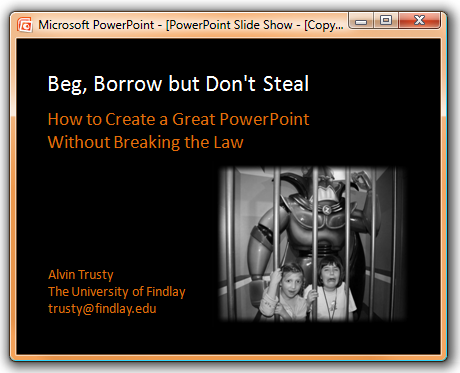
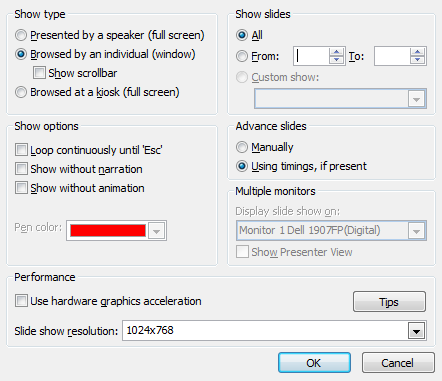
To keep the file size to a minimum and reduce the effect of compression anomalies, I did the screen capture in PowerPoint at the approximate resolution of a TeachTube video (320 x 240).  The graphic at the top of this post is a screen shot of the presentation (close to actual size).  I used Windows Media Encoder to create a movie of that small window instead of the normal full screen PowerPoint.  You can adjust PowerPoint to play in a small window in the Show Setup (screen below).
powerpointshowsetup.png

I selected the “Browsed by an individual” for the Show Type.

To create the movie, I had to listen to my recorded audio and advance the slides in the PowerPoint so my recorded voice matched the screen captured movie.  There were a lot of ways that I could have done this, but a real-time replay was the easiest and probably quickest.

Once I had the movie, I dropped it into MovieMaker and dragged the WAVE audio file in as the audio track.  I had to slide the audio back and forth a little to get it synchronized perfectly with the video.  That was it.

I could have placed my slides into a service like SlideShare.  I know they support audio now, but I’m not sure I could have used my recorded audio.  I would have lost all the transitions if I had used a service like SlideShare.  That alone was enough to deter me from that particular service.

I had a hard time getting to TeacherTube several times today.  I’m sure it was a bandwidth issue.  They definitely do not have the bandwidth of major non-educational streaming sites (YouTube, MetaCafe, Blip.tv), but TeacherTube is one of the few streaming sites that is not blocked by most K-12 school districts.


Posted in edtech | Tagged , , , | 4 Comments