Before I started class today, this article popped up in my aggregator. Ironically, we had just finished an assignment that was closely related.
Martha Groom presented “Using Wikipedia to Reenvision the Term Paper” at Educause last week (link includes her PowerPoint slides). Professor Groom assigned her students a term paper, but instead of printing the paper and turning it in to her, it had to be posted on Wikipedia.
Overall, her students really liked this approach. All but one student had a very positive experience. The main problem was with the Wikipedia community. They deleted one article because it was not relevant enough to warrant an entry and they moved the contents of four other articles into existing articles. Some of the comments by the Wikipedians weren’t so friendly. I think Groom used the term “rude” in her description.
Just last week I had worked with one of my classes on a wiki project. When I originally added this activity to this course a couple of semesters ago, I thought about having the students post directly to Wikipedia. After about two minutes of hard thought, I decided it would be better if we did not mess up Wikipedia during our “learning experience”. Instead, I setup a blank copy of Mediawiki (the program used by Wikipedia) and we created our own wiki dealing with the topic of copyright.
I created fifteen blank articles and assigned four students to each one. The topics were fair use, DMCA, plagiarism and other things related to copyright law. Each group was to use the discussion portion of the wiki as a planning area and together determine the contents of the article.
Groom’s work aside, here is why a wiki is a great tool for group work. Any time multiple students submit one paper it can be difficult to determine how much each student contributed. Mediawiki archives all these details. Below is a snippet of the history of the Wikipedia entry for Copyright.
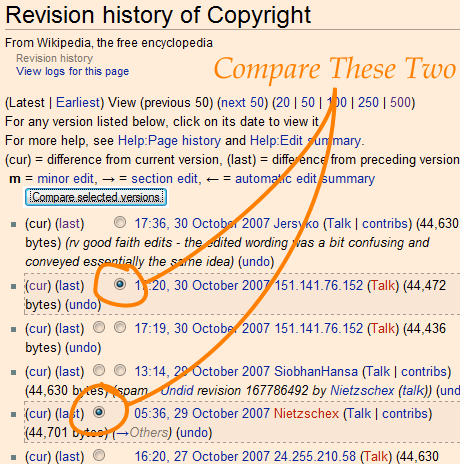
At any time a comparison of two versions of the article or discussion can be executed. By selecting two different versions and clicking the “compare selected versions” button, a side-by-site version (pictured below) is shown.
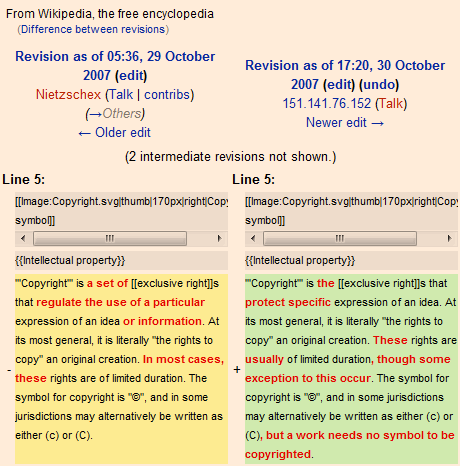
This comparison shows exactly what was modified by the second editor. Going through the history of each assigned article, I was able to determine which students initiated the original version of the article, which students added relevant content, which students spruced up the wording and layout of the text and which students did nothing at all.
The history file is listed chronologically reversed (last modification is first on the list). I could see how the article took shape over a one-week period. I could also see which students didn’t login until after midnight on the day the article was due.
For group work, I have not used a better tool than Mediawiki. It is simple for the students to use and loaded with features that make assessment easy.