
Kinetic Typography

Here’s a product of research in “motion of text” and how that motion can add an emotional element to the text even when no sound is present. I spend a lot of time talking with my students talking about motion mainly in PowerPoint. If the default actions in PowerPoint are used, the result is usually distracting. If some of these kinetic effects can be added to a PowerPoint presentation, the end result could increase the audience’s emotional response making the event more memorable.

The author of the movie has a free program that can be used to create presentations. You can find it on the Carnegie Mellon website.
Posted in edtech | Tagged | Comments Off on Kinetic Typography

Efficiency Tip #31 – Details View

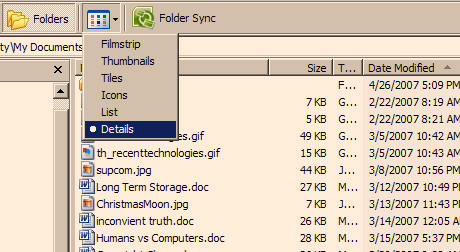
Back in Tip #3 I talked about using Windows Explorer.  Here is an extra tip that will help you locate what you are looking for even quicker.

listdetails.png

In addition to using the Folder button, also select the Detail view.  This will list all the critical properties of your files: name, size, type and date modified.

By clicking the column heading (Name – Size – Type – Date Modified), all files will be sorted by the selected column.  A second click will reverse the order first/last or last/first of the column.

Using the Details view can help you quickly find the newest file (sort by date) or the biggest file (sort by size).  You can even make sense of the files on your Desktop with this view using Windows Explorer.

TSPY=2.39

Posted in edtech, efficiency | Tagged , | Comments Off on Efficiency Tip #31 – Details View

Efficiency Tip #30 – Pay at the Pump

Pay At PumpIt takes approximately three minutes to go into a gas station and pay for gas.  The same transaction at the pump takes only ten seconds.  If you fill the tank just once a week, paying at the pump will save you almost two and a half hours of time each year.  More importantly, it will save you time standing in a gas station (not the best place to pass your time away).

With the price of gas going through the roof, you may need the extra time working a second job.

TSPY=2.45

Posted in edtech, efficiency | Tagged , | 3 Comments

One-to-one Lashback

Alan November has a good post on one-to-one laptop program lashback.  Here is a quote:

First of all we should never call any program a “Laptop Program”. We certainly do not have pencil and paper programs. As soon as a school or district places the focus on the technology I believe it is doomed to fail.

The research is all over the place on this topic.  Most say there is no difference in student learning with laptops or without laptops.  The larger problem is number of variables in the equation.  Giving each student a laptop will not make a difference if the teacher uses the same instructional techniques as in a laptop-less class.  The assignments must be different.   Students must be involved in determining how the learning process materializes.  The role of the teacher is dramatically different.  November defines the teacher as someone who builds learning communities.

The article gives a list of institutional changes that should take place before a laptop program is initiated. Training teachers to use technology is one small step toward revamping the educational processes involved when instituting a project as complex as a laptop program. In fact, the technical training is probably the easiest step to complete.

Posted in edtech | Tagged | Comments Off on One-to-one Lashback

Scholar by Blackboard

Scholar BetaIf you are a Blackboard user, here is a del.icio.us/Scuttle social bookmarking service that plugs right into the learning management system.  It’s called Scholar.  You must have Blackboard to add bookmarks to the system.  Without a Blackboard server you can search through the links made public by Blackboard users.  Browsing isn’t too bad because all the links are connected to courses with academic content.  There aren’t as many links in the database, but a search will have a higher probability of a valuable hit.

Having social bookmarking built into the LMS solves a lot of the problems inherent in larger sites like del.icio.us.  All the bookmarks in Scholar can be grouped by course.  A student or an instructor can have generic bookmarks or bookmarks associated with specific courses.

Now we need someone to integrate Scuttle into Moodle.

Posted in edtech | Tagged | Comments Off on Scholar by Blackboard