Efficiency Tip #35 – Roboform

RoboformIf you find yourself repeatedly entering the same information into web forms, Roboform can save you some serious time.  You tell Roboform your personal information: name, address, phone, fax, email, instant message ID.  When you want to fill out a form on the web, Roboform does the typing.  It will even remember your passwords if you so desire.

There is a USB version that you can take with you when you move from computer to computer.

TSPY=2.65

Posted in edtech, efficiency | Tagged , | 1 Comment

Efficiency Tip #34 – Start Page

Depending on where you bought your computer, it probably came with a browser that starts at a corporate web site – Dell – Apple – Gateway.  The first thing you probably do when you get to this page is go somewhere else.

startpage.pngChange your start page to something more useful.  For many years I used a custom page that I created.  A late version of it can be found here.  This page has every “normal” thing I do listed with a link.  I can check my web mail, login to Blackboard, view the news and go to my favorite pages.  There is even a Google search at the top.  Ten years ago, my start page used Alta Vista as the search engine.  Times change.

Now I use Protopage as my start page.  Protopage overcomes the main problem I had with my original start page – ease of change.  My old page required me to edit the HTML of the page.  That almost always involved FTP’ing the file as well.  It was difficult enough that I didn’t add temporary links like I do now.  Just today I added three links to my Protopage.  I put them in the “test” window.  This is where potentially useful things go until I can decide if I really will use them often.  If I use the link enough, I will keep it.  Otherwise, I will remove it. 

TSPY=4.00

Posted in edtech, efficiency | Tagged , | 1 Comment

Why Wikipedia is Better for Education

Over dinner we were talking about a paper one of the kid’s is writing.  The topic is genetic engineering and the ethical issues involved if parents are able to pre-determine attributes of children. At some point I brought up Wikipedia. My daughter says (quoting a teacher from school) that it is unreliable as a resource.

The Whole Internet Truth

I had to agree. For some topics, the most recent article may be unreliable, but unlike an encyclopedia, Wikipedia lets you see every argument from every side of the story up until the current article. The history feature of Wikipedia lets you see the article as it is written today, and how it was written yesterday and even last year. There may hundreds of modifications to an article.

We looked up “genetic engineering” in Wikipedia. There have been more than 2000 edits to the article since 2001. Every one of those edits is available for review.  In addition there is a discussion attached to the article.  Here the editors talk about the edits, why parts have been modified and what changes could be made in the future.  Sometimes a real debate between experts is right there in the discussion.  This insight benefits the educational process.

It is the process of determining what is correct that is most important to the educational process.  Anyone can look something up using an encyclopedia. Today’s student should be able look at a plethora of information and determine what is correct. Wikipedia provides the opportunity for this kind of learning.

Posted in edtech | Tagged | Comments Off on Why Wikipedia is Better for Education

Efficiency Tip #33 – Autorun

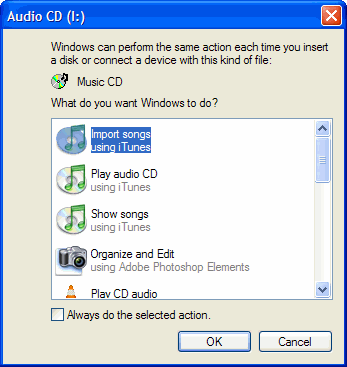
Computers are not good at predicting your intentions.  Any time you insert a CD, DVD or USB drive, the operating system looks at the content on the media and gives a “best guess” as to what you want to do.  Then a window pops up listing of things you probably don’t want to do. 

autoplaymenu.gif

I would say my computer selects what I want about one time out of a thousand.  The computer takes my valuable time to give me a list of things I don’t want to do.  If the computer were not trying to calculate my every move, I could be doing what I want to do.

This is why I turn Autorun OFF.  Here is a Microsoft link that tells you how to do this.

http://support.microsoft.com/KB/126025

Personally, I use TweakUI to turn off the Autorun “feature” of Windows.

TSPY=3.98

Posted in edtech, efficiency | Tagged , | 1 Comment

Efficiency Tip #32 – Copy/Move

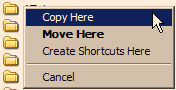
Right Click DragWhen you drag a file from one folder to another, what happens?  Does the file get moved?  Does a copy of the file get placed in the new location?  The computer will automatically decide for you if you do the standard drag and drop.

There are two basic rules the computer will follow.  If the initial and final locations of the file are on the same drive, the file is moved.  If the initial and final locations of the file are on different drives, the file is copied.  As long as you can remember those two rules and you never need to move a file to a different drive or copy a file from one folder to another folder on the same drive… you will be ok.

Have you already forgotten the two rules?

Here is a way to always get what you want without remembering any rules.  Instead of a normal drag, use the right mouse button.  When you right-click and drag, Windows will present you with a drop-down menu that lets you select Move, Copy or Create Shortcut.  The default operation will be in bold, but you can select anything from the list.

Here’s an extra tip that will help you control the NTFS permissions on your files.  When you move a file, the permissions go with the file.  When you copy a file, the file’s permissions are changed to those of the destination folder.  That’s something you will have to remember because there is no right-click menu to help you out.

TSPY=1.01

Posted in edtech, efficiency | Tagged , | Comments Off on Efficiency Tip #32 – Copy/Move