PowerPoint or No PowerPoint

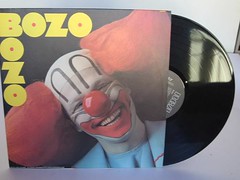
BozoYou may have seen this post in Slashdot a couple of days ago. It points to an article talking about the research of Australian educator, John Sweller. Sweller developed the “cognitive load theory” which explains how our brains handle new information. He says our working memory can only hold two or three tasks at a time. These tasks are only retained a few seconds. Without rehearsal anything new is gone in about 20 seconds.

Key points about Cognitive Load Theory:

  • Working memory is only limited when you’re learning new information. Once information is in long-term memory, it can be brought back to working memory in very large amounts.
  • In a classroom situation, only limited material is going to be retained, unless notes are taken or handed out.
  • Power-point presentations can backfire if the information on the screen is the same as that which is verbalized, because the audience’s attention will be split between the two.
    PowerPoint should be reserved for diagrams, pictures and graphics that are not easily explained with dialog.

Professor Sweller states that the worst PowerPoint presentation is one that is read to students. According to his research, our brains can’t handle reading while listening to someone else read the same material. I won’t be telling this to my pastor who asks everyone to bring a Bible each Sunday for the sole purpose of reading along with him.

I must admit that a presentation where a PowerPoint is read word-for-word is terrible. Guy Kawasaki said it best…

…as soon as the audience figures out that you’re reading the text, it reads ahead of you because it can read faster than you can speak. The result is that you and the audience are out of synch.

Don’t be a Bozo. If you are going to read your PowerPoint, give everyone a handout and send them home. Your audience will be better served.

My earliest recollection of reading in class was in first grade. We all had the same book. We all read the same words aloud together. I remember doing this in every grade through high school. As freshmen I know we read one of Shakespeare’s plays during class. I think it was MacBeth. We did the same with Romeo and Juliet in tenth grade. Shakespearian English was certainly something new for my brain in high school. No wonder I didn’t understand it.

Sweller adds another thing in the article. He says we should not present students with new problems to be solved. We should instead show already-solved problems to them when introducing new information.

The only option we have is to pile on the homework and have the students come to class with much of the material already in long term memory. I’m not sure how that fits with the ban on homework.

I remember freshman chemistry with Dr. Haight. This was long before anyone had ever heard of PowerPoint. Dr. Haight read his notes to us while he wrote them on the board. The man was a speed writer. It was all we could do to keep up with his writing. There certainly wasn’t time to think about what we were writing. For the second semester of freshman chemistry I had Dr. Sadurski. His approach was completely different. His notes were neatly printed using color coordinated markers on overhead transparencies. He would drop a sheet on the overhead and talk about it. We would write as fast as we did the first term, trying to finish before he flipped to the next slide.

I learned chemistry from both of these instructors. The information I was given in class was complete enough that I could go over the notes and do the homework and prepare for the exams. If one of them had used PowerPoint, I think I would have still learned the same amount of chemistry. Most of what I learned as an undergraduate was learned outside of class using materials I acquired during class. I heard it. I saw it. I wrote it down. All those things helped me understand it.

Posted in edtech | Tagged | 1 Comment

Scratch

scratch.pngIf you are looking for a way to introduce programming to an elementary class, take a look at Scratch from MIT.

Scratch reminds me of Squeak, but with a Lego-like feel. You use pre-made building blocks to create programs. Your finished project can be uploaded to the Scratch site using a YouTube-like utility. There it is made available for anyone on the web. You don’t need anything special to try out the student projects. Take a look at the gallery.

Posted in edtech | Tagged | 1 Comment

Learn Out Loud

Learn Out 
LoudLearnoutloud.com is a nice source for audio and video with many topics that deal with education. There is a mix of free and pay resources. Most are professionally produced. I did a search for “Lessig” and found 125 links to my favorite open-source-copyright lawyer.

The only problem I have with the site is that it favors Real Audio. I would not install that player on my machine for anything. Fortunately there are plenty of plugins that enable you to play RAM files in most of the popular players.

Posted in edtech | Tagged , | 2 Comments

Start Page

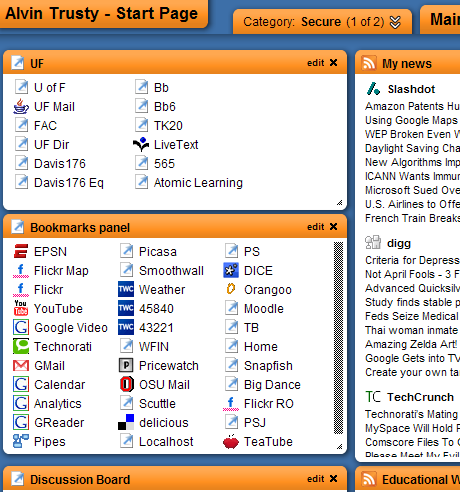
protopage.png

Where does your browser start? Currently mine goes to Protopage. A lot has changed with this free service since I blogged about it almost a year ago. The main thing that I now notice every time I open my browser is the sluggishness of the site. Sometimes my browser will take fifteen to twenty seconds to load my page. I don’t know if Protopage is bogged down or if I have too many items on my start page. It’s probably a little of both. I am very demanding of my start page. I have a dozen RSS feeds bringing all the news I want to one page. Three different sets of links get me to UF, Popular and Course related pages. Of course I have the local weather and quick notes to myself (the killer app of the Web 2.0 start page). I have five different computers pointed to my start page. From any of those computers I can make a change and it is instantly available to all the machines. On top of that, it is password protected so I am the only one that can get to it.

Over the Easter break I plan to look at some different start pages and decide if I want to make the jump to something new. It won’t be the first time that I have changed. Ten years ago, my start page was always my server at my office. You can find it on the WayBackMachine. If you want to see something really funny, check out the link to “searchs“. Alta Vista was the top search engine of the time and Google wasn’t even on the list.

At some point I realized that my “favorites” (bookmarks) were being saved on my computer as an HTML file. I found that file and made it my start page. I made a copy of my bookmarks page and loaded the HTML on my laptop, my office desktop and my home computer. The only problem with this was changing it. Every time I added a link, I had three places that needed the update.

By the time 2000 hit, I was connected enough of the time that I went back to a web server based starting page. My own server had a page I called the Intranet.

I switched to the UF server in 2002 – http://homepages.findlay.edu/trusty

I used the UF page until early 2006 when I switched to Protopage. Before starting with Protopage, I looked at several similar services.

http://www.netvibes.com
http://www.pageflakes.com
http://www.goowy.com

All the biggies have their own start pages tied to your personal account.

http://www.google.com
http://www.live.com (Microsoft)
http://my.yahoo.com

I even thought about making del.icio.us my start page since most of the resources on my start page have always been links. Google’s browser sync is similar. Ten years ago either would have worked great. Now I have notes, lists and dynamic content. A list of links isn’t enough.

I have start pages on all the popular sites and I plan to explore how each one can make my browsing more productive… and fun. I’ll check back in when I’m finished.

Posted in edtech | Tagged | 4 Comments

Yahoo Pipes

Over the weekend I was looking for a blog with a post that was tagged “edtech” but had “video” in the description. Technorati has an advanced search feature that permits searching either the description or the tags. You cannot do both at the same time.

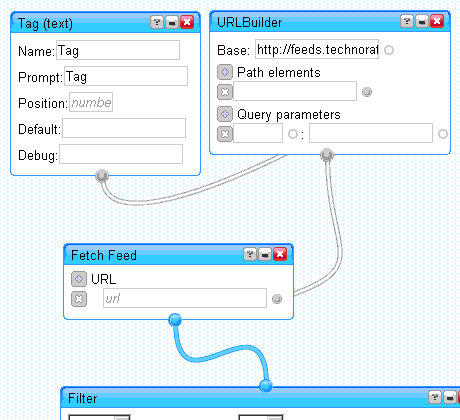
yahoopipes.gif

I remembered hearing about Yahoo Pipes in a podcast. This web-based drag-and-drop “programming” environment will let you create your own mashup of sites that use RSS. All you need is a free Yahoo account.

If you are the type of person that learns by “seeing” what other people have done, start with someone else’s pipe. All the pipes that are published are available to edit. If you see something that someone else has done that is similar to what you need, make a copy of it and modify it to fit your needs.

Here is what I came up with.

http://pipes.yahoo.com/pipes/pipe.info?_id=iDswoM3e2xGqPvxGlfXiAA

As of right now, there are three hits on my search. It would have taken a long time to manually sift through the more than 3000 blogs with posts tagged as “edtech”. Less than 0.1% of them had the keyword I was looking for. My mashup lets me easily find a needle in a haystack.

Posted in edtech | Tagged | Comments Off on Yahoo Pipes