

Garr Reynolds has a nice followup to the debate on PowerPoint, complete with slides. If you use PowerPoint/Keynote and are not a reader of the Presentation Zen blog, you should check it out.
Garr Reynolds has a nice followup to the debate on PowerPoint, complete with slides. If you use PowerPoint/Keynote and are not a reader of the Presentation Zen blog, you should check it out.
 T.H.E. Journal has an article discussing the legal issues involved in using biometrics in a public school. If you aren’t familiar with these devices, they are used to authenticate a person using a personal attribute that cannot be stolen or duplicated. Typical methods involve finger prints, retinal scans or facial recognition. The idea is that your fingerprint is always with you (for your use) and someone else cannot easily steal it (for his use).
If you have tried to get kindergarten students to remember a password, you probably already know how biometric authentication can benefit young children. Try giving a password to a first grader and telling her not to tell anyone the “secret” word. Most first graders can keep a secret for about two minutes.
The article brings up privacy issues that may halt the use of biometrics in schools. Some states have already passed legislation that restricts biometric use. They require the school to jump through technical “hoops” if a biometric is used to collect personal information from a student.
The article suggests that fingerprints could be used to disclose health information of an individual. This sounds a little too much like Gattaca to me.
I’m scratching my head. The first question I have is “what good is a database of identification markers?” If you look at the data stored by a fingerprint biometric device, the whole fingerprint isn’t there. Only enough points to uniquely identify that user are saved. From that data, someone cannot recreate the original fingerprint.
If I have a database of all fingerprints I could do like Tom Cruise in one of the Mission Impossible movies and make a glove with someone else’s fingerprints. I suppose that could be worth something someday. Today it could log me into a first grader’s session of Reader Rabbit.
 John has a post about grammar and spelling that hits home. I have never been a great speller. Technologies like Word’s auto-correction feature and ieSpell’s web form spell checker have made things much better. I still put in “you” when I should have “your” because I think much quicker than I type and that extra letter never makes it from my brain to my fingers.
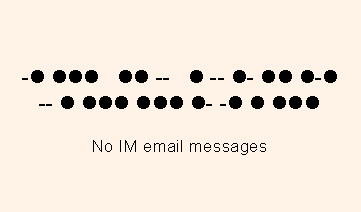
But the technology cannot help those who do not use it. I still get emails, discussion posts and even project papers with not only grammar errors but also spelling errors. I have banned the “IM” email messages. All my syllabi explain that email is to be composed in a professional manner. Some day my students will be teachers and they will send email to parents. Those parents will feel better knowing their children are being educated by teachers using proper grammar and spelling.
One of my own kids has a teacher that is continually sending home “update” sheets with misspelled words. I know this teacher well and am comfortable with every teaching practiced used in the class. I just have a hard time getting past those spelling errors. I could live with some grammar errors. Being in a room where the average age is seven can affect one’s grammar. I am only asking that all the messages sent home to the parents get a second look, followed by F7. That’s a keyboard shortcut in Word everyone should memorize.
I saw this for the first time over the weekend (I don’t watch much TV).
I had two thoughts.
1 – Didn’t Apple start the whole “cancel or allow” thing? OS X has always required major changes in the OS to be accompanied by not only a username, but also a password for an administrative user. Vista only requires the user to click “Allow”.
2 – Weren’t there more security problems with OS X last year than for XP? I watch SecurityFocus and Bugtraq for these things. OS X had more listings than XP in 2006.
At what point does this become false advertising?
After yesterday’s post about PowerPoint, my wife and I have had a lengthy discussion about using PowerPoint in class. She teaches education classes at Ohio State so we are always stealing each other’s material. She is going to use my Google PowerPoint on Monday when she introduces searching to her students.
Here is our debate. I prefer to use as few words as possible on my slides and speak most of the content. It jives with Swellers research, but has one problem. If my PowerPoints are the “notes” that the students have after the presentation, the slides themselves will not be good review documents. I make up for this by recording my voice and syncing it to the slides via TeacherTube.
She gives the PowerPoint to the students as a resource. That’s it. They listen to it in class. They take notes. She places the PPT file into Carmen (their Learning Management System) as a resource. Unless their notes from class are clear, there is a chance some of the material from the presentation will be lost.
There are two possible solutions (not counting the TeacherTube approach). The first (and most common methodology I see from my students) is to put all the text into the presentation itself. This creates a PowerPoint with too many words… the type that is typically “read” to the audience. The second (and preferred) method is the put the extra information in the Notes of each slide.
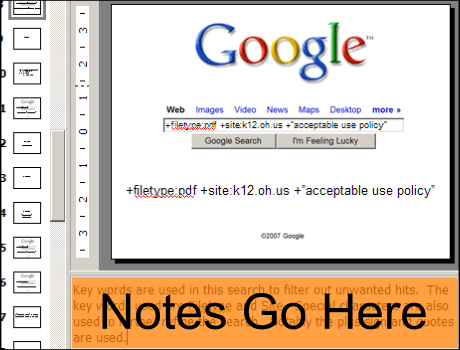
In PowerPoint, each slide has a Notes field. If you don’t see the Notes area under your current slide, click the View menu and select Notes Page. This displays a feature where as many notes as are needed to explain the slide can be typed. These notes will not show up on the slide when the presentation is given. Notes are a handy way of making a PowerPoint with diagrams or a nominal amount of text into a more useful study guide.