Get to know your class

On the first day of class I take a picture of every student.  I don’t have a nice plain wall to use as a background.  I pull the projector screen down in the front of the room and have each student stand in front of it.  It works well.

As I take each picture, I have the students write their names on a sheet of paper.  The camera saves the pictures as files with consecutive numbers at the end of the file names.   After class I rename each picture using the student’s name from the gradebook.  I use Irfanview‘s Thumbnail tool to create a contact sheet for each class (insert is pixelated to protect the identities of my students).  I use this to learn the names of the students.

After making the contact sheet, I resize all the pictures to 1024×768 and store them in the document area of Blackboard.  We use the pictures in several assignments during the semester.  We make several PowerPoint presentations using the pictures.  When we format Word documents, I have them place their own picture at the top of the document (makes it easy to know who the paper belongs to) and format text around it.  I use them in another lesson that requires the student to demonstrate knowledge of cropping.  In one assignment I have each student select a graphics program and add text over the picture.

The only thing I do not have them do is place the pictures on a public network, which is why I have pixelated the contact sheet in this post.  That leads to discussions on privacy and copyright.

Posted in edtech | Tagged | 2 Comments

Taking Attendance

Normally it takes me about two minutes to take attendance in class.  I’m trying something different this semester.  Using my point-and-shoot I can snap four pictures covering everyone in class in about ten seconds.

Every day I post these pictures in Blackboard.  If someone misses class, he/she can easily see who was there and pick up the notes.  The pictures I post in Blackboard are full size (8 megapixel).  The resolution is high enough that it is easy to identify everyone.

Posted in edtech | Tagged | 4 Comments

Un-Jailbroken iPod Touch

My wife wanted a small portable computer for Christmas.  She didn’t want something as big as a laptop.  We looked at the netbooks, but none were small enough to fit in her purse.  I thought the iPod Touch would be the perfect gift.

There was only one problem.  My iPod Touch was hacked a year ago.  Since then, the App Store came online and thousands of cool programs are available for everyone without the nerdiness required to jailbreak the device.  After I played around with the new Touch, I decided to reset mine and purchase the $9.95 upgrade to get all the new stuff.  What could I miss from the outdated jailbreak version I was using?

For the most part, it was a great choice.  I have scores of apps that were not available before and I have only downloaded the freebies.  Truth be told, most of the apps I have downloaded are games that I played a couple of times.  There are some nice productivity tools.  I have Evernote so I can type myself a message that updates a document on the web.  I have Facebook, Tritter, Google Apps (read only mode), a Bible with dozens of translations, VNC, wireless network file sharing and more.

I did lose a few things and two of them I really miss.  First and foremost (and almost a deal breaker) is Nemus Sync.  This app sync’ed my Google Calendar with the iPod Calendar.  It is bi-directional and there is nothing (not even a pay app) like it in the Apps Store.  The second app is the full version of Wikipedia.  You can buy a version for $8.00 but some of the reviews say the two gigabyte download doesn’t play well with iTunes or the synchronization process.

I also lost my Apache web server and wireless SSH server.  Those had a certain coolness factor, but were handy at times. I also can’t get into the OS like I could before.  I can’t find a screen capture utility which is why I had to use a picture from Flickr in this post.

Overall I’m glad I have the apps store.  I really miss my Google Calendar sync, but maybe Nemus will add it to the Apps Store.  They have other applications in there.  I would certainly pay a few bucks for it.

Posted in edtech | Tagged | 9 Comments

Ways To Use A Digital Camera

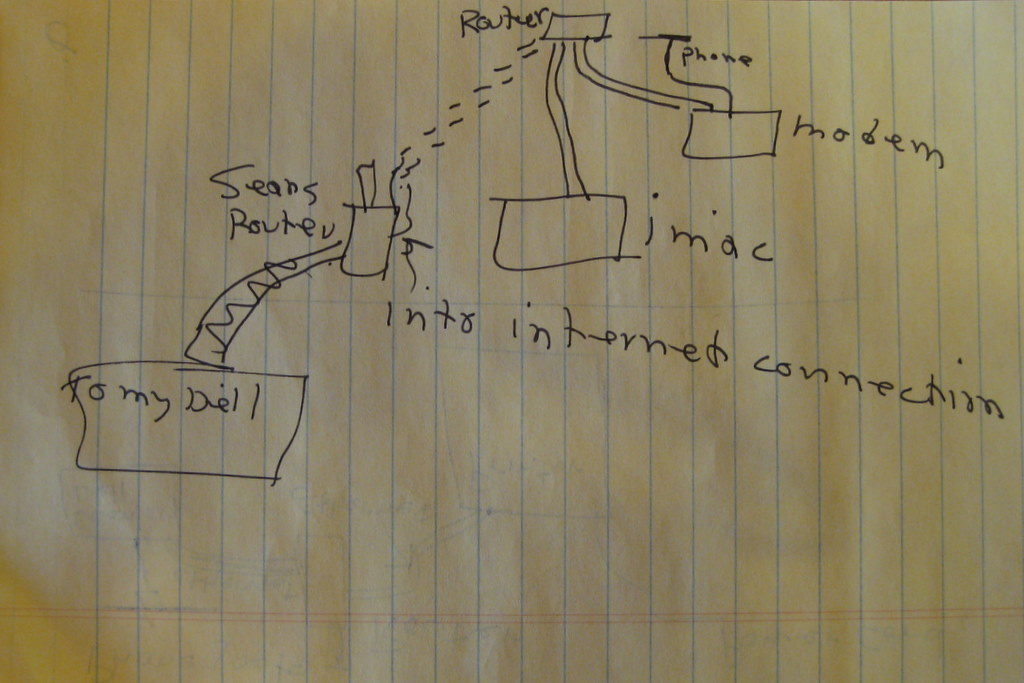
I am not going to call it a “series” yet, but I have the first post.  I have a new point-and-shoot that I plan to have with me all the time.  I was having lunch with Buzz, and he was diagramming some things he was trying to do on his home network.

We were at Panera.  Buzz drew this diagram on the back of a piece of paper he had.  I wanted to take the paper, but he needed it because of the contents on the other side.  Ten seconds later I had a perfect copy in the memory of my camera.  For all intents and purposes, my digital camera is a photo copier.

Digital camera aside, I wanted this picture for a different reason.  Buzz is a retired public school superintendent.  I think he retired ten or fifteen years ago.  If you have a problem reading between those lines, let me make it very simple.  Most of the people his age from his profession don’t know the difference between a patch cord and a patch of strawberries.

But Buzz is different.  He has taken upon himself the pursuit of greater technical understanding.  Take a look at this drawing.  He wants to configure a second access point on his home network.  He already has DSL connected to a router.  The second access point requires an Internet connection for configuration.  He did not want to interrupt his network connectivity to add the second router.  He drew this picture and asked me if everything would work if he set it up this way.

I applaud his effort to stay on top of all things technical!  We need more school administrators willing to learn the basic principals of the technology surrounding them in school.

Posted in edtech | Tagged | 1 Comment

Merry Christmas

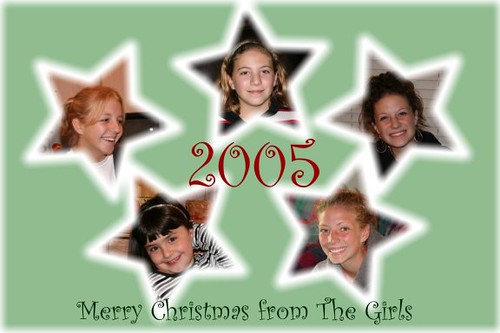
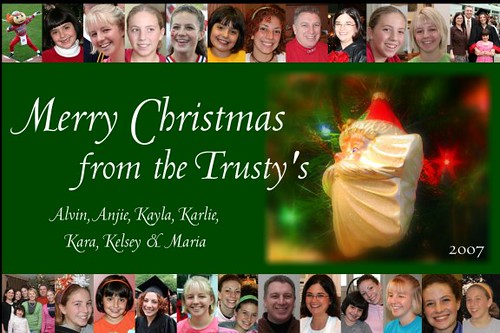
Four years ago we began a Christmas Postcard tradition.  The first one was the result of an after-dinner conversation.  We invested a good five minutes in it, but it still turned out OK.  In 2006 we went all out.  I had the idea of putting the pictures on the tree months before Christmas.  It was a good thing because it seemed like it took months to put the card together.

Last year we streamlined things a bit and went with a simple design which included a picture of our favorite ornament.  And this year is completely minimalist with only three pictures.  We did add the personal touch of signing the card.

Some postcard trivia:

1 – Brutus the Buckeye started appearing on each card in 2006.  Can you find him in the 2008 picture?
2 – Someone in the family has taken each picture except the Brutus on the 2006 card.
3 – Photoshop has never been used to create our postcard.  Instead I use a program called Xara (my favorite graphic editor).  We send a JPEG of the final version to Snapfish for printing.
4 – We all signed the 2008 card using a tablet computer, but Kayla was away at college.  She sent me an Adobe Illustrator file with her signature and I imported it into Xara.
5 – To make our card grammatically correct, we dropped the apostrophe in 2008.  We are plural and not possessive.

Seeing all the cards on one page, we have decided to make the 2009 card red.

Posted in edtech | Tagged | Comments Off on Merry Christmas