
September 2026 S M T W T F S 1 2 3 4 5 6 7 8 9 10 11 12 13 14 15 16 17 18 19 20 21 22 23 24 25 26 27 28 29 30 Archives
-
Recent Posts
On the Internet, nobody knows you’re a dog
It has been a couple of months since Taffy became a part of our family. I created a post when we first got her and included her email address.

She hasn’t used that email yet (she’s still a pup and can barely read). But no one on the Internet seems to have figured that out. So far she has received more than 100 unsolicited email messages (about three a day). Most of the messages are typical spam: pharmaceuticals, money making opportunities, Christmas gift ideas, etc. She even has one from someone offering several million dollars if she can help transfer some money from Africa to the US. I don’t think she is going to be able to help because another message says she is having problems with her bank account.
The old adage still holds true. On the Internet, nobody knows you’re a dog. Especially if you have an email address.
At any rate, Taffy says “Merry Christmas!” to all of you.
Teaching To The “A” Student
Here’s an excellent presentation by Benjamin Zander, conductor of the Boston Philharmonic Orchestra. He demonstrates a lot of excitement which he attributes to attitude. No PowerPoint here. He makes his point with some very simple drawings (more like scribbles) on two sheets of paper.
Take note of how he determines an “A” in his class.
Change.GOV switches to Creative Commons
Maybe the new president will bring some change to our copyright laws. It seems the first step was taken today as CHANGE.GOV’s copyright designation was changed from “all rights reserved” to Creative Commons Attribution license.
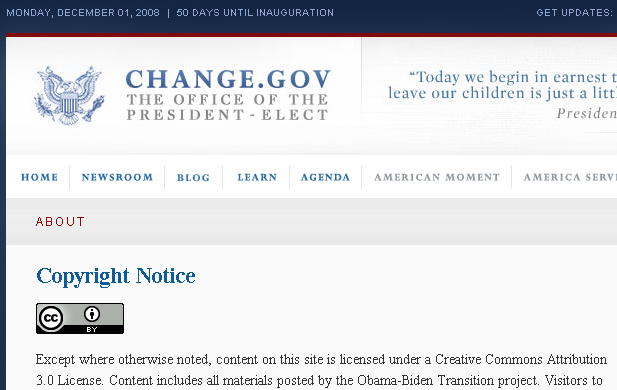
It is a well known fact that Lawence Lessig is a supporter of Obama. Maybe Lessig has some influence on the new President.
Works licensed under Creative Commons are more restricted than works in the public domain. There is some debate as to whether everything on CHANGE.GOV is by definition already in the public domain. By definition, works created by the federal government or agents of the federal government are automatically in the public domain. Obama is not officially the President, but all his content is on a site using a dot GOV domain. I tell my students that dot GOV web sites are federal government projects. That makes them in the public domain.
I still think the Creative Commons designation is OK on the site. There are areas of the site which seek input from the general public. If someone who is not employed by the federal government were to post a significant creative work in a “comment” area, that post would be licensed under the Creative Commons Attribution license.
Our copyright law definitely needs some change. Since 1998, no copyright protected work has gone into the public domain. We have ten more years before the Mickey Mouse Copyright Extension Act expires. Hopefully, CHANGE.GOV will do more than add a Creative Commons logo to the site.
Posted in edtech
4 Comments
All Hard Drives Will Fail
Disk Storage
View SlideShare presentation or Upload your own.
From 2004 to 2008 I was lucky. During that time I didn’t have a single hard drive failure at home. The law of averages caught up with me this past summer. Within a span of thirty days, three of my hard drives, including the hard drives of my two main computers crashed. All the data was gone. Not even SpinRite could bring it back.
Here is the good news. I did not lose anything. All my important data was safe on backup disks. Every night, while I sleep, all my important files (document folders, databases and web site) are archived on external hard drives. I have three different external hard drives, so I always have multiple generations of archived files.
My friends haven’t been so lucky. In the last month three different people have given me computers with dead hard drives. The hard drives have pictures, personal communications, financial information and other files the owner must have back. None of the files have been backed up anywhere.
Take a look at the last slide of the embedded PowerPoint. It shows that 4.7 gigabytes of data can be saved to one twenty-five cent recordable DVD. Almost every computer made today has a DVD burner. Using a burner and a quarter-dollar blank DVD, most of your files could be saved. In fact, if you buy a 50 pack of DVDs, you could backup all your files once a week for a year for a total cost of $12.50.
There are many ways to backup your files. The simplest way is to drag your Documents folder onto a blank DVD. If you have pictures, music or video files, you may have more than 4.7 gigabytes of data. In that case, use multiple disks. I can backup everything important to me using ten blank DVDs. Burning ten DVDs takings more of my time that I want to devote to backups. That’s why I use external hard drives.
Another tool I use is Mesh. This free tool from Microsoft lets me synchronize my files across multiple computers. It’s a “real-time” backup. When I change a file on my home desktop, my office desktop automatically gets the updated version of the file too. It is an automatic off-site backup.
USB flash drives are also convenient backup devices. Important information can be duplicated on one of these portable drives. Most of my students use USB drives in the computer labs. I have only seen a handful of these drives fail and those were mostly due to physical damage. On the other hand, most of my students have lost a USB flash drive at some point (dropped it somewhere, left it in the lab, etc). Once again, if all your files are on one drive (hard drive, external drive, USB flash drive) and you lose that drive, all your files are gone.
Given all the digital data we have, personal backups are more important than ever. If you don’t have an established backup routine, establish one today. You will thank yourself later.