On the move

How many first-year teachers have the benefit of being in one room all day?  If you are a middle or high school teacher, the odds are you will be using more than one computer every day because you will be moving from room to room.

Here are a few things you can do to make sure you have your technical tools with you wherever you are.

1 – Setup a Protopage

Protopage is a very customizable web page.  Access requires only a browser.  Every computer I use has the browser configured to go to my Protopage as the start page.  Protopage has all the links I use over and over along with my RSS feeds, notes to myself, local weather and just about anything else that deals with using a computer on the Internet.  I can use my home desktop and create a new note on my Protopage.  When I go to my laptop that note is there too.  It is also automatically on my university desktop and my tablet computer because those computers start at my Protopage.

If I run across something interesting and I want to review it later, I copy and paste the link into my “To Be Reviewed” list on my Protopage.  As I have time to look at these sites, I remove them from this list.  The good ones move to my second tool.

There are other “start page” tools out there: Pageflakes, Netvibes, iGoogle, etc.  I have tried them all and Protopage is the most customizable.

2 – del.icio.us

When I run across a site that I know I will reference in the future, I add that site to my del.icio.us links.  My links have good descriptions and tags so I can usually find something quickly.  Since del.icio.us needs only a browser, I can get to my links from any computer.  Note that links to the sites I use multiple times daily (webmail, Blackboard, calendar, etc) are on my Protopage.  This is because Protopage permits me to permanently place those links in the top left corner of the page.  Links in del.icio.us are sorted in reverse chronological order (last one entered is at the top).  That makes those links I use every day a little harder to get to in del.icio.us.

3 – USB Flash Drive

I carry one of these all the time.  Actually I have a couple with me most days.  If I have files I need throughout the day (Word documents, spreadsheets, PowerPoint files) the USB drive is an easy way to get them from one computer to another computer.  This is especially true when getting files from home to work.

I also have Hamachi running on my home and office computers.  This creates a VPN between my home computer and my office computer.  I can actually get to my home computer’s hard drive while I am at the office.  That can be handy, but it is probably more than most people will bother with.

4 – My Blog

I noticed this when I was getting ready for the eTech conference.  I have written about so many different topics in my blog, I end up going back and looking at those things when I need a refresher.  I talked with John about this a couple of years ago.  When I put it in my blog, it is a permanent record that I can easily refer to in the future.  This source doesn’t necessarily have to be a blog, but you need somewhere to write your extended thoughts so you can find them later.
Posted in edtech, efficiency | Tagged , , | 2 Comments

GOM Player

For the last few years, I have used a classic media player that I downloaded from freshmeat.  Since I switched to Vista last summer, the media player has been quirky.  Last week I heard someone mention GOM Player on one of the podcasts I listen to and I decided to give it a try.

http://www.gomplayer.com

To me, there are two important components to a good media player.

1 – it plays everything (audio, video, whatever)

2 – there must be simple keyboard controls (preferably configurable)

There are many players that will handle that first requirement.  With a little work, you can even get Windows Media Player to do everything.  But the second requirement isn’t always available.  For example, if you want to pause the Windows Media Player the keyboard command is Control-P.  That’s crazy. 

I want it to be the space bar because every media player I have ever used has been that way.  Besides, why should I ever need to press two keys (Control-P) to perform a basic function of a media player?

GOM Player plays everything right out of the box.  I installed it on a fresh system and it brought all the necessary codecs in automatically.  If you don’t like the default keyboard shortcuts (which are good), you can change any or all of them in the preferences menu.

I like this media player so much I have switched all my machines to GOM for both audio and video.

Posted in edtech | Tagged , , | 1 Comment

Lessig for Congress!!!

If this pans out, it should mean some exciting things involving technology and politics.  After the death of Congressman Tom Lantos, there is talk that Lawrence Lessig may be interested in filling his seat in the US House of Representatives.

Lessig has focused on political issues on his blog for quite some time.  If he wins in this special election, we would have a real advocate and knowledgeable person in DC with a sound understanding of copyright and technology.  Maybe he could be the driving force behind the repeal of the DMCA!

Posted in copyright | Tagged , | 1 Comment

Copyright – We are what we eat

According to a Microsoft survey, most children learn what they know about copyright from their parents.  That must be why only 11% of the 7th to 10th graders surveyed said they had a clear understanding of what was legal and what was illegal when it came to downloading music, video and other creative works from the Internet. 

85% said it was a punishable offense to steal a cell phone, CD or DVD from someone’s locker at school, but less than half said the same about downloading music illegally from the Internet.  Even after learning about copyright law and how it relates to downloading music, a quarter of the students surveyed said they would continue to break the law because, “Rock stars don’t need the money.”

As a copyright educational tool, only 14% of the kids said TV, magazines and newspapers were effective.  Apparently students don’t learn about copyright at school at all.  Our normal educational system wasn’t even mentioned in the article.

Where would copyright fit into a school’s curriculum?  I was at a meeting tonight at our local school.  I asked the Social Studies teacher where he thought copyright should be taught.  He agreed it was an important topic and probably fit into the Social Studies curriculum, but didn’t know if there was a state standard requiring it.

There isn’t.  I checked all the academic content standards on ODE’s web site and the only time copyright is mentioned is when technology is involved.  The technology academic content standards are the only ones with benchmarks and grade-level indicators that deal with copyright.  Since there is no achievement test for the technology standards, most schools probably don’t have a course that addresses them.

I think I have a better understanding of why most college freshman don’t have a solid understanding of copyright law.

Posted in copyright, edtech | Tagged , , , | 7 Comments

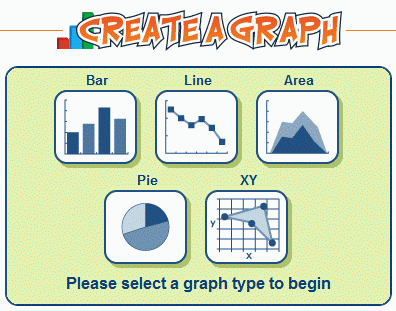
Create A Graph

createagraph.gif

Here is a free web-based graphing tool from the National Center for Educational Statistics.  It’s called Create A Graph.

Pick at graph type: bar, line, area, XY, pie
Enter your data
Provide labels and select fonts/sizes
Preview
Print or Save to a file

There are many file formats available: PDF, SVG, PNG, JPG, EMF and EPS.

One of my students is using this site to introduce elementary students to graphing concepts.  It is a nice alternative to Excel, especially with younger students.

Posted in edtech | Tagged , , , | Comments Off on Create A Graph