

Efficiency Tip #90 – Free Anti-Virus

I see a lot of computer problems. Everyone in the neighborhood brings every problem to my door. There is nothing worse than something that can be prevented for free. I’m talking about a computer infected with a virus.

There are a thousand ways of catching one of these things. The most common method is via email. As a rule, you should never open an attachment. Never. Period. I know you are going to open up files your friends send you. Everyone does. That’s why the virus creators use email to spread their wares.

I use AVG Anti-Virus. It is free.

http://free.grisoft.com

Once installed, it automatically checks for updates.  All my email gets filtered through the virus checker as well.  Something else that is just as important – it doesn’t slow my computer down.

Don’t download illegal software and don’t open email attachments.  Those two things will protect you from most of the problems out there.  A free anti-virus program will take care of the rest.

TSPY=0.42
Posted in edtech, efficiency | Tagged , | 2 Comments

Efficiency Tip #89 – Browse Full Screen

Whenever I look at large graphics within a browser, I do it full screen.  Open your browser and press F11.  It works in IE or Firefox.

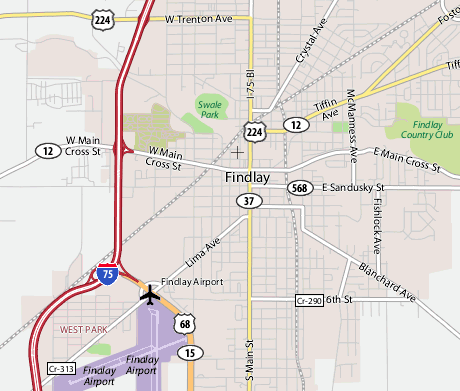
findlaymap.png

I find this feature especially useful when looking at maps.  It adds about 10% more to the viewing area.  Of course it works when looking at pictures of the kids (or grandkids) too.

I think I have figured out why I don’t like tabs.  Tabs eat up part of the viewing area.  More importantly, they use up 25 pixels right at the top of the browser.  This particular area is the most valuable when it comes to looking at browser content.  That’s why banner advertisements are always at the top of the page.

TSPY=0.10

Posted in edtech, efficiency | Tagged , | 1 Comment

Efficiency Tip #88 – Use RSS

Yesterday I talked about using del.icio.us for bookmarks.  I talked about a “start page” a few months ago.  The start page is one extra step you can take to improve not just your bookmarks, but almost everything you do on the Internet.  Create a “start page” with items you look at often.  I use Protopage.  Here is a Protopage I made just for this post.  It took five minutes to create and setup.

http://www.protopage.com/trustyblog

There are three main parts to this page.

1 – News
2 – Pictures
3 – Links

The first two items are driven by what is called RSS.  These are “feeds” from other sites that are dynamically created just for me.  Protopage acts as a news agent for me.  When I subscribed to “Alvin’s Educational Technology Blog”, I told Protopage’s RSS component to continually monitor that specific site on the Internet and report back any new stories.
You don’t have to use Protopage for your RSS subscriptions.  RSS is built into Internet Explorer and Firefox.  You can also setup a (free) Google Reader account.

The beauty of RSS is that I can subscribe to many different sites – news, pictures, comics, del.icio.us bookmarks – and have all that information come to me on one page.  I can glance at my one page and see if there are any new stores without visiting all those different web sites.  Did you catch that reference to del.icio.us?  If I know your del.icio.us username, I can subscribe to your bookmarks.  Any time you add a new bookmark, my RSS reader tells me.

Check out the Dilbert comic on the Protopage.

http://www.protopage.com/trustyblog

Today it is today’s comic strip.  Tomorrow it will be tomorrow’s strip.  Next Thursday it will be next Thursday’s strip.  All this happens automatically using RSS.

I subscribe to about fifty different feeds.  I can easily scroll through all those multiple times every day.  If I had fifty bookmarks and had to visit the sites interactively, it would take hours to go through all fifty just once.  I would have to sift through advertisement banners and other distractions.  Often I would click a link to find out nothing new is posted on the site.  RSS is one of the biggest time savers on the Internet.  Period.

TSPY=5.93

Posted in edtech, efficiency | Tagged , | 5 Comments

Efficiency Tip #87 – Del.icio.us

I have a computer at my office, a computer at home and a laptop for everywhere else.  I need to get to the Internet from each computer.  Many of the places I visit are the same every day… online email, check classes, news, weather, Dilbert.
As I read the news (mostly blogs about educational technology), I find interesting sites I want to remember.  Most people bookmark new sites.  For me, that doesn’t work.  There is only a one in three chance I’ll be using this computer the next time I want the URL.  This is why I use del.icio.us.  I can store all my bookmarks there and be able to access them from any computer.  Setup an account.  It’s free.

Here are my person bookmarks that I share with the public.

http://del.icio.us/atrusty

When I login, I get all my non-public bookmarks. 

Each time I speak at the eTech Ohio Conference, I post all the bookmarks with a special tag.  Here are last year’s links.

http://del.icio.us/tag/etechohio07

Tagging permits the grouping of links based on descriptive words of your choosing. You can manage your own links with tags or check links other people have found.  I have started to tag “educational court case” articles I read with the “edulaw” tag.

http://del.icio.us/tag/edulaw 

Using a site like del.icio.us makes it easy for me to move from computer to computer and always have my personal bookmarks.

There are other ways of accomplishing the same thing.  If you use Firefox, there is an extension called Google Browser Sync.  Start by setting up a Google account.  Then install this Firefox extension on each computer you use.  Each time you start Firefox, it will check to see if your bookmarks have been changed and update the current computer.

With del.icio.us there is no software to install.  You can get to your bookmarks from any computer in the world.  It’s one of those things I use every time I use the Internet.

Posted in edtech, efficiency | Tagged , | 2 Comments

Missing Marker – Found

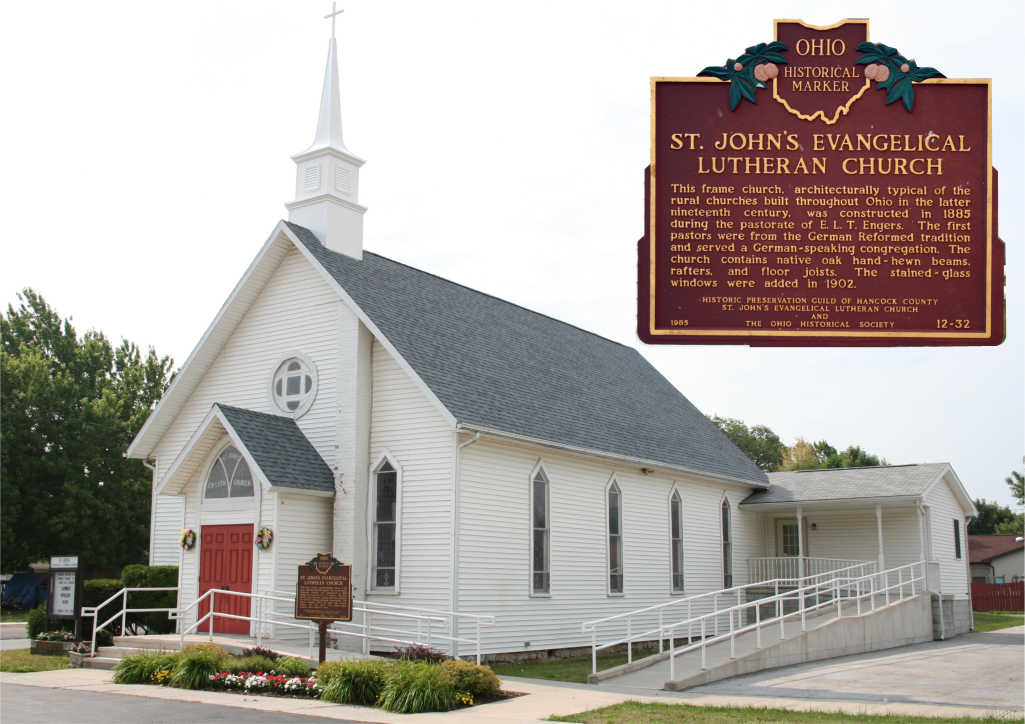
Earlier this week we were looking for the historical marker at St John’s Evangelical Lutheran Church.  The OHS lists the marker at 1701 Tiffin Ave, in Findlay.  We found the marker twelve miles away in McComb.

There just happens to be a church with the same name in Findlay.  I’m not sure how they placed the marker in the wrong town.  According to Google, there are 520 listings for churches named “St. John’s Evangelical Lutheran Church” in Ohio.  At least OHS lists the correct county.

Over the weekend we plan to venture in Allen county.  OHS lists six markers.  Hopefully we can find all of them.

Tagged | Comments Off on Missing Marker – Found