Efficiency Tip #67 – Turn Off Hibernate

In an earlier post I explained why never turning your computer off is better.  When you walk away from your computer, make sure hibernate is turned off.  To do this, go to the Control Panel – Power Options – Hibernate and ensure the Enable Hibernation box is NOT checked.

I have had too many problems with my computer not waking up properly after being in the hibernated state.  A better option (when you walk away from your computer) is to use Standby mode.  Do this by initiating a normal shutdown, but select Standby instead of Shutdown or Restart.  Your computer will wake up almost as fast and you won’t have the problems associated with hibernation.

TSPY=0.20

Posted in edtech, efficiency | Tagged , | 2 Comments

Efficiency Tip #66 – allSnap

If you have ever used a drawing program with a “snap” feature, you will understand the benefit of allSnap.  In a drawing program, the snap feature will pull a close object exactly to the snap point.  It makes lining things up simple.  The utility allSnap does the same for your opened program windows.

Snapping happens in one of the following ways:

1 – Snap window to the edge of the screen.
2 – Snap window to the top of the screen.
3 – Snap edge of window to the edge of another window.

That last one makes it easy to place two windows side by side without overlap.  I do this all the time when I compare two spreadsheets or documents.  Snapping works when you move or resize a window.

If you have two monitors, allSnap treats the center as a snap point making it easy to snap to the center without slipping into the other screen.

TSPY=0.25

Posted in edtech, efficiency | Tagged , | Comments Off on Efficiency Tip #66 – allSnap

Vista: More Secure – OS X: Better Commercials

According to CSO Online, Vista is the most secure desktop operating system available.  Here is the full report.  The graph below shows how Vista compares with XP, Red Hat, Ubuntu, SUSE and Mac OS X.

Three months ago there were skeptical comments concerning the way each OS was installed before the vulnerability testing (see 90 day report).  Some users stated that extra components not used by most users were causing the problems.  The six-month study shows two separate graphs – one with a full install and one with a reduced build.  The chart above shows the reduced build.  Clearly all versions of Linux have more problems than XP or OS X.  OS X has a slight advantage over XP when it comes to high severity vulnerabilities while OS X has twice an many total vulnerabilities as XP.  If you read the report you will see that Apple takes significantly longer to repair problems than Microsoft does.

It is good to see that Microsoft has finally gotten it right with Vista.  Even Steve Gibson says Vista will probably end up being the most secure desktop OS ever.

Posted in edtech | Tagged | Comments Off on Vista: More Secure – OS X: Better Commercials

Efficiency Tip #65 – Shift-Delete

Deleting a file can take a while.

1 – Select the file.
2 – Delete the file.
3 – Yes – I do want to delete the file.
4 – Right-click the Trash can and select Empty Recycle Bin
5 – Yes – I am sure I want to empty the Recycle Bin

Here is a way to avoid steps four and five.  At step two press Shift-Delete.  You will get the “are you sure” message at number three, but the file skips the recycle bin and is gone for good.

Be cautious when you use this shortcut.  Sometimes the recycle bin can be a nice safety net for files that are accidentally erased.  At other times it is painful extra step.  To get your file back after a Shift-Delete, you will need a disk utility. 

TSPY=0.29

Posted in edtech, efficiency | Tagged , | Comments Off on Efficiency Tip #65 – Shift-Delete

Efficiency Tip #64 – Network Properties

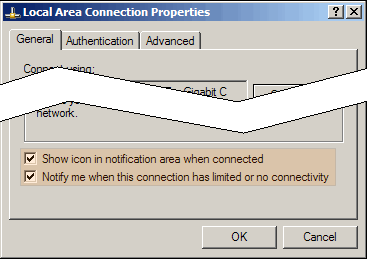
Today, it is rare to find a computer not connected to a network.  Keep your network properties in view all the time by placing its icon in the notification area.

networkproperties.png

To do this, go to Network Connections in the Control Panel.  Right-click your network connection (Local Area Connection for wired – Wireless for Wireless).  The graphic above will pop up.  Check the Show Icon box highlighted in the graphic.  You should also check the Notify Me box so that problems generate a warning.

Now your network status will always be in the bottom corner of your screen.  If your DHCP server has a problem, your wire becomes disconnected… or any other problem occurs, you will see a warning instantly.

TSPY=0.50

Posted in edtech, efficiency | Tagged , | 1 Comment