Compounded Time

I was in a meeting today where one person (who just happened to be closest to the computer in the room) acted as secretary and kept notes.  It was a meeting where the exact words used in the document were important and had to be edited until everyone in the meeting agreed on the wording.

Two minutes into the meeting I realized we were going slower than we could if the person on the computer were using more efficient techniques.  I noticed right away that instead of Shift-Ctrl-Right Arrow, the editor used the mouse to highlight the word immediately in front of cursor.  Not only did this take longer, the first letter of the word was missed with the click and drag of the mouse… and the whole process had to be restarted.  At that point I started keeping track at the TSPY, but in the end I had to add another parameter. 

There were twenty people in the meeting.  The extra time used by our editor didn’t just cost the editor a few minutes.  It cost all of us a few minutes.  During the two hour meeting we could have saved about eight minutes with all the TSPY amounts added together.  With twenty people in our group, we wasted a total of 8 x 20 minutes.  That’s two hours and forty minutes.

When I am in front of other people, I don’t like to waste their time.  Using technology in an efficient way is one more way to give extra time to the whole group.

Posted in edtech | Tagged | Comments Off on Compounded Time

Efficiency Tip #42 – Sleep Work

While I Was SleepingMy computer does more while I sleep than a lot of people get done all day long.  Each night my computer gets a defrag and backup.  I use the Task Scheduler that is built into Windows.  It runs a defrag at 1am and a backup at 3am.
 To get to the schedule click Start/All Programs/Accessories/System Tools/Scheduled Tasks.  You can add any program as a task to run at a specific time.  To defrag my drive I run DEFRAG.EXE with an added parameter to indicate the drive I want defragged.  It looks like this

C:\WINDOWS\SYSTEM32\DEFRAG.EXE C:

When I get up, everthing is finished.  My computers runs more efficently all day long.

TSPY=2.08

Posted in edtech, efficiency | Tagged , | 1 Comment

Efficiency Tip #41 – Folders

folderlayout.pngI mentioned this when I talked about pictures, but it goes for all content.  Use folders to organize your files and do it in a logical way.  This is the single most important technical skill anyone can master and it is easy to learn.

I keep everything I create in the My Documents folder.  This makes backup simple; I only have to copy one folder to my backup drive.  I have generic folders for most things – music – pictures – taxes.  Inside these folders are more folders that separate content into more specific categories: Taxes/2007, Taxes/2006, Taxes/2005, and even Taxes/2007/Receipts.

My folder rule is simple.  Every project gets a folder and all the files for the project go in the folder. 

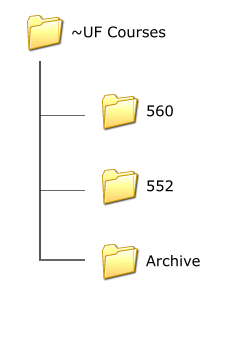
The graphic to the right shows my “courses” folder structure.  Each semester I create folders with the course numbers I teach.  The previous semester’s folders are copied into a “semester” folder and then moved to the “archive” folder.  The “semester” folder has a name in the form “2007 Spring”.  By organizing files in this manner I can easily grab work from any student by knowing the year and semester the student participated in a specific course. 

One other important tip.  Notice the top folder in the graphic is named “~UF Courses” instead of “UF Courses”.  There are two folders I use multiple times each day.  I want those two folders at the top of the My Documents list for quick access.  I prefixed their names with the Tilda so those folders are always alphabetically first.

You may think this “folder organization” is overkill.  I cannot disagree more.  Right now I have more than 159,000 files in My Documents dating all the way back to 1993.  If it were not for folders it would be complete chaos. I use Google Desktop as well, but it’s the folder organization that prevents my insanity.

TSPY=3.14

Posted in edtech, efficiency | Tagged , | 1 Comment

Congratulations Kayla

kaylagraduation.JPG

Any words of wisdom for the high school graduate?

Posted in edtech | Tagged | 1 Comment

Efficiency Tip #104 – Caps Lock Sound

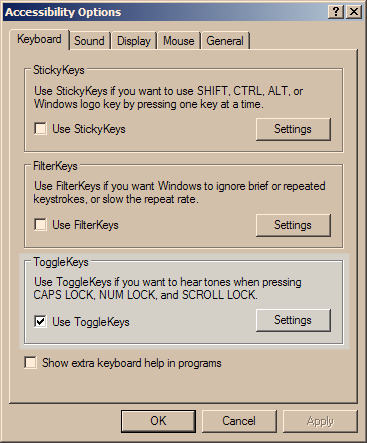
If you have ever inadvertently turned the Caps Lock key on and then did some typing before noticing… here’s a way to hear a sound any time that key is pressed.

 In the Contol Panel – Accessibility Options you will find the setting.

 caplocks.png

Check the box to turn on the sound.  I don’t use the Caps Lock much.  Most of the time it is pressed by mistake.  This gives me one more way to catch my mistake.

Fortunately many applications that require you to login with a password have a built-in “check” to see if the caps lock key is on.  For everything else, turn on the sound.

TSPY=0.25

Posted in edtech, efficiency | Tagged , | Comments Off on Efficiency Tip #104 – Caps Lock Sound