Wimba

Horizon WimbaI started a new pilot today. UF is comparing Elluminate with Wimba. We used Elluminate last semester. I had the training for Wimba today and I start using it in class tomorrow.

Both of these programs are synchronous tools designed to create a face-to-face class experience for an online class. On the surface both are similar products that run through a web browser. With a headset microphone one person can talk to the entire class. The interface allows sharing of presentations (PowerPoint, pictures, Flash, movies) in addition to applications. As the presenter, I can run Excel on my machine and share the application with the class. Everyone can then see my desktop. I can even pass control of the application to someone in the class.

Wimba has one feature that I liked. In the session, there is a phone icon. If someone has a problem with an Internet connection, he/she can dial a phone number, type in a passcode and be right back in the discussion via the phone.

I haven’t had experience running a session with Wimba. That will happen today. I’ll give you a report once I’ve taken it around the block a few times.

Posted in edtech | Tagged | 9 Comments

Efficiency Tip #24 – Two Monitors

Last year, when it was time to buy a new computer, I didn’t. Instead I purchased a new video card and a second display. I already had one 19″ flat panel. I picked up another one that matched. The video card is a high end nVidia with two digital outputs.

There are two basic configurations with two monitors: one big screen with the task bar going all the way across or two independent screens. I use the latter. I can still drag applications from one screen to the other, or stretch something across two screens. The main difference is maximizing an application only fills one screen with my setup.

I usually have my email running in the left monitor and EI in the right window. I only run Firefox in the left window. I can look at a spreadsheet in the left window while typing in a document on the right. When I create web pages in the right screen, I can instantly preview them on the left screen. Overall, my efficiency has gone up measurably not to mention my score in Supreme Commander. Forbes says they have seen a 50% increase in productivity from copy editors with two monitors instead of one.

Bill Gates OfficeBill Gates actually has three monitors on his desk. Maybe that’s the secret to being a billionaire.

TSPY=1733.33

Posted in edtech, efficiency | Tagged , | 1 Comment

The Jury Is In

ProtopageProtopage still rules.

I have been exploring other options for my start page: Pageflakes and iGoogle. The basic functionality of Protopage leaves them all in the dust. No other site has the flexibility of resizing windows and infinite placement on the desktop.

Pageflakes and iGoogle lock you into three columns of equal width. That doesn’t work for me at all. In addition, too much desktop real estate is used by the borders on the windows.

Here are things I use a lot.

Links – I have about 50 that I use all the time. I have three groups – UF – Personal – Current Courses.

RSS Feeds – I have two windows of feeds – Tech News – Education News. These windows are big enough that I can read abstracts of article. I have about 30 feeds total.

Notes – I use Protopage to write notes to myself all the time. I keep my notes from phone calls, emails, courses… just about everything. I use a window that looks like Notepad. Anything important goes in. When it’s done I delete it. I can leave myself a note while I’m on the office computer. It’s on my start page when I get home.

I don’t use widgets. I have link to weather for my area code. I can look in the corner of my Windows desktop to see the time.

In my last post I was concerned about the load time of Protopage. I found out that the others are just as slow if I load the same things that I have in Protopage. It’s the RSS feeds that do it. I tried moving them to Google Reader, but it complicated my life too much.

I’m sticking with Protopage. It does everything I need and does it nicely.

Posted in edtech | Tagged | 1 Comment

Efficiency Tip #23 – Windows-Tab

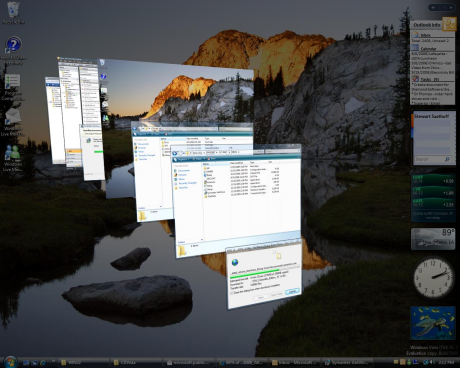
This is something new in Vista. It works like Alt-Tab, but with a different presentation.

WindowsKeyTab

Hold down the Windows Key and tap tab. Full screen versions of each open window will stack like a deck of cards at an angle. As you tap the tab key, the top screen is shuffled to the bottom and all the other screens move up. It gives a more visual display of what is on each page.

This shortcut and the old Alt-Tab have added the desktop to the list of programs. This gives you one more way to get to the desktop (reduce all programs) in Vista.

TSPY=1.80

Posted in edtech, efficiency | Tagged , | 4 Comments

Citizendium

Imitation is best the compliment.

Citizendium

The Citizendium (sit-ih-ZEN-dee-um), a “citizens’ compendium of everything,” is an experimental new wiki project. The project, started by a co-founder of Wikipedia, aims to improve on that model by adding “gentle expert oversight” and requiring contributors to use their real names. As of May the 13th, 2007, we were working on over 1,815 articles.

I would hope that all 1815 articles are spectacular, especially when being compared to Wikipedia’s 1.8 million.

I do wonder what a “real name” is. Will someone run a “wiki background check” on each author? At any rate I wish them all the best. The more resources we have, the more chances our students will have to compare and contrast.

I hope the masses never decide what is fact and what is fiction based on the number of hits in a Google search.

Try this. Type “recieve” into Google. It looks like 13 million people have misspelled this word. Would you “beleive” is at 4.8 million? “Noticable” is hardly noticeable at 2.1 million and “aparent” is anything but… at 1.1 million.

Hopefully we never write a dictionary based on mob rule.

Posted in edtech | Tagged | 2 Comments