Efficiency Tip #22 – Print Screen

Print ScreenA picture can say a thousand words. Sometimes the picture is right there in front of you and you need to explain it to someone that cannot see your screen.

Just above the Insert key and the Page Up/Down group is a key that says “Print Screen” right on the key. Some keyboards shorten it to “Prt Scr”, but it’s in the same spot on the keyboard.

Pressing this key seems to do nothing. Actually, the operating system captures the screen and saves it to the clipboard, effectively doing a Ctrl-C of the screen. To access the captured picture, open any program that can paste a picture (Word, PowerPoint, PaintShop Pro) and paste.

There is your picture. Save the file and email it to someone that needs to see your screen.

Windows actually has two flavors of screen capture. Pressing Print Screen alone copies the whole screen. If you hold down the Alt key and then press Print Screen, only the active window is copied. If the active window is not maximized, this will create a smaller graphic that only shows one program window.

I tend to use the Alt-Print Screen more because I have two monitors. Both screens are captured by the Print Screen key alone. That’s a big picture.

TSPY=2.00

Posted in edtech, efficiency | Tagged , | Comments Off on Efficiency Tip #22 – Print Screen

Encyclopedia of Life

Encyclopedia of LifeGoing head-to-head with sites similar to Wikipedia, EOL will be a huge web site containing information about all of Earth’s 1.8 million known species. Information will be free and with sections geared toward students, teachers and researchers.
The site will include species descriptions, pictures, maps, videos, sound, sightings by amateurs, and links to entire genomes and scientific journal papers. The 300 million pages of information will take about ten years to complete.

Initial funding of $12.5 millions from the MacArthur and Sloan foundations will get the project through the first 2.5 years.

Hopefully most schools won’t block this one.

Posted in edtech | Tagged | Comments Off on Encyclopedia of Life

Efficiency Tip #21 – Windows Key-R

This one may have a higher price than most people are willing to pay. It involves more typing than any shortcut covered so far, but I use this one as much as any other.

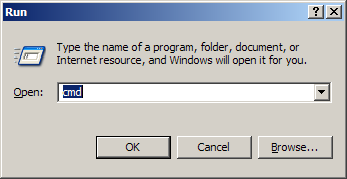
Run

Press the Windows Key and R at the same time. This will bring up a box where you can type the name of any program on your computer and run it. To use this shortcut you have to know the specific name of the program executable of the program you want to run. Here are a few I use all the time.

cmd – Command Prompt
calc – Windows Calculator
notepad – Windows Notepad Editor

You can get to all these programs by clicking Start/All Programs/Accessories/Program Name.

It turns out that you can run any program if you know what to type.

winword – Microsoft Word
excel – Microsoft Excel
powerpnt – Microsoft PowerPoint

You can even type a URL like

http://www.google.com

and Windows will open a browser and go to that URL.

Posted in edtech, efficiency | Tagged , | 1 Comment

Efficiency Tip #20 – Paste Special

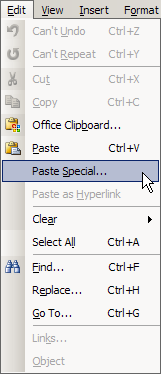
Paste SpecialThis one is my wife’s favorite.

When you copy text, you also copy all the formatting and even HTML if the original is on a web page. Pasting into Word (or any other word processor) can create a mess that must be manually repaired. Instead of the normal Paste command, try Edit/Copy/Paste Special. If you want to use only the keyboard

Alt-E, and then S

From there you can paste unformatted text. In this way the only thing that ends up being copied is the text. All the text, tables, bullets, etc are left behind.

TSPY=7.12

Posted in edtech, efficiency | Tagged , | 2 Comments

Generation NeXt

Mark TaylorUF is hosting the SEED Conference 2007. The keynote speaker for the first day was Mark Taylor and his topic was Generation NeXt Comes To College.

He defined Generation NeXt as people born to Generation X parents. I think I’m in that group. My parents are Baby Boomers. Taylor talked about how these generational cohorts interact with each other.

Gen NeXt students are wired. Each day they consume 8.5 hours of media in 6.5 hours (they multi-task). They all have cell phones and many can text message without looking at the keys. They also rely on their parents a lot. Taylor talked of one study that showed 80% of these college students talked to their parents on the cell phone yesterday.

Coincidently, last night at the dinner table my wife was talking about students she interviewed for a GA position at her University. When each of the candidates was asked if he/she was familiar with Word, Excel and PowerPoint, the responses were all the same. “I’ve used them since I first started to read.”

She then said something that surprised me even more and gave me a flashback of the keynote by Taylor. She pointed out an article that said current college graduates were being invited to job interviews… along with their parents. The employer wants to make sure the parents play a roll in decision. That’s just weird.

Posted in edtech | Tagged | Comments Off on Generation NeXt