Efficiency Tip #16 – Refresh – F5

reloadThe next time you need to refresh (IE) or reload (Firefox) the content of your browser, try pressing F5. The alternative is to use the mouse to click the little refresh (reload) button.

There are times that the data on the page changes in real time – the weather page – the school delay page – JR’s blog. The F5 key will go out and grab the latest version of the page.

I use this one so much that I programmed one of my mouse buttons (I have a mouse with several programmable buttons) to act as F5. Since I normally browse the web while I use the mouse, the mouse button saves me a trip to the keyboard or the tool bar. From anywhere on the page – mouse click – refresh (or reload).

TSPY=1.35 (without programmable mouse)
TSPY=2.88 (with programmable mouse)
Posted in edtech, efficiency | Tagged , | Comments Off on Efficiency Tip #16 – Refresh – F5

A Little Too Happy

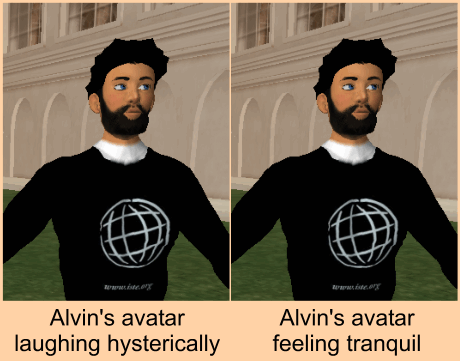
Once in a while I stroll over to Will Richardson’s blog just to see what’s going on. Today was one of those days. I read his post on Second Life and couldn’t help but laugh. Can we just end this whole Second Life thing? There is nothing worse than a virtual environment where every avatar is suppose to represent a real person… that can only communicate by typing on a keyboard.

Laughing in SL

I said (rather, I typed) something funny to someone in SL and got back a “LOL” in the chat dialog. Isn’t it bad enough that we can only chat with a keyboard and not with our real voices? Now I have to imagine that the virtual representation of someone I’m talking with is also laughing based on the fact that “LOL” was typed back to me. Shouldn’t the avatar grab his gut and roll around on the ground? Maybe there is a way to make the avatar do this and no one I have talked with knows how to do it. I could create a cheat sheet of all the body language needed in SL. Then when someone says (types) something funny I could say “PWWILAMCC”.

Please Wait While I Look At My Cheat Sheet… and then I could roll around on the ground laughing.

Posted in edtech | Tagged , | 1 Comment

Web 2.0 Omnivores

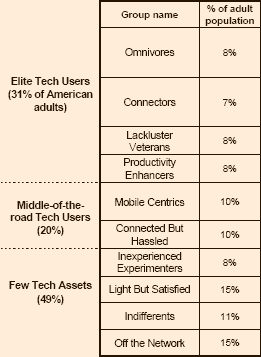
pewreportAccording to a recent Pew Internet & American Life Project publication, I am probably a Web 2.0 Omnivore. The fact that I’m writing this and have written many posts on this and other blogs could be enough to put me into that group. I have also published videos on multiple streaming servers.

I own a PalmPilot, portable MP3, digital voice recorder and a couple of cell phones. If you call the phone at my office, the message says you should email me.

I don’t use Twitter. Those people must be in the top 0.8%.

You can probably read a lot of different things into this report. For one thing, 15% of us don’t have a cell phones or Internet connection. The average age of this group is 64. I suspect this group will continue to shrink if only from attrition. At age 64 I hope to have an email implant with retinal display and global wireless connectivity. If Moore’s law continues to play out, I’ll have a computer the size of a credit card that is so advanced it will treat me like a house pet. I can’t wait.

Posted in edtech | Tagged | 3 Comments

Efficiency Tip #15 – Zoom

Ctrl-Plus

When it comes to digital content, there are two trends: larger monitors and smaller print. The next time you are trying to read something in your browser and the print is too small, zoom in. If you have a scroll mouse, hold down on Ctrl and Scroll forward. If you don’t have a scroll mouse, stop reading this and go buy one.

If you are using the keyboard and need to scroll in, press Ctrl-Plus (that’s the plus key). Ctrl-Minus will zoom out.

Zooming works in IE, Word, Excel and PowerPoint (and probably most other MS applications). It also works in Open Office. There is no zoom feature in Firefox. Ctrl-Scroll does change the font size, but not the graphics. In Firefox the scroll direction is the opposite of all other applications.

I have seen this shortcut effectively used in presentations when someone is doing a live Internet connect and part of the resulting web page is too small to see on the projector screen. Just point to the spot that is small… and zoom.

TSPY=0.33

Posted in edtech, efficiency | Tagged , | 1 Comment

Brain Exercises

Brain ExecisesHere is the article I read last year and referred to yesterday. Simple ways to make yourself far cleverer. It’s based on research at the BBC. Here are the steps involved in training your brain to be cleverer in seven days.

Saturday

Brush your teeth with your ‘wrong’ hand and take a shower with your eyes closed.

Sunday

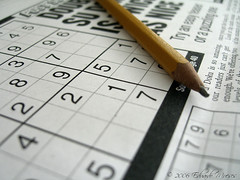
Do the crossword or Sudoku puzzle in your Sunday paper and take a brisk walk.

Monday

Have oily fish for dinner, and either cycle, walk or take the bus into work.

Tuesday

Select unfamiliar words from the dictionary and work them into conversations.

Wednesday

Go to yoga, Pilates or a meditation class, and talk to someone you don’t know.

Thursday

Take a different route to work; watch Countdown or Brainteaser.

Friday

Avoid caffeine or alcohol; memorize your shopping list.

As you can see, Wednesday is the day you are suppose to talk to a stranger. I actually try to do as many of these as I can each day. Some of them aren’t possible (like the second half of Monday).

If you want to improve your character, read Ben Franklin’s – The Art of Virtue. Franklin had a daily checklist he used to keep track of thirteen different virtues with a focus on one specific virtue each week. Each day he reflected on his success.

Now you can use the Do It Yourself Planner to create your own check sheet.

Posted in edtech | Tagged | 2 Comments