
Google Reader

Google ReaderI use an aggregator to fetch most of the fresh information I read on a daily basis: news, blogs, weather, Dilbert. An aggregator is a program that pulls different web pages you select into one window. Take a look at the Education and Tech News window on this page.

http://www.protopage.com/educ260

Those listings are updated each time you visit the page. From that one page you can see all the headlines and easily click (or right-click Open in New Window) the headlines that interest you. Anything on the web with an RSS feed (look for one of these symbols)

RSS RSS XML

can be “fed” into an aggregator.

Google Reader is more than a list of links to headlines. Within GReader you can read an abstract of the article. It keeps track of those you have read and lets you mark important items so you can easily find them in the future. You can also share your items with others.

The killer feature of GReader is its connection to the Google search database. If you want to read news about “Alvin Trusty”, you type my name into the Add Subscription box of GReader. Google finds my blog and every blog I’ve linked to or posted on. Each listing has a “subscribe” link under it. You click the one(s) to which you want to subscribe. It’s just that easy.

Posted in edtech | Tagged | 2 Comments

Efficiency Tip #11 – Open New Window

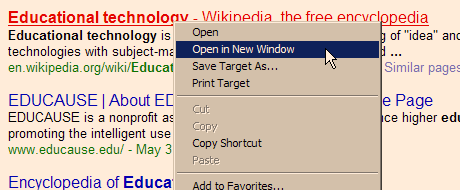
Many tasks require the mouse. Make sure the mouse you use has a right-click button. The next time you use Google (or whatever search engine you prefer) instead of clicking a link, do a right-click “Open in New Window”.

OpenInNewWindow.png

In Firefox it is “Open Link in New Window”. Opening a link this way preserves your entire search back in the original Google search page. How many times have you found pay dirt on the first link of a search? Depending on my search topic, I may look at 10 or 20 different pages. If the page I open is a dead end, I close that window (Alt-F4). There is the rest of my search waiting for me in the original window.

I use this method so much I once refused to switch from Netscape to IE because the Netscape right-click listed the new window option first and IE listed it as the second item in the drop-down menu. Over time I improved my mouse skills to almost make up the difference. IE still lists it second and in Firefox it is first.

TSPY=3.16 (IE)
TSPY=3.19 (Firefox)

Posted in edtech, efficiency | Tagged , | 1 Comment

Joost

JoostLast week someone who reads my blog offered me a Joost account (thanks John). Basically Joost is TV over the Internet. You pick the channel. The show starts when you click “play” and you can pause the show at any time. You can watch real shows from Comedy Central, National Geographic and a dozen less known channels. I heard about it on a TWIT podcast where the biggest news was that no one could get an account. The beta was limited to a few people who were able to give accounts to a few people… so you had to know someone with an account who was willing to share with you.
Today the big news is that current users will be able to give out an unlimited number of accounts in the next few days. If you’re interested in an account, let me know.

Posted in edtech | Tagged | 7 Comments

Efficiency Tip #10 – Ctrl-F

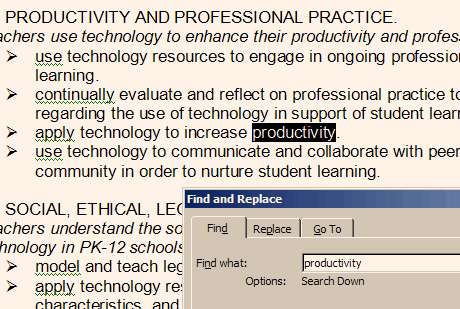
The next time you are trying to find something on a long web page, use this shortcut. Press Ctrl-F. This will bring up a search dialog box. Type in the word or phrase you are looking for on the page.

Find using Ctrl-F

Your browser will do the rest. This shortcut works in your browser, word processor and most other programs that handle text in some way. If you are lucky, the F3 key will do the same thing, but many programs have lost F3 functionality.

TSPY=3.72

Posted in edtech, efficiency | Tagged , | 1 Comment

Vista

Vista Business Today Vista arrived at the Trusty house. It only cost $10 through the UF campus agreement. The deal is for Vista Business.

I plan to install the new OS on my main machine as soon as I finish all the grading for this semester. It will probably be later this week. I can’t wait!

I have a lot of software installed on my machine. It will interesting to see what stops working. I will keep you posted.

Posted in edtech | Tagged | 1 Comment