
Last night was the first scheduled marching event for the Van Buren Band. Unfortunately, the heavy rain washed us off the field. Next week will be at home with Liberty Benton.
Here is the Van Buren Music Booster’s site.
Last night was the first scheduled marching event for the Van Buren Band. Unfortunately, the heavy rain washed us off the field. Next week will be at home with Liberty Benton.
Here is the Van Buren Music Booster’s site.
This PowerPoint answers a few common questions about technology. If there is a critical topic that you think should be added, let me know. I can update the deck.
Click the play button (single click) and the presentation will go by itself.
I have been using Picasa for several years. If I am looking at a picture on my computer, chances are good I’m probably using Picasa to do it, especially if it’s a picture from my digital camera.

Above is a picture I took for Buzz. He has converted all of his overhead transparencies to PowerPoint slides by having me photograph each picture. Then he creates a slide from each picture in PowerPoint.
The whole process is actually very low tech. We use a white piece of foam core on Buzz’s desk. He holds the foam core at an angle so we don’t get a shadow from the lights in the ceiling. I snap a picture. Picasa does the rest.
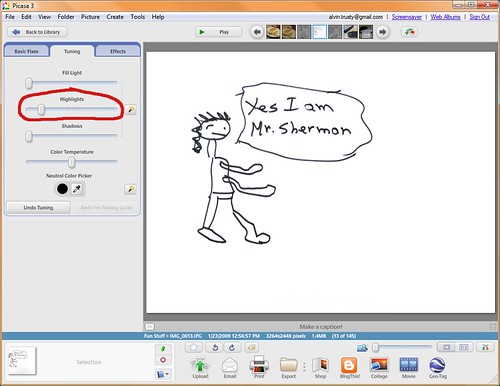
In the Tuning tab of Picasa is a Highlights adjustment. By cranking this up, all the edges of the paper and shadows go away and leave only the black ink behind. It’s literally that easy. I export the picture and it’s finished about ten times faster than a scanner could do.
Now if I could only figure out who this Sherman character is.

After I started to seriously use FeedReader3, I began to get this error:
A error occured in program
Can’t perform execSQL operation. Query active ? {TEnclosures}
I went to the support forums to see if anyone else had had the same problem. I searched for “execSQL” and there we no hits. I then searched for “TEnclosures” with the same result. My thought was that I may be the first person to have this problem.
I started reading through the forums and found this page.
http://www.feedreader.com/node/1963
My exact problem. I have no idea why the search didn’t find this article. “execSql” is right in the title… and in the body. I re-did the search matching the case of the words in the post. Still not found.
I added a post giving a specific blog site which causes FeedReader3 to crash. Since then I have found about ten more. In fact, the program has been completely unusable. An error on a site creates a message in FeedReader3. As soon as OK is clicked, the error box pops back up. The program cannot be closed at this point because the error message blocks all other activities in the program. I have to kill the program in Task Manager.
No responses have been given in the discussion. I had to uninstall the application. It looked great at first, but turned out to be a dud. I wish I could find another reader which sorts by tag. If you know of one, please let me know.
Meanwhile, Google Reader has worked flawlessly.