Nailed by Digital Photo

Coming back from lunch today, I noticed a campus security guard taking a picture of the car parked next to me.  I had to ask why.

The car was registered in the computer system, but there was no parking pass hanging from the rear view mirror.  We have transferable tags at UF.  Sometimes people try to share them between a couple of cars and end up on campus with a car and no tag.

Apparently, a few people have tried to pull one over on security.  After getting a ticket, they switch the tag back to the ticketed car and show up at the security office acting puzzled.

“I have a tag.  Why did I get a ticket?”

Now security provides visual evidence when this question is asked.  All the photos are digitally connected to the tickets to provide visual evidence in a dispute.

“Why?  Because this picture of your car shows you did not have a parking pass when we issued the ticket.”

Posted in edtech | Tagged | Comments Off on Nailed by Digital Photo

Legitimate Takedown and Fair Use

If you haven’t seen the Sarah Palin parody on Saturday Night Live, don’t go to YouTube. Here is the YouTube page where the video was.

As you might expect, content created on Saturday is still protected by copyright on Sunday. You can find the video over at NBC, although the link did not show up when I searched Google. It is posted on NBC’s main page right now. There are even embed codes so the video can be placed on my site (below).

The version on the NBC site had a pre-roll advertisement. I can embed it on my site, but NBC is getting the ad revue from the commercial (which seems to be gone from the embedded version of the video).

Here is something just as interesting. The one place you can find part of the video on YouTube is on Fox News’ reporting of the video. Fox News did not show all of the SNL video during their news show. They only played a small segment of the SNL broadcast. Because of the shorted duration, the Fox News version is protected by fair use. NBC may ask for another take, but it will be more difficult because Fox “played by the rules” when they showed the clip in the first place. So it will be up to Fox to decide if they want the clip taken down. The copyright protected commentary belongs to them.

Posted in copyright | Tagged , , | Comments Off on Legitimate Takedown and Fair Use

More on Mesh

Over the summer I reviewed everything I use technology to do in a typical day.  More of these tasks are going online.  This blog for instance is completely online.  I upload pictures to Flickr and embed them with text into a web-based editor in WordPress.

I also switched all my email to Gmail.  Before, all my computers had to have a copy of Eudora and it was a bit of a hassle to keep them all synchronized.  Eudora is gone giving me one less program on my computers.  Basically I need Office and a simple graphics editor and I can do almost everything online.  

I use four different computers on a regular basis.  I have a main computer at home and another one at the office.  I also have a laptop and a tablet.  Below is what my Mesh looks like.  I’m typing this on my laptop and my tablet is in my backpack, so it is offline.
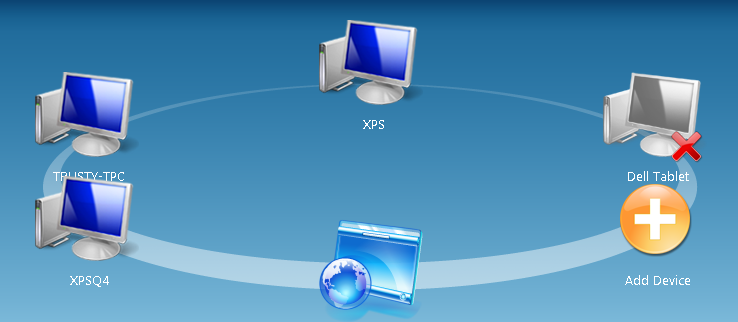
Each computer has Microsoft Office.  Other than that I use Picasa, IrfanView and Paint Shop Pro.  A couple of the computers have specialty software for specific tasks.  For example, my home desktop has video editing software that the others do not.

Out on the Mesh I have a folder for each course I teach and an extra folder called Presentations.  I can create a PowerPoint presentation on my home desktop and save it in the Mesh folder.  When I get the office, that PPT is on my computer there.  When I take my laptop to class, the file is there too.  I can use any computer to make a change, and the updated local file is synchronized to every computer on my Mesh.   Read that last sentence again.  That is incredible.

In a pinch, I can even use someone else’s computer and login to my Mesh via a browser where I can grab any of my up-to-date files.

There is also has a major new feature added since I last talked about Mesh.  Now a local folder can by synchronized to the Mesh without consuming the online storage.  Microsoft provides five gigabytes of online storage with a free Mesh account.  That’s enough for all your documents and a few multimedia files.  It’s not enough for all my photos.  With the new feature I can set the Mesh to sync my pictures to all the computers in my Mesh, but skip the online desktop.  In this way, only my class and presentation files cut into my five gigs of online storage, but I still have all 25 gigs of my pictures on all my computers.  The Mesh is essentially a P2P synchronization system that keeps all my files up to date.

Keep in mind that synchronizing is not the same as backing up.  If I delete a file from my Mesh, it gets deleted from every computer on my Mesh.  I can always go to my daily backup and recover the file, but I might not need to do that.  The Mesh does not treat files like those on a network.  If I go across my network and delete a file from my file server, that file does not go into my network server’s trash.  The file is gone.  The Mesh actually puts the deleted file into the trash on each computer in the Mesh.  So if I delete a file, I have four chances (one on each computer in my Mesh) to pull the file out of the trash.

If you have not signed up for a Mesh account, you no longer need an invitation.  Microsoft has opened the beta to everyone.  If you regularly use more than one computer, setup an account today.  Of all the technologies I have used in the last year, the Mesh more than any other has fundamentally changed the way I work.

Posted in edtech | 1 Comment

Picasa Name Tags

Google continues to crank out innovative features in their products.  Today the web version of Picasa added face recognition.  The way it works is intriguing.  After you activate the feature, Picasa goes through all your photos and groups them based on who is in each picture.  All the pictures identified with the same person are then presented together.  Picasa asks once – who is this?  You type the name and all the pictures are tagged with that person’s name.  If a list of photos contains extra pictures (a couple of my kids were identified as the same person), the mis-identified pictures can be dropped from the list.  If a picture contains more than one person, it will show up in several lists as Picasa asks you to identify each person in each photo.

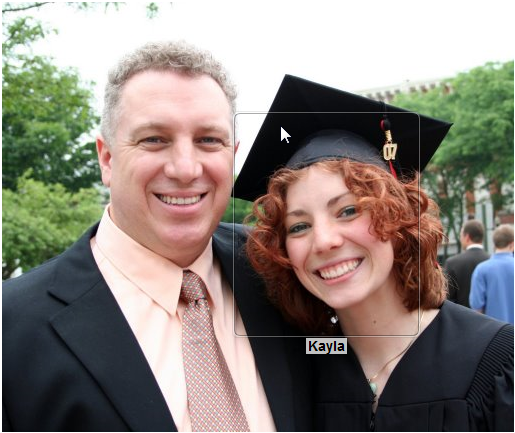
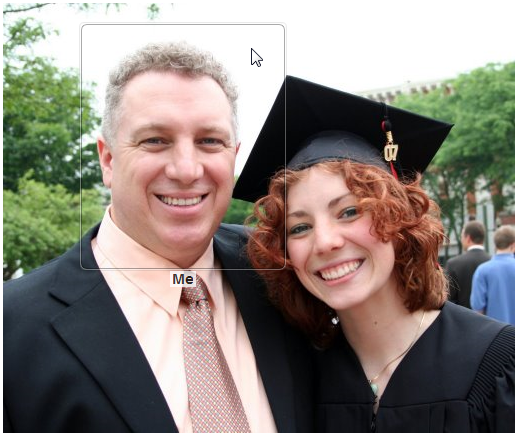
Here’s where it gets interesting.  After names are associated with faces, any picture that is opened will list the people in the photo.  Mouse-over a face and Picasa identifies the person.

This adds a new dimension to searching.  I did a query on all the pictures with Me and Kayla.  This photo came to the top of the list.

Before you add names to all your pictures, consider the privacy settings.  When you enter information about a person, the data includes nickname, full name and email address.  By default, only the nickname associated with a photo shows up on the public side.

Considering the way pictures are identified by current search engines, this new feature of Picasa is a potential game-changer.  I cannot wait for this feature to be added to the desktop version of Picasa.  I have about 50,000 pictures that it can tag.

Posted in edtech | Tagged , , | 5 Comments

Chrome

Today, Google released their first web browser without much fanfare.  It’s called Chrome and it’s all new code.  It’s very light.  The download is only 475k.  That is correct.  A full-blow browser that is less than one half megabyte.
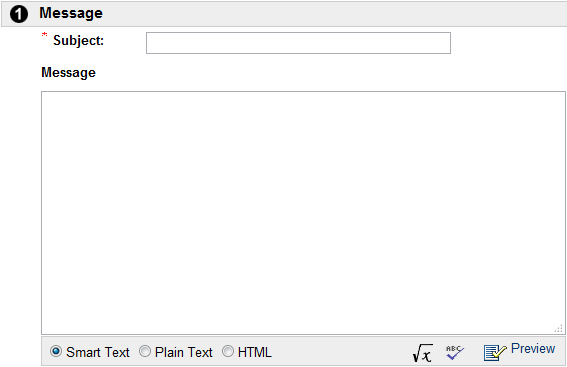
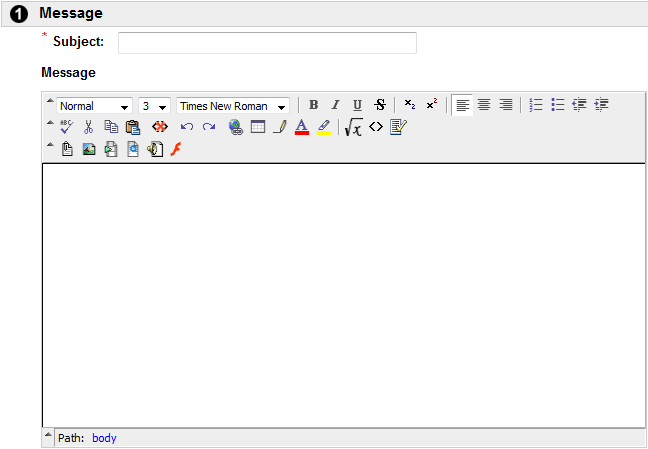
I tried it in a few key applications that I must use on a daily basis.  At the top of the list is Blackboard.  Like most web applications, Blackboard uses a WYSIWYG editor which includes the common functions of a word processor (bold, italize, insert picture, etc).  That’s gone in Chrome.  Take a look at the difference.

Chrome Editor

Firefox Editor.

As you can see, the difference is a big deal and one reason I won’t be switching to Chrome any time soon.

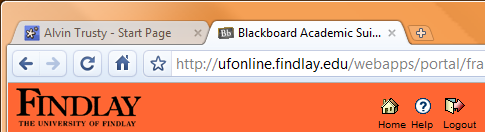
There is one really cool thing about Chrome.  It handles tabs in a completely different way.  Instead of eating up valuable screen space below the URL and above the content of a web page (like every other browser I have used), Chrome places the tabs at the very top of the browser window.  It is space that is already used by useless title of the page, so no screen real estate is lost.  Clever.

Posted in edtech | 3 Comments