Efficiency Tip #6 – Ctrl-Enter

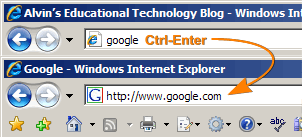
I seem to remember a time when typing the main domain name would take you to the site. I could type “google” and hit enter. Magic happened and all the pieces of the URL appeared. That doesn’t seem to work any more, but there is a way to reduce all that typing. This tip that will save fifteen key strokes every time you must manually type a URL into your browser. Instead of typing

http://www.google.com [Enter]

type

google [Ctrl-Enter]

Both Internet Explorer and Firefox will automatically type the “http://www.” and “.com” for you when you use the Ctrl-Enter shortcut.

If you are going to a site that ends in “.net” use Shift-Enter. A “.org” address uses the Shift-Ctrl-Enter shortcut.

Quick Reference:

google [Ctrl-Enter] —> http://www.google.com
google [Shift-Enter] —> http://www.google.net
google [Shift-Ctrl-Enter] —> http://www.google.org

TSPY=2.88

Posted in edtech, efficiency | Tagged , | 3 Comments

Elluminate

ElluminateI just finished a pilot program using Elluminate. This is an online “classroom” tool. Everyone in a course connects to a web site. For the most part it looks like an interactive chat with a whiteboard. The most important “extra” is a microphone. The teacher controls the microphone. It can be passed around so students can actually talk to everyone in the session. If you want to talk, you will need a microphone. I use a $10 headset from Wal-mart. In addition to the voice, any application or the entire desktop of the teacher can be shared with the class. The experience in some ways is better than an actual classroom. Let me explain how that is possible.

I teach a multimedia class which includes several activities using Flash. When I introduced the basic concepts of Flash, I shared my Flash program with the whole class. I “talked” my way through the basics and everyone could see the program and hear my voice. There is a “hand up” button that participants can use to get the instructor’s attention. As students had questions, I could stop and answer them.

On top of all of this, everything was being recorded. After the session, anyone absent could watch the whole thing on tape delay. As we worked through the activities I learned that even people that attended the live sessions were going back through the recorded sessions. In fact several people commented that they were replaying small parts over and over to see exactly how something was done.

If you have ever used Flash, you know how complicated it can quickly become. Objects on the stage are connected to frames, scenes, properties, actionscripts… all sorts of things that aren’t easy to follow the first time through. It is easy to get lost in how objects are associated with different properties. Having the frame-by-frame review tool helped everyone. Participants actually commented that this was better than a live classroom because of the recording.

Posted in edtech | Tagged | 8 Comments

Efficiency Tip #5 – Shift-Ctrl-Home

Today’s tip adds more reach to yesterday’s. To highlight a document from the cursor to the first word of the document use Shift-Ctrl-Home. To highlight everything from the cursor to the end of the document use Shift-Ctrl-End.

Ctrl-A will highlight the whole document from anywhere in the document. Sometimes you don’t need everything. Shift-Ctrl-Home and End let you highlight only the half you want to highlight.

TSPY=2.16

Posted in edtech, efficiency | Tagged , | Comments Off on Efficiency Tip #5 – Shift-Ctrl-Home

Efficiency Tip #4 – Shift-Ctrl-Arrow

There is nothing that slows down word processing more than taking your fingers off the keys. The only way most people know to highlight text is to find the mouse, move the cursor to the area of the text and drag the cursor across the text.

shift control arrow

Here is a tip that will save you days of hunting for that mouse. The next time you need to highlight some text in your word processor, use the Shift-Ctrl-Arrow keys to highlight text.

Let me start one step back. In your word processor, hold down on the left Shift key. Now tap the left arrow key. This will highlight the previous letter of text. Keep tapping the left arrow and eventually you will highlight the whole word. Now speed things up even more. Hold down the left Shift and Ctrl keys. Now tap the left arrow key once. This highlights the whole previous word. Three taps of the arrow key and three words are highlighted. Shift-Up Arrow highlights the whole line of text. Shift-Ctrl-Up Arrow highlights everything back to the beginning of the paragraph.

If you don’t need to highlight but instead need to move the cursor over a few words. Ctrl-Arrow moves the cursor over one whole word with no highlighting. Ctrl-Up or Down works the same way.

Happy word processing.

TSPY=4.22

Posted in edtech, efficiency | Tagged , | Comments Off on Efficiency Tip #4 – Shift-Ctrl-Arrow

Hello

I really tried. I’ve spent more time in Second Life this week than I should have. So far, 53 people have said “hello” to me. Other than that

hi: 6
can i help you: 4
greetings earthling: 1

Extended conversations were variations of “what have you found around here that is interesting?” Let’s face it. This is a chat room where everyone has an avatar that looks like Barbie. Am I suppose to think that watching someone’s avatar typing is better than IRC? I have been in SL four days straight and I can’t find anyone doing anything interesting. In the educational areas it is hard to find anyone… period.
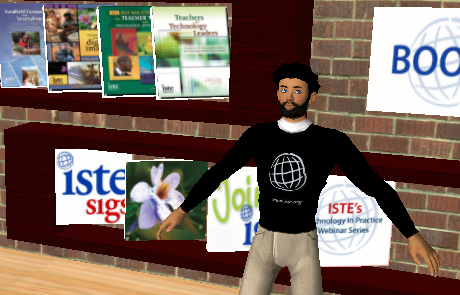
me in SL

I did manage to get a free ISTE T-Shirt on EDUIsland. I swept the floor in a Univ Cincy building and made a dollar. Actually it is a Linden dollar. I saw a link where I could exchange Linden dollars for real dollars. I didn’t have enough cash to make it worth a look. Frankly, I didn’t have enough to buy a tattoo from a kid on a skateboard.

I visited the computer museum, a farm with sheep, a camp ground and many corporate buildings. The corporate people were usually the ones that asked if they could help me. I did like I do in Best Buy and told them I was just looking around.

Behind the scenes there are some things that could be used in education. All the objects created in SL are programmed by SL users. There is value in learning how to create objects that are interactive in real time. An art person can express a lot of creativity here.

I can’t imagine trying to teach a class in SL. With no voice broadcasting, it is just a glorified chat. I also saw a lot of “questionable” things in the educational areas. Once again I am bagging SL for a while. Maybe later in the summer I will have some time to mess around some more. I bet people will flock to me if I say I’m John Rappold.

Posted in edtech | Tagged , | 2 Comments